Dark-room simulation players
If you play with little overhead lighting, look for specified key lighting and check whether you can adjust its brightness or effects so the keyboard does not distract you.


Start with lighting controls you can use comfortably in a dark room, then check whether your transport-simulation bindings call for a physical numpad or dedicated macro keys. A full-size board suits players who need more directly accessible keys; a compact or wireless board makes more sense when those keys are unnecessary and desk flexibility matters more. Check the selected layout and switch feel before ordering, particularly if you share the room.
If you play with little overhead lighting, look for specified key lighting and check whether you can adjust its brightness or effects so the keyboard does not distract you.
If your own bindings use many commands, a physical numpad, dedicated macro keys or remapping may matter more than a compact footprint. Check that your game allows the assignments you intend to use.
For long or late sessions, check the exact switch option if key noise matters to someone nearby. If you want wrist support, confirm whether the selected model includes a rest.
For a dark-room transport-simulation setup, decide how you will see the keys and reach your usual commands before choosing a keyboard for its switch or connection options.
| Concern | What to check | Who this matters to |
|---|---|---|
| Lighting you can control | Check the selected model’s lighting settings, including brightness and a static option if animated effects would distract you. | When I play with the room lights low, I want to find keys without a distracting light show. Around 33% of consumers put readable, controllable lighting first. |
| Room for commands | Compare your game bindings with the physical layout; check for a numpad, dedicated macro keys or supported remapping as needed. | If my routes use many assigned commands, I want the controls I rely on within easy reach. Around 33% of consumers prioritise control-map capacity. |
| Quieter long sessions | Check the exact switch option and whether a wrist rest comes with the chosen model; manufacturer quietness descriptions are not comparable sound measurements. | When someone else shares the room, I care about key noise during a long session and may want somewhere to rest my wrists. Around 17% of consumers make quieter, more comfortable play their primary concern. |
| Flexible desk placement | Check the available connection modes and physical size against where you sit and the keys you still need. | If I move the keyboard or rearrange my desk, connection choices and a smaller footprint matter more to me than extra physical keys. Around 17% of consumers put flexible placement first. |
Key illumination does not, by itself, tell you whether brightness or lighting effects can be adjusted to suit a dark room.
Check the exact variant’s lighting settings and software requirements. If moving effects bother you, look for an explicitly stated static setting.
A smaller layout can leave out the physical numpad used by your current control map.
List the commands you use regularly, then choose full size if direct numpad access is important to you.
Models in the same family can have different national layouts, affecting key legends and symbol placement.
If you need English (UK) legends, confirm the selected layout in the basket rather than relying on the product-family name.
A manufacturer’s description of quiet switches does not establish how loud one keyboard is beside another.
Check the named switch option and, if sound will decide your purchase, look for independent testing of that exact version.
These product lines illustrate different approaches to lighting, controls and keyboard feel; check the particular model and variant rather than treating a brand name as a specification.
The Apex 3 UK and full-size Apex Pro Gen 3 address different priorities: a manufacturer-described quieter RGB board and a board with adjustable actuation and numpad access, respectively.
The BlackWidow V4 is relevant if separately accessible commands matter to your simulation control map.
The G915 X LIGHTSPEED is relevant when a low-profile keyboard and a choice of connection methods suit your desk.
The K70 RGB PRO illustrates a full-size option with per-key lighting and a static-lighting setting.
These keyboards offer different combinations of illuminated keys, full-size or compact layouts, and wired or wireless connections for a transport-simulation desk. Compare their stated layouts with your bindings, and check the lighting controls on the variant you select.
 No image available
Consider its 108-key layout if you want a larger set of physical controls for your simulation bindings.
The product title specifies detachable switches and three connection modes. Confirm the keyboard layout and available lighting adjustments if UK legends or a subdued lighting setting matter to you.
 No image available
Consider this compact keyboard if your transport-simulation bindings do not require a full-size layout.
The title specifies a US layout, tri-mode wireless operation, RGB lighting, hot-swappable switches and VIA compatibility. Check its available lighting adjustments and whether its key layout accommodates your commands.
 No image available
Its stated full-size 108-key layout may suit a control-heavy setup; confirm the physical keys your bindings require.
The title specifies a US layout, tri-mode wireless operation, RGB lighting and Silent Tactile switches. The switch name is not a measured noise comparison; check the lighting controls and switch feel for your selected version.
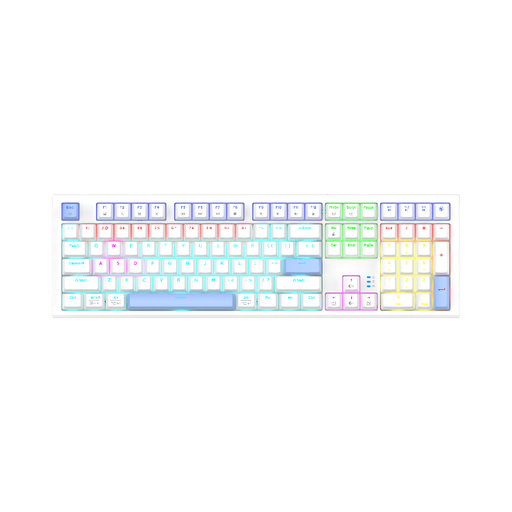 No image available
Consider this wired full-size option if the larger layout fits your control map and you do not need wireless placement.
The title specifies a US QWERTY layout and USB-A connection. Confirm the keys present and the available RGB lighting settings before choosing it for a dark room.
 No image available
Its 75% layout is worth considering if you prefer a smaller keyboard and can accommodate your simulation commands without full-size key access.
The title specifies wired, Bluetooth and 2.4 GHz wireless modes, plus RGB backlighting. Check the selected layout and whether the lighting offers a brightness or static setting that suits your room.
Choose full size if your own control map uses a physical numpad; it is not necessary for every transport simulator. SteelSeries describes the full-size Apex Pro Gen 3 as providing numpad access, so check what a smaller layout would remove from your usual bindings.
Choose a model whose exact variant offers lighting settings you can live with in a dark room, rather than relying on an RGB label alone. CORSAIR says the K70 RGB PRO’s tournament switch changes its lighting to a static single colour; check the settings of any other model separately.
They can help if your game permits you to assign commands that you want on separate keys, but they are not essential for every control map. Razer lists six programmable macro keys for the BlackWidow V4, while Logitech G lists nine G keys for the G915 X LIGHTSPEED; check your game’s binding options before choosing either approach.
Yes, if English (UK) key legends and symbol placement matter to you. Razer shows both US and UK layout selections for the BlackWidow V4 X, so confirm the variant selected in your basket rather than relying on the product-family name.