High-volume booking administrators
If dates, quantities and reference numbers fill much of your working day, number-pad access may matter more than a compact footprint. Logitech and Keychron list full-size keyboard options with number pads.


If you enter booking dates, quantities and reference numbers frequently, start by considering a keyboard with a number pad, while allowing enough desk space for the mouse. Prioritise device switching only if you type on separate computers or other devices: two monitors connected to one computer do not require it. For prolonged shifts or discomfort, consider keyboard shape as part of the whole workstation setup, not as a remedy on its own.
If dates, quantities and reference numbers fill much of your working day, number-pad access may matter more than a compact footprint. Logitech and Keychron list full-size keyboard options with number pads.
If you type on separate computers, or move between a computer and another device, switching between paired devices may be useful. Two monitors attached to one computer are a different setup.
If sustained booking work makes comfort a priority, consider keyboard shape alongside screen, chair and mouse positioning. The Health and Safety Executive advises looking at the workstation as a whole.
For a two-screen booking desk, establish how often you enter numbers and whether the screens use one computer or separate devices. Then check how the keyboard and mouse will fit on the desk.
| Concern | What to check | Who this matters to |
|---|---|---|
| Repeated numeric entry | Confirm a number pad on the exact variant; check whether its shortcuts work with your booking tasks. | When I enter dates, quantities and references repeatedly, I want numeric entry that does not depend on the top number row; around 33% of consumers put this need first. |
| Desk fit with one computer | Check usable desk width and mouse reach. The Health and Safety Executive advises keeping the keyboard and screen central. | With two monitors on one computer, I would rather leave room for the mouse than choose extra keyboard width I rarely use; roughly 25% of consumers prioritise desk fit. |
| Switching between devices | Identify the separate devices you type on, then check the keyboard’s pairing method and compatibility. | If booking and other work happen on different devices, I want to move between them without changing keyboards; around 25% of consumers place device switching first. |
| Comfort on long shifts | Consider layout familiarity and keyboard height alongside screen, chair and mouse position; seek a workstation assessment where applicable. | During sustained booking work, I need a setup that suits my posture without assuming a new keyboard will address every cause of discomfort; about 17% of consumers make long-shift comfort their main concern. |
Both displays may be connected to one computer, in which case a keyboard that switches between computers offers little benefit for that task.
List the devices you actually type on before making multi-device pairing a priority.
Giving up a dedicated number pad may make repeated dates, quantities and booking references less convenient, although a smaller board leaves more mouse space.
Review a typical booking session and decide which matters more: direct numeric entry or desk width.
The Health and Safety Executive’s display-screen guidance considers the workstation as a whole, including equipment placement and individual requirements.
For prolonged daily work or reported discomfort, review the workstation assessment as well as keyboard, mouse and screen placement.
Layout and switch options can differ within a keyboard family, changing how the supplied model fits your work.
Check the exact layout designation, number pad, connection options and included accessories on the variant you intend to order.
Logitech offers low-profile productivity keyboards as well as differently shaped ergonomic models.
Keychron’s K10 range is relevant if you want a full-size mechanical keyboard and a UK-ISO option.
Kensington offers office keyboards with familiar and more distinctly shaped ergonomic layouts.
These keyboards offer different starting points for a booking desk, from full-size and UK-labelled options to a 108-key mechanical model. Check the exact number-pad layout and connection behaviour against your own workflow before choosing.
 No image available
Consider this full-size UK-labelled option if booking entry takes priority over a compact desk footprint. Confirm that its keys and any shortcut functions suit the booking tasks you repeat.
 No image available
This UK-layout model is worth checking if you want to balance booking entry against desk space. Confirm the supplied switch option and whether its typing feel and sound suit your workspace.
 No image available
Consider this Bluetooth, UK-labelled option if your booking setup includes a device that can use that connection. If you type on separate hosts, check how the exact keyboard switches between them; two monitors on one computer do not create that need.
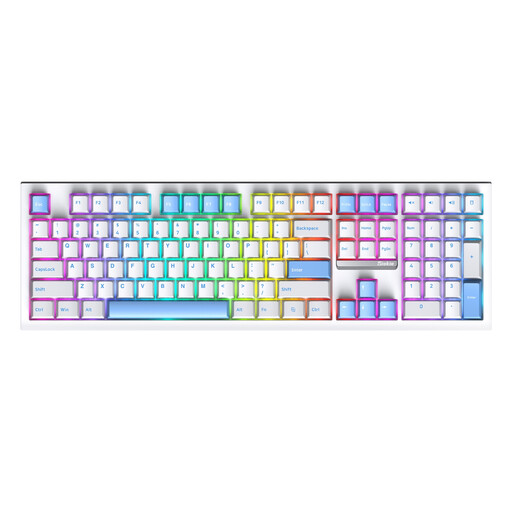 No image available
The 108-key mechanical design may interest you if you prefer that keyboard type for booking work. Confirm the supplied key layout before ordering, particularly if you need a familiar UK layout, and check whether the switch feel suits a shared workspace.
No: two monitors connected to one computer can use a single-host keyboard. Switching becomes useful when you type on separate computers or other devices; Logitech and Keychron list models with multi-device pairing.
A number pad is worth considering if you repeatedly enter dates, quantities or booking references. If numeric entry is occasional and mouse space is tight, compare that convenience with the extra width of a full-size keyboard.
An ergonomic shape alone is not a complete answer to discomfort during booking work. The Health and Safety Executive advises considering the whole workstation; its setup guidance includes keeping the keyboard just below elbow height and the keyboard and screen central.
In the UK, employers must carry out a workstation assessment for workers who use display screen equipment daily as part of their normal work, continuously for an hour or more, according to the Health and Safety Executive. The assessment considers the workstation rather than the keyboard alone and should be revisited when work changes or a user reports pain or discomfort.
Yes, if you rely on a familiar UK key arrangement, confirm the exact variant’s layout rather than judging by its product image. Keychron identifies UK-ISO K10 Pro variants, while Logitech lists an English UK QWERTY variant of MX Keys for Business.