If both screens connect to one computer, choose a keyboard for its layout, shortcuts, desk footprint and typing comfort; device switching is optional. If you type into a second, independently controlled computer, tablet or phone while preparing slides, look for multi-device pairing and a convenient way to change the active device. Compact, full-size, ergonomic and mechanical layouts each involve different compromises in key access, space or typing feel.
Who is this for?
Slide builders using two devices
You edit slides on one computer and type notes, messages or source material on a second computer, tablet or phone. Logitech and Keychron document models that pair with multiple devices; check how the particular keyboard switches between them.
Editors using two monitors on one computer
Both displays are connected to the same computer, so your keyboard does not need to switch hosts to work across them. Key layout, navigation controls, shortcuts and space for a mouse are more relevant decisions.
People preparing slides for long sessions
You spend extended periods drafting and revising, and may value a palm rest, a particular typing feel or configurable shortcuts. Compare those features on individual models without assuming that an ergonomic shape or mechanical switches will suit everyone.
What matters when choosing?
Start by identifying whether the keyboard will control one computer or switch between separate devices. Then decide which keys and desk arrangement make slide editing comfortable for you.
One computer, two monitors
Choose this setup: Both displays are driven by the same laptop or desktop, so an ordinary compatible keyboard types into that one computer.
Keep in mind: A multi-device switch changes the keyboard’s active computer or mobile device; it does not control which of your two monitors displays a window.
Two independently controlled devices
Choose this setup: You regularly type into a presentation computer and a separate laptop, tablet or phone.
Keep in mind: Switching the keyboard between devices does not also share files or a cursor; check the connection and operating-system support for each host.
| Concern | What to check | Who this matters to |
|---|
| Switching devices |
Check supported host devices, the number of pairings and how you change the active device. |
If I edit slides on a computer but also type notes on a separate tablet, I want to move between them without repeatedly pairing the keyboard. Around 33% of consumers put switching between independently controlled devices first. |
| Layout and shortcuts |
Check the selected layout, number pad, navigation keys and any requirements for configuring shortcuts. |
When I enter figures and move around slide objects, I want the keys I use to be easy to reach. Layout and shortcut access are the primary concern for around 27% of consumers. |
| Comfort and typing noise |
Consider the shape, palm support and selected key or switch type for your workspace. |
Long drafting sessions make typing feel important to me, especially if I share a quiet room. Around 20% of consumers would prioritise comfort or lower-distraction typing. |
| Desk space and portability |
Compare the footprint with the dedicated keys you need to keep. |
I need room for a mouse or carry the keyboard between workspaces, but I do not want to lose keys essential to my editing routine. A compact setup comes first for around 20% of consumers. |
Mistakes to avoid
-
Assuming two monitors require device switching
Two displays connected to one computer do not become separate keyboard hosts. Multi-device controls address typing into different computers or mobile devices.
Identify what drives each screen before making device switching a requirement.
-
Choosing a compact layout without checking its keys
A smaller layout may leave more mouse space but omit a number pad or some dedicated navigation controls you use in presentation software.
List your regular editing keys, then compare their positions on the exact layout you intend to buy.
-
Assuming Bluetooth covers every part of the workflow
Connection support alone does not establish how a keyboard switches hosts or whether its shortcut configuration works on each of your devices.
Check the model’s operating-system support, switching method and any software needed for the shortcuts you plan to use.
-
Putting an old keyboard in household rubbish
GOV.UK says electrical products and batteries bearing the crossed-out wheelie-bin symbol should not go in household rubbish.
Use an appropriate electrical-waste collection point or eligible retailer take-back route, and follow local guidance for removable batteries.
Brands to consider for these keyboard needs
Logitech
Worth comparing if you want device-switch buttons, a compact layout or an ergonomic option.
- Logitech documents Easy-Switch pairing on models including the K780, Signature Slim K950 and Pebble Keys 2 K380s.
- Cradles, palm support and other layout features differ by model; check the selected keyboard rather than assuming they come with Easy-Switch.
Keychron
A reference point for UK-ISO mechanical layouts if switch choice or configurable keys matter to your slide work.
- Keychron describes the K10 UK-ISO as full-size with Bluetooth pairing for up to three devices and USB-C wired operation; its K3 and K5 Max ranges offer different layout and customisation options.
- Key arrangement, configuration tools and switch feel depend on the exact model and variant.
HP
A brand to check for productivity keyboards with model-dependent device connections, shortcuts or palm support.
- HP’s UK store describes selected keyboards with multi-device connections and programmable shortcuts.
- Connection methods and comfort features vary across the listed models, so compare the individual specifications.
Joybuy keyboard choices for slide preparation
These keyboards cover different priorities for preparing slides: a split layout with wrist support, a full-size UK layout, and two compact mechanical layouts. If typing into a second device is essential, check the selected model’s pairing, switching method and host compatibility before buying.
 No image available
HP 960 Ergonomic Split Layout Wireless Keyboard with padded wrist rest
Consider this split layout if wrist support matters during long slide-editing sessions. Check the selected key arrangement and whether the shape suits your typing habits.
View on Joybuy
 No image available
Targus EcoSmart Full Size Wireless Keyboard, UK layout
The full-size UK layout is worth considering if familiar key placement matters more than a small footprint. For work across separate devices, confirm how this model switches between them.
View on Joybuy
 No image available
HyperX Alloy Rise 75 Wireless Keyboard UK
Its 75% layout is an option when desk space matters but you still want to assess key access for slide editing. Check the switching controls, compatibility with each host and the selected switches’ sound and feel.
View on Joybuy
 No image available
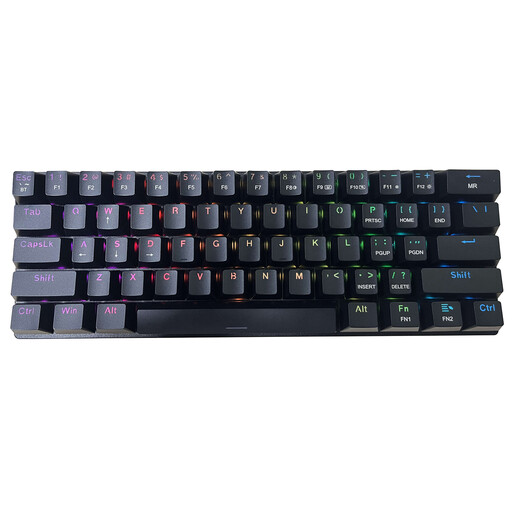
ET 60% Tri-Mode Mechanical Keyboard, US layout, 61 keys
This compact keyboard may suit a workspace where carrying size matters. Its stated US layout, 61 keys and clicky blue switches make key access, symbol placement and typing noise important checks for slide work.
View on Joybuy
Common questions
Do two screens mean I need a multi-device keyboard?
No. If both screens connect to one computer, a conventional compatible keyboard types into that computer across both displays. Multi-device switching becomes useful when you also need to type into a separately controlled computer, tablet or phone.
How do I pair a Logitech Easy-Switch keyboard with another device?
For Logitech’s documented Bluetooth setup, hold the Easy-Switch key for three seconds if its indicator is not flashing rapidly, then select the keyboard in the other device’s Bluetooth settings. Follow the instructions for your exact model, including any pairing code shown on the device.
Should I choose a UK-ISO layout for preparing slides?
Choose UK-ISO if its key positions and symbols match the layout you normally use. Check the selected variant rather than relying on a product-family image: Keychron, for example, identifies UK-ISO versions of particular models.
What should I do with an old wireless keyboard or its batteries?
Take unwanted electrical equipment to an appropriate recycling collection point or eligible retailer take-back route rather than putting it in household rubbish. GOV.UK says products and batteries bearing the crossed-out wheelie-bin symbol should be collected separately; check local arrangements for removable batteries.


