What matters when choosing
For UI design at a standing desk, establish a comfortable workstation position first. Then choose the keyboard layout that accommodates the keys, shortcuts and mouse placement your work requires.
Adjustable ergonomic keyboard
Consider it when: You need to change keyboard tilt or the position of your hands after setting the desk height. Logitech describes seated and standing tilt settings for the ERGO K860; Kinesis describes separable, tentable Freestyle2 halves.
Trade-off: A fixed curved shape may not fit everyone, while a more adjustable split layout takes time to set up and learn.
Full-size productivity keyboard
Consider it when: Familiar key positions, a dedicated numpad and repeated shortcuts matter more to you than changing the keyboard’s shape.
Trade-off: A full-width layout leaves less space immediately beside the keys for a mouse than a compact layout.
Compact programmable keyboard
Consider it when: You want the mouse nearer the keyboard and need to assign design commands to keys; Keychron lists QMK/VIA remapping on the 75% K3 Max.
Trade-off: A 75% layout has no dedicated numpad, so check where your frequently used commands sit.
| Concern |
What to check |
Who this matters to |
| Standing position and comfort |
Check whether the key surface can sit just below elbow height with relaxed shoulders. Compare available tilt or split adjustment with your desk and mouse position. |
When my desk is raised, I want to type without shrugging or holding my wrists at an awkward angle. Around 31% of consumers would put standing-position comfort first. |
| Shortcuts and device switching |
Check the connection methods and whether remapping software supports your operating system and design commands. |
Moving between design tasks or devices, I need my regular commands to stay easy to reach. Shortcut workflow would be the primary concern for around 31% of consumers. |
| Desk space and mouse reach |
Measure the space for keyboard and mouse, then check whether you can work without a dedicated numpad or navigation keys. |
If I use the mouse extensively, I want room to place it close to the keyboard without crowding my hands. Around 23% of consumers would prioritise that placement. |
| Layout and key feel |
Confirm the exact UK-ISO or other layout variant, key legends and switch choice; allow for any unfamiliar key arrangement. |
I do not want an unfamiliar layout or key feel interrupting commands I already know. For around 15% of consumers, getting that fit right would come first. |
Joybuy product choices
These keyboards offer compact 75% or 96% layouts for a standing-desk setup; the Siukie CTRL100 also lists a motorised lift. Compare their stated layouts with your UK key preferences, and check the shortcuts and adjustments you need on the exact model.
 No image available
Ticktype EVO75 75% mechanical keyboard, Spray-coated Nebula
Consider this compact board if space beside your keyboard and configurable shortcuts matter to your workflow.
The listed variant has a US layout, tri-mode wireless connectivity, VIA compatibility, hot-swappable Creamy Rye switches and an 8000mAh battery.
Check that its US key arrangement and VIA configuration suit your commands; assess its position at your standing desk rather than assuming it provides tilt or split adjustment.
Joybuy
 No image available
Siukie CTRL100 96% mechanical keyboard, Brown
Consider the CTRL100 if you want a 96% layout and an adjustable keyboard angle at your standing desk.
Its listed features include a motorised lift, tri-mode wireless connectivity, an IPS screen and HMX Cream Taro switches. The stated layout is US QWERTY.
Check the lift’s angle settings against your working position, and confirm whether its layout and shortcut options suit your design applications.
Joybuy
 No image available
AULA S75 Pro 75% mechanical keyboard, Star Vektor switches
Its 75% layout is relevant if you want to leave more space beside the keyboard for a mouse.
The listed variant has tri-mode connectivity, a TFT display, a knob, side-printed keycaps and hot-swappable Star Vektor switches.
Confirm the exact key layout and whether you can assign the design shortcuts you use; check its fit at your standing-desk height.
Joybuy
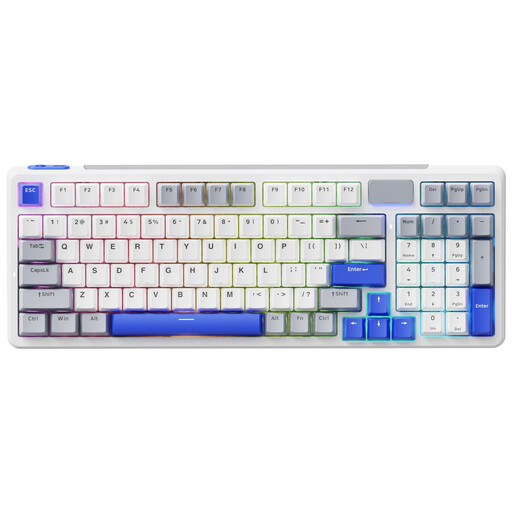 No image available
Rapoo V700DIY 96% mechanical keyboard, Gasket Mount-WB
Consider this 96% layout if you want a keyboard narrower than a conventional full-size arrangement while retaining more keys than a 75% board.
The listed variant is a tri-mode mechanical keyboard with a US QWERTY layout and gasket mount.
Check its exact key positions, design-software compatibility and mouse placement at your desk before choosing it for a shortcut-heavy setup.
Joybuy
Common questions
How high should my keyboard be when I stand?
Aim to place the keyboard just below elbow height without shrugging your shoulders, as the Health and Safety Executive advises. Adjust the desk and screen together, and keep the mouse close to the keyboard and in line with your elbow.
Is a separate keyboard needed when I raise my laptop screen?
A separate keyboard lets you position the keys independently of a raised laptop screen. For applicable employer-provided display-screen-equipment workstations, the UK Health and Safety (Display Screen Equipment) Regulations 1992 schedule specifies a tiltable keyboard separate from the screen, subject to the workstation’s requirements; this is not a blanket purchasing rule for every private home setup.
Does an ergonomic keyboard replace a workplace DSE assessment?
No. The Health and Safety Executive says employers must assess the whole workstation, job and individual requirements for workers who use display screen equipment daily for continuous periods of an hour or more. A keyboard change alone does not assess desk height, screen position or reported discomfort.
Should I choose a UK-ISO layout for UI design?
Choose the layout on which you can reliably find the keys and shortcuts you use, then confirm the exact variant before ordering. Keychron lists a UK-ISO K3 Max, but a global product name or photograph should not be taken as confirmation that every seller offers UK legends.
Should I rest my wrists on a palm rest while typing?
Use the space in front of the keyboard to support your hands when you pause, rather than fixing your wrists in place during active typing. The Health and Safety Executive advises keeping wrists straight while keying and notes that space in front can support hands and wrists when not keying.


