Control light on the screen before choosing a keyboard: the Health and Safety Executive advises arranging the desk and display to avoid glare and bright reflections, which illuminated keys cannot fix. For frequent entry of hours and totals, check for a full-size layout with a number pad; if long typing sessions matter more, consider a split or sloped design that fits the user and workstation.
Who this choice affects
Window-side hours-entry volunteers
If daylight reflects off the display, screen position and control of window light come before keyboard lighting. The Health and Safety Executive advises arranging the desk and screen to avoid glare or bright reflections.
Frequent numeric-record administrators
People repeatedly entering dates, durations and totals should check for an integrated number pad before choosing a compact layout. A full-size keyboard also needs enough space on the desk.
Comfort-focused regular typists
For longer record-updating sessions, keyboard shape, angle and palm support are worth assessing alongside desk and chair position. A split layout may take time to get used to and will not suit everyone equally.
What to check before buying
Start with the position of the screen and window light. Then decide whether number entry, sustained typing comfort or the way a shared desk operates should drive the keyboard choice.
| Concern |
What to check |
Who this matters to |
| Glare and changing daylight |
Check whether the screen can be repositioned or window light controlled. Consider adjustable key lighting only if the keys themselves are hard to see. |
If daylight reflects off my screen, I need to tackle that before choosing illuminated keys; roughly 36% of consumers would put glare control first. |
| Entering hours and totals |
Confirm an integrated number pad and the intended UK key layout on the exact variant; do not assume a 108-key label confirms the arrangement. |
Repeatedly entering durations and totals makes a familiar number pad my priority. Around 29% of consumers would make numeric entry their main concern. |
| Comfort during longer sessions |
Assess keyboard angle, split shape and palm support together with available desk space and chair position. |
When record updates take longer, I want a typing position that suits me, even if a different layout takes practice; approximately 21% of consumers would prioritise typing comfort. |
| Shared-desk operation |
Decide whether a fixed wired connection or wireless switching suits the desk. For wireless models, check connection requirements and who will manage charging or batteries. |
At a desk used by several people, I want connection and upkeep to be straightforward; about 14% of consumers would put shared-desk simplicity first. |
Common buying mistakes
-
Using keyboard lighting to tackle screen glare
A backlight illuminates keys, not the display. Reflections can still make the hours-entry screen difficult to use.
Position the screen to avoid bright reflections and control intrusive window light where possible; only then decide whether adjustable key lighting would help.
-
Choosing a compact board without checking the number pad
Tenkeyless, or TKL, layouts omit the integrated number pad that some people rely on for repeated numeric entry.
Check the exact variant's layout and images for an integrated number pad before ordering.
If you need a number pad later, a separate keypad becomes another item to accommodate on the desk.
-
Assuming every QWERTY layout has UK key positions
US and UK variants can place familiar symbols differently, which matters when entering records or using shortcuts.
Confirm the regional layout for the exact model and variant, particularly where a listing specifies US QWERTY.
-
Assuming an ergonomic shape suits everyone
A split layout, palm rest or different tilt can require adaptation and must fit the person as well as the desk.
Consider the whole workstation when assessing comfort. If discomfort persists, seek an individual workstation assessment rather than relying on a keyboard claim.
Brands to consider for these keyboard types
Logitech
Its MX Keys S is an illuminated productivity-keyboard option, while ERGO K860 offers a split-keyboard shape for users considering typing comfort.
- Logitech says MX Keys S key lighting responds to the surrounding light; it describes ERGO K860 as having a curved split keyframe and adjustable palm lift.
- Neither feature controls reflections on the monitor. Check the precise layout and lighting features of the model being considered.
Kensington
The Pro Fit Ergo Wireless Keyboard is a model to examine for a shared desk where connection options and a sloped, split shape matter.
- Kensington specifies 2.4 GHz and Bluetooth connectivity, quiet keys, a wrist rest and spill-proof keys for this model.
- These are model-specific features. Check its layout and fit, particularly as Kensington describes it as designed for average-to-larger hands.
Keychron
The C2 Pro 8K is a wired, full-size mechanical option for a fixed workstation where a direct connection and configurable keys are priorities.
- Keychron identifies full-size ISO versions and offers configurations with RGB backlighting and hot-swappable switches.
- The cable limits movement, and switch and lighting options depend on the configuration selected.
CHERRY
The KC 500 MX LP is a low-profile mechanical option with white lighting, offered in full-size and tenkeyless versions.
- CHERRY describes low-profile switches and white lighting for the KC 500 MX LP.
- Choose the full-size version if an integrated number pad is essential; the tenkeyless version omits it.
Joybuy keyboards for this task
These full-size or 108-key keyboards offer lighting for users considering key visibility beside a bright window. Check the exact number-pad and regional layout before choosing one for hours entry; none replaces control of glare on the screen.
 No image available
Siukie PL108W 108-key 3MODE RGB keyboard, Black
For regular hours entry, check the number-pad arrangement and regional key layout against your records workflow.
- Mechanical keyboard with 108 keys, 3MODE connectivity, RGB lighting and detachable switches.
- Check whether the lighting can adjust as daylight changes if that feature matters to you.
View on Joybuy
 No image available
Ticktype DP104 Custom, Gecha Gray, Silent Tactile switches, US layout
For repeated numeric records at a shared desk, check the number-pad arrangement and whether this US layout suits everyone using it.
- Full-size 108-key mechanical keyboard with tri-mode wireless connectivity, RGB lighting and a hot-swappable layout.
- This variant has Silent Tactile switches; confirm its key symbols and lighting controls before buying.
View on Joybuy
No image available
Ticktype DP104 Custom, Gecha Gray, Thocky Linear switches, US layout
If you are considering this switch variant for hours entry, confirm the number-pad arrangement and whether the US layout fits your usual key positions.
- Full-size 108-key mechanical keyboard with tri-mode wireless connectivity, RGB lighting and a hot-swappable layout.
- This variant has Thocky Linear switches; check the exact switch and lighting controls rather than assuming they match another DP104 variant.
View on Joybuy
 No image available
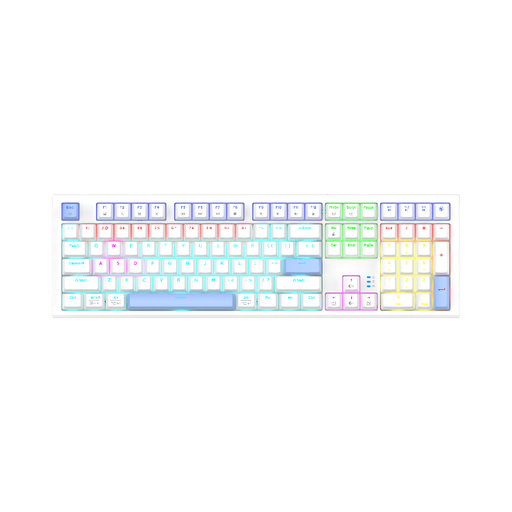
ochama J104 full-size RGB wired keyboard, White, US QWERTY
For a fixed hours-entry desk, a wired connection avoids choosing a wireless setup; check that the key layout and number-pad arrangement fit the task.
- Mechanical keyboard with a USB-A connection and RGB lighting.
- The listed US QWERTY layout may differ from familiar UK symbol positions; check the exact keys before buying.
View on Joybuy
Questions about choosing a keyboard
Will a backlit keyboard fix glare from a bright window?
No: keyboard lighting affects the keys, not reflections on the display. The Health and Safety Executive advises arranging the desk and screen to avoid glare or bright reflections; assess key lighting separately once the screen is usable.
Should I use a compact keyboard for volunteer-hours entry?
A compact layout can suit limited desk space, but check whether losing an integrated number pad would hinder frequent entry of durations and totals. Tenkeyless variants omit that pad; confirm the exact layout rather than relying on the keyboard's model family.
Do display-screen rules automatically apply when volunteers enter hours?
Volunteering alone does not establish whether a particular arrangement is covered. The Health and Safety Executive describes display-screen equipment duties for employers and workers who regularly use screens as a significant part of their work; the organisation should assess its arrangement and responsibilities rather than assume coverage or exemption.
What matters when several people share a wireless keyboard?
Check the exact keyboard's connection method, the computer's compatible port or Bluetooth capability, and who will manage charging or batteries. Also confirm the regional key layout for everyone entering records; Kensington, for example, specifies both 2.4 GHz and Bluetooth connectivity for its Pro Fit Ergo Wireless Keyboard.


