For routine appliance-warranty entry, start with a full-size UK-layout keyboard with a number pad; a wired USB model also avoids charging and pairing. If you enter records for long periods, consider a comfort-focused wired model; if you switch between devices or want more freedom to position the keyboard, consider a wireless model. Beside a bright window, check key legibility and screen glare separately: illuminated keys cannot remove reflections from the display.
Who is this for?
Occasional warranty record keeper
If you mainly enter model numbers, serial numbers, dates and contact details, a familiar UK layout and dedicated number pad may matter more than wireless features. The Logitech K120 listings from Joybuy illustrate the straightforward wired route.
Long-session desk user
If you log records in batches, allow room to position the keyboard and screen comfortably. The Health and Safety Executive advises keeping both central and placing the keyboard just below elbow height; the HP 485 Comfort listing offers adjustable typing angles.
Multi-device record keeper
If you move between compatible devices, wireless placement and device switching may be worth the charging or battery-management steps. Changing light can also make adjustable key illumination useful, but screen reflections still need attention.
What matters when choosing?
Simple wired keyboard
Choose it when: You mainly enter warranty details at one computer and want to plug in rather than manage a battery.
Allow for: A cable, a suitable USB port and space for a full-size board.
Comfort-focused wired keyboard
Choose it when: Record entry takes long enough for keyboard angle and desk positioning to influence your choice.
Allow for: A shaped keyboard and wrist rest taking up desk space; they do not replace a suitable workstation arrangement.
Wireless illuminated keyboard
Choose it when: Cable-free placement or changing room light matters enough to justify a wireless setup.
Allow for: Charging or batteries, device-compatibility checks and separate action to reduce screen glare.
For warranty forms beside a bright window, weigh repeated data entry, legibility and longer-session comfort against one another before choosing a connection type.
| Concern | What to check | Who this matters to |
|---|
| Accurate record entry |
Confirm UK key legends and a dedicated number pad if you enter digits repeatedly. |
When I enter batches of serial numbers and dates, I want familiar keys and a number pad rather than relying on the number row; around 50% of consumers put structured entry first. |
| Window-side legibility |
Check whether you can read the key legends at the desk and position the screen to limit reflections. |
If daylight changes across my desk, I need to see the keys without mistaking keyboard lighting for a fix for screen glare; roughly 30% of consumers make legibility their primary concern. |
| Comfort and setup |
Check keyboard position and angle, then confirm the required port or wireless connection. |
For longer record-entry sessions, I want a workable desk position and a connection I can manage easily; about 20% of consumers prioritise comfort and setup. |
Common buying mistakes
-
Assuming every QWERTY keyboard has UK legends
Physical key labels can differ even when a computer lets you change its software input layout, as Microsoft Support explains for Windows.
Check that the particular keyboard is labelled UK, UK QWERTY or UK-ISO, then check the computer’s input-layout setting.
-
Expecting backlighting to remove window glare
Illuminated keys do not remove reflections from a display. The Health and Safety Executive advises arranging screens and lighting to avoid glare.
Plan the screen position first; consider adjustable key illumination only if changing room light makes the keys harder to see.
-
Choosing a compact layout without considering the number pad
Less keyboard width may be useful on a small desk, but losing a dedicated number pad changes how you enter repeated dates and serial digits.
Choose the layout around your actual entry volume: check for a number pad if warranty forms are a regular task.
-
Treating a wrist rest as a complete workstation fix
A shaped keyboard or adjustable tilt cannot correct the position of the whole desk setup. The Health and Safety Executive advises keeping the screen and keyboard central and the keyboard just below elbow height.
Make room to position both keyboard and screen appropriately, particularly if you enter records for long stretches.
Brands to consider for these keyboard types
Logitech
Its listed models span basic wired UK-layout entry and wireless keyboards with illumination or device-switching features.
- The K120 is listed with a UK layout, number pad and low-profile keys; Joybuy describes a UK-layout K120 with USB plug-and-play connectivity.
- Logitech describes adaptive backlighting on MX Keys S and switching between up to three computers on MX Keys for Business. Check the exact model’s features rather than assuming they are shared.
HP
The HP 485 Comfort Wired Keyboard is a full-size, shaped option for sustained desk entry.
- Quiet keycaps, a cushioned wrist rest and three typing angles are listed for the UK model.
- Allow room for its shape and wrist rest, and check that its USB-A cable can reach a suitable port.
Keychron
The K5 Max range offers a UK-ISO low-profile mechanical option for buyers who want to choose how the keyboard connects and is configured.
- Keychron UK lists wired, Bluetooth and 2.4 GHz connection options for the K5 Max ISO collection.
- Check the exact UK-ISO variant, switch choice and availability before ordering; those decisions add complexity to a simple form-entry setup.
Joybuy keyboard choices for warranty records
These keyboards offer different ways to handle desk-based warranty entry, from UK-labelled wireless models to wired and multi-mode mechanical boards. For the Siukie models, confirm the physical key layout before relying on UK punctuation legends.
 No image available
Hyper® HyperSpace Next Bluetooth Wireless Keyboard (UK), white
Consider this UK-labelled wireless model if cable-free placement suits your warranty-recording desk.
Bluetooth wireless connection is stated in its name. Check how its keys look in your window-side position and plan for charging.
View on Joybuy
 No image available
ASUS ROG Strix Scope II 96 Wireless Keyboard, white, UK layout
Consider this UK-layout model if you want a wireless keyboard for a desk where warranty forms are one of several tasks.
Its name identifies the 96 variant. Check the supplied switch variant and how clearly you can see its legends in daylight.
View on Joybuy
 No image available
Targus EcoSmart™ Full Size Wireless Keyboard (UK)
Its full-size UK-labelled format is worth considering when you want a familiar desk layout without a keyboard cable.
This is a wireless model, not the wired, no-battery route. Check its power requirements and key-legibility at your desk.
View on Joybuy
 No image available
Siukie PL108W 108 Keys Detachable Switch 3MODE RGB Mechanical Keyboard, black
Consider this model if a 108-key mechanical board with connection choices appeals for a fixed desk.
The name specifies 3MODE and RGB. Confirm the physical UK layout and key legends before using it for forms that require UK punctuation.
View on Joybuy
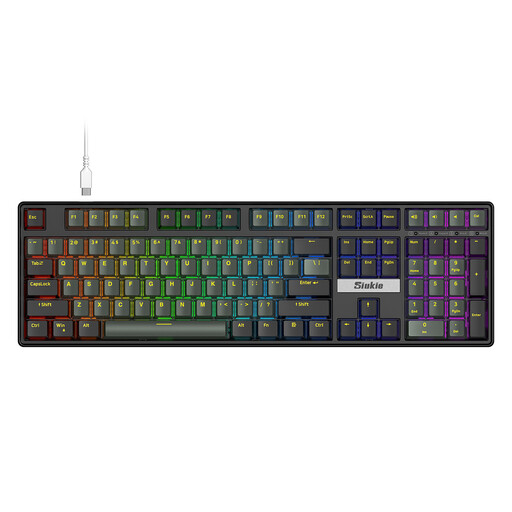 No image available
Siukie CR108 108Keys Detachable Switch Wired Mechanical Keyboard
This wired 108-key model may suit a fixed warranty-recording desk if you prefer not to manage a wireless connection.
Check its physical layout and daylight key-legibility before choosing it for UK-form entry; lighting cannot correct screen glare.
View on Joybuy
Questions and answers
Do I need a backlit keyboard beside a bright window?
Not necessarily: backlighting may help when room light changes, but it will not remove window reflections from your screen. Check whether the key legends are readable at your desk, then position the display and lighting to limit glare, as the Health and Safety Executive advises.
Is a number pad worth having for appliance warranties?
A dedicated number pad is useful if you repeatedly enter dates, telephone numbers and serial digits. For occasional forms on a restricted desk, a compact keyboard can still work, provided you are comfortable using its available number keys.
How should I position a keyboard for longer record-entry sessions?
Keep the keyboard central with the screen and just below elbow height, following Health and Safety Executive posture guidance. Arrange the display and lighting to avoid reflections; a wrist rest or adjustable keyboard angle does not replace attention to the whole workstation.
What should I do with an old keyboard?
Check local electrical-recycling or reuse options rather than assuming it belongs in general waste. GOV.UK describes waste-electrical-equipment rules as supporting recovery and recycling, while North London Waste Authority notes that a keyboard in good condition may be reused or donated.


