Choose a wrist rest that fits your keyboard’s width and front height without pushing your wrists upwards; softness alone cannot establish a good fit. For prolonged coursework editing on a laptop, a separate keyboard and mouse matter more to the overall setup than adding a wrist rest to the laptop alone. Keep the keyboard just below elbow height and use space in front of it to rest your hands when you pause, in line with Health and Safety Executive guidance.
Who is a wrist rest for?
Long-session assignment editors
If you spend sustained periods typing, revising and formatting coursework, consider a rest only after arranging the keyboard at a comfortable height. The Health and Safety Executive advises keeping the keyboard just below elbow height and the shoulders relaxed; padding does not replace that setup.
Laptop-first students building a desk setup
If most of your editing happens on a laptop, decide whether you will use a separate keyboard and mouse before choosing a keyboard wrist rest. The Health and Safety Executive recommends those separate controls for prolonged laptop use so the screen can be raised independently.
Shared-desk or compact-keyboard users
If you move between study spaces or use a slim keyboard, compare the rest with the keyboard’s width and front height as well as the available desk space. Kensington specifies its low-profile ErgoSoft rest for keyboards with a front height below 10 mm; that condition does not establish a fit for taller keyboards.
What matters when choosing?
Start with the keyboard you will actually use, then check the rest’s height and width. Surface feel and desk space matter once that basic fit is clear.
| Concern |
What to check |
Who this matters to |
| Keyboard fit and wrist position |
Measure the keyboard’s width and front height; compare both with the rest’s dimensions and stated compatibility. |
When I edit for a long stretch, I want the rest to meet my keyboard without lifting my wrists into an awkward position. Around 42% of consumers put this fit first. |
| Comfort during long sessions |
Compare the stated padding, cover material and base grip after confirming the rest fits the keyboard. |
Repeated typing and pauses make a stable surface and its feel especially important to me. For around 33% of consumers, that ongoing comfort is the primary concern. |
| Desk space and laptop routine |
Check whether you will use an external keyboard and whether your desk has room in front of it; the Chartered Institute of Ergonomics & Human Factors advises positioning the keyboard about 10–15 cm from the desk edge. |
Moving between study spaces, I need the keyboard and rest to fit without crowding my working area. Practicality across those spaces comes first for around 25% of consumers. |
Mistakes to avoid
-
Choosing padding before measuring the keyboard
A soft rest can still sit too high, too low or too short for your keyboard. Kensington’s ErgoSoft model for slim, compact keyboards is specified for a front height below 10 mm, rather than for every keyboard profile.
Measure the keyboard’s front height and width, then check the particular rest’s dimensions and compatibility statement.
-
Expecting a rest to fix a laptop workstation
A wrist rest does not let you raise a laptop screen independently of its built-in keyboard. For prolonged laptop use, the Health and Safety Executive advises a separate keyboard and mouse so the screen can be elevated.
Arrange the screen, chair, keyboard and mouse before deciding whether a wrist rest would be useful in the resulting setup.
-
Pressing wrists onto the rest throughout typing
The Health and Safety Executive distinguishes resting hands and wrists when not keying from keeping wrists straight while keying. A rest that encourages bent wrists during typing is not serving that purpose.
Keep your touch light and your wrists straight while typing; use the space in front of the keyboard for pauses.
-
Fitting a full-size rest onto a shallow desk
Full-size rests take up space in front of the keyboard. Trust specifies its Vela model at 43.5 × 8.4 × 2.0 cm, so its footprint is worth checking if your study space is limited.
Measure the available desk depth as well as the keyboard width, leaving room to position your forearms comfortably.
Brands to consider
Kensington
Kensington offers keyboard and mouse rests in different formats, including an ErgoSoft model for slim, compact keyboards.
- Kensington specifies gel cushioning and a keyboard front-height limit below 10 mm for that ErgoSoft model.
- Check that height condition against your own keyboard rather than assuming the model fits a taller profile.
Leitz
The Leitz Ergo Adjustable Keyboard Wrist Rest is a full-size option for a desk setup where the preferred rest height may change.
- Leitz specifies two selectable heights, 15 mm and 22 mm, and foam cushioning.
- Its full-size format may take more space than a compact-keyboard setup allows; measure the desk before choosing it.
Trust
Trust’s Vela is a fixed-size rest intended for full-size keyboards with numeric pads.
- Trust specifies a 43.5 × 8.4 × 2.0 cm rest with foam-and-gel padding, a microfibre lining and a non-slip PU base.
- Its fixed dimensions and height still need checking against your keyboard and available desk space.
Fellowes
Fellowes includes a wrist rest designed for a tenkeyless keyboard in its workspace-accessory range.
- Fellowes describes that model as designed for a TKL keyboard.
- Confirm its dimensions, height and material against your keyboard and desk before buying.
Joybuy products for this setup
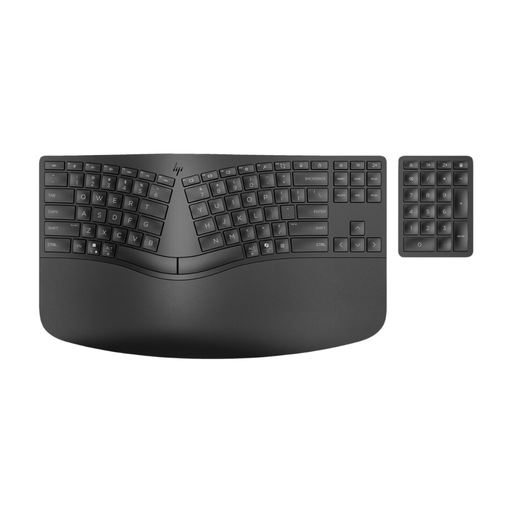
If you are setting up a separate keyboard for coursework editing, this option combines the keyboard and a padded wrist rest rather than adding a standalone pad to a keyboard you already own.
 No image available
HP 960 wireless split-layout keyboard with padded wrist rest
Consider this if you need a separate keyboard with an integrated rest for assignment editing, rather than a standalone rest for your current keyboard.
Its product name identifies a wireless split layout and padded wrist rest. Check the keyboard and rest dimensions against your desk and preferred typing position, and whether your laptop setup also needs a separate mouse.
Joybuy
Common questions
Should I buy a wrist rest for coursework on a laptop?
Consider one if you use a separate keyboard and can place the rest at a suitable height in front of it. For prolonged laptop work, the Health and Safety Executive advises using a separate keyboard and mouse so the screen can be raised; a wrist rest alone does not address that setup.
Should my wrists stay on the rest while I type?
Keep your wrists straight while typing rather than holding them against a rest that makes them bend. The Health and Safety Executive describes space in front of the keyboard for resting hands and wrists when not keying.
How do I choose a wrist-rest height?
Choose a height that works with your keyboard and lets you keep a straight wrist position without raising your shoulders. The Health and Safety Executive advises placing the keyboard just below elbow height; if you are considering the full-size Leitz Ergo Adjustable model, its stated 15 mm and 22 mm settings give you two heights to check against your setup.
How should I clean a wrist rest?
Follow the care instructions for the particular model and check its cover material before using a cleaner. A cleaning or fluid-resistance statement for one product should not be assumed to apply to other gel, foam or fabric rests.


