Players who customise controls
If you assign keys for inventory, building, maps or communication, the position of extra controls and the software used to configure them may matter more than keyboard size.


A larger display does not, by itself, call for a different keyboard. For survival games, favour accessible programmable controls if you regularly customise bindings, or a tenkeyless (TKL) layout if broad mouse movements matter more than a number pad. Choose wireless for a placement need rather than screen size alone, and check the physical UK layout and any software features you intend to use.
If you assign keys for inventory, building, maps or communication, the position of extra controls and the software used to configure them may matter more than keyboard size.
If you make broad mouse movements but still use dedicated arrow and navigation keys, a TKL layout is worth considering. CORSAIR describes TKL as removing the number pad while retaining those keys.
If you also type outside games or play for long sessions, check the physical key layout, switch feel and keyboard position rather than relying on the gaming label alone. Logitech identifies ISO as the standard physical layout across the UK and Europe.
Start with the controls you actually use, then decide how much mouse room and placement flexibility your large-screen setup requires. Check physical layout and key feel before choosing a particular model.
| Concern | What to check | Who this matters to |
|---|---|---|
| Custom controls | Check the position of programmable keys and whether the configuration software works with your PC. | If I frequently switch between movement, inventory and building controls, I want bindings I can reach and remember. Around 40% of consumers put configurable controls first. |
| Desk space and placement | Check the space available for your mouse, whether you use a number pad and where a cable or wireless receiver would sit. | When broad mouse movements compete with keyboard space, or I move between seating positions, the board’s footprint and placement come first. For around 30% of consumers, that is the primary need. |
| UK layout and key feel | Confirm the physical UK/ISO layout and choose a switch feel you prefer; check the recommended range if considering adjustable actuation. | If I expect familiar key positions during long PC sessions, an unfamiliar layout or overly sensitive keys could get in the way. Around 30% of consumers prioritise layout and consistent key feel. |
TKL frees horizontal space by removing the number pad, according to CORSAIR. That can be inconvenient if the pad is part of your game bindings or other PC work.
Check which keys you regularly use before choosing TKL for mouse room.
ANSI and ISO keyboards differ in physical key shapes and positions; changing a software language setting will not change the keys or printed legends.
Check the specified layout and product photographs, particularly the Enter and left Shift keys.
A layout mismatch may also mean looking for compatible replacement keycaps.
On the K70 PRO TKL, CORSAIR warns that settings outside its recommended 0.3 mm to 3.6 mm range may increase sensitivity and affect consistency. That range is specific to this model.
For an adjustable keyboard, start with its own manufacturer guidance and change settings gradually for the controls you use.
A wired keyboard can still suit a large display when the PC and keyboard remain at a fixed desk position. Wireless is more relevant when the keyboard needs to move or a cable would be inconvenient.
Check the intended keyboard position and cable route before deciding which connection you need.
A wireless setup may also involve charging and managing its receiver or connection mode.
The BlackWidow range includes full-size and compact mechanical keyboards. The BlackWidow V4 Pro is a wired, full-size option for players considering additional physical controls.
The G915 X LIGHTSPEED is a low-profile wireless option for a setup where keyboard placement and connection choice matter.
The Apex range includes UK-layout TKL options for buyers considering mouse room alongside adjustable key registration.
The K70 range includes TKL keyboards for buyers who want dedicated arrow and navigation keys without a number pad.
These keyboards offer different ways to balance compact size, familiar keys, adjustable input and placement in a large-screen PC setup. Check the exact layout and controls of each model against the actions you use in survival games.
 No image available
Consider this model if you want a smaller wireless board and plan to check how its key assignments fit your survival-game controls.
The product name specifies a wireless keyboard in a UK variant. Confirm that the configuration software works with your PC before relying on custom bindings.
 No image available
Consider this compact model if desk space and tuning key registration matter more to you than a full-size layout.
The product name identifies an Analog gaming keyboard in a UK-layout variant. Check that its key arrangement covers your usual bindings before choosing it.
 No image available
Consider this 60% model if freeing mouse room takes priority over keeping every control on a dedicated key.
The described arrow-key access uses a modifier, so check whether that suits your regular actions. Confirm the physical layout of this variant if you need UK/ISO keys.
 No image available
Consider this option if you want wireless placement while keeping a number pad in a more compact arrangement than a conventional full-size board.
The product name specifies a wireless UK-layout variant. Check which switch option this particular model includes and confirm any game-binding features you need.
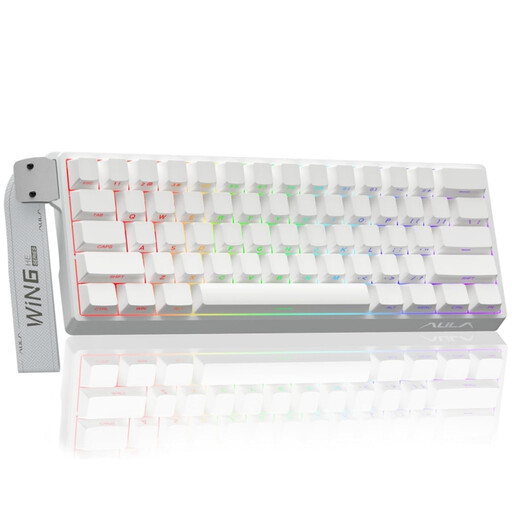 No image available
Consider this compact wired model if mouse room and adjustable key actuation are priorities at a fixed desk.
The product name specifies hot-swappable magnetic switches, Rapid Trigger mode, an 8000 Hz polling rate and side-engraved keycaps. Check its physical layout and access to arrow and navigation functions before buying. Its safety information advises keeping it away from pacemakers and magnetic-sensitive medical devices.
A TKL keyboard makes sense when mouse room matters more to you than a number pad; it is not automatically preferable for survival games. CORSAIR describes TKL as retaining dedicated arrow and navigation keys, but the missing number pad may matter for your bindings or other PC tasks.
Yes, if you expect UK key positions or also type outside games, check the physical layout of the exact variant. Logitech identifies ISO as standard across the UK and Europe; inspect the stated layout and key photographs rather than assuming that every keyboard offered to UK shoppers has UK legends.
No; screen size alone does not determine the connection you need. Wireless is worth considering if you move the keyboard between positions or a cable would be inconvenient, while a wired board can suit a fixed desk. Check the keyboard’s available connection modes against where it will sit relative to the PC.