Recipe-card digitiser
You are turning handwritten recipes into fields such as ingredients, quantities, yields and cooking times. A familiar layout with convenient number entry may matter more than extra customisation.


Choose a full-size keyboard or a separately positioned number pad if recipe quantities, timings and other numbered fields make up much of your work. If you move between an index and recipes on other devices, check switching and shortcut support instead; for long sessions, choose a layout you can position comfortably as part of the wider desk setup.
You are turning handwritten recipes into fields such as ingredients, quantities, yields and cooking times. A familiar layout with convenient number entry may matter more than extra customisation.
You spend extended periods building or maintaining an index. Keyboard position, screen position and the rest of your workstation deserve attention alongside the keyboard itself, as the Health and Safety Executive advises for display-screen work.
You consult a recipe on a phone or tablet while editing the index elsewhere. Device switching may be useful, provided the keyboard’s connection methods and optional shortcuts work with your devices.
Start with the fields you enter most often, then consider how long you type, which devices you use and how much desk space is available.
| Concern | What to check | Who this matters to |
|---|---|---|
| Numbers and navigation | Look for an integrated or separate number pad, then check that the navigation keys and physical layout suit your indexing fields. | When I repeatedly enter quantities, timings and yields, I want number entry to feel straightforward. Around 31% of consumers put structured numeric entry first. |
| Long-session comfort | Assess the keyboard’s shape and placement alongside the screen and chair; the Health and Safety Executive advises keeping the keyboard central and just below elbow height. | If I catalogue recipes for extended periods, I need a setup that lets me type without twisting towards the screen. Comfort is the primary concern for around 31% of consumers. |
| Device switching | Confirm connection methods, the number of supported devices and whether desired shortcuts need compatible software. | If I read a recipe on a tablet while editing the index on a computer, I want to move between tasks without disrupting entry. For around 23% of consumers, device switching comes first. |
| Space and typing noise | Measure the available desk width and decide whether a compact layout’s key arrangement works for you; assess any quiet-typing claim against your surroundings. | I need room beside the keyboard for recipe cards or another device, or I share the space with someone else. Roughly 15% of consumers prioritise space and low-distraction typing. |
A smaller keyboard can leave more room for recipe cards, but its key arrangement may make repeated quantities and timings less convenient.
List the fields you enter most often. If numbers feature heavily, compare an integrated number pad with a separately positioned keypad before choosing a compact layout.
The Health and Safety Executive identifies workstation design and work routine, not just keyboard choice, as relevant to discomfort during display-screen work.
Keep the keyboard central and just below elbow height, review your screen and chair positions, and vary activities or take breaks during longer indexing sessions.
A keyboard that uses a USB receiver does not offer the same connection choices as one with Bluetooth or several stated modes. Optional shortcut features may also depend on software support.
Check the exact model’s connection methods, required ports, power arrangement and operating-system support against each device you intend to use.
A US-layout keyboard can place symbols differently from a UK layout, even when both use QWERTY letters. That matters when typing recipe notes and symbols.
Inspect the pictured key legends and the stated physical layout, and set your operating system to the layout that matches the keyboard.
Its MX Keys S and Wave Keys lines offer different approaches to multi-device recipe work and desk layout.
The Q6 Max UK-ISO is a full-size mechanical route for consumers who want switch choice and several connection methods.
The STREAM KEYBOARD WIRELESS is a conventional full-size, low-profile office-keyboard option.
The HP 230 and HP 960 serve different number-entry and desk-layout needs.
These choices cover full-size and compact keyboard layouts for entering an index at a desk. Check each model’s physical key layout and number-entry arrangement against the recipe fields and devices you use.
 No image available
Consider this set for recipe entry at a fixed desk if you want a full-size keyboard and mouse together. The title specifies 2.4 GHz wireless and a US layout; check the number-pad arrangement and that your device can use the required connection.
 No image available
This is a full-size option for substantial recipe entry if you prefer a mechanical keyboard. Its title specifies a US layout, tri-mode connection, hot-swappable design and silent tactile switches; confirm the number-pad arrangement and assess the switch sound for your room.
 No image available
Consider this wireless model if recipes and the index sit on different devices. Before choosing it for frequent numeric entry, check the physical key layout, number-entry arrangement and compatibility of any switching or customisation features you need.
 No image available
Its 96% US QWERTY layout may interest you when desk width matters but you still want to assess a larger key arrangement. The title specifies tri-mode wireless and a motorised lift; check the number-pad layout and device-switching controls. Keep fingers, hair and small objects clear of the moving lift mechanism.
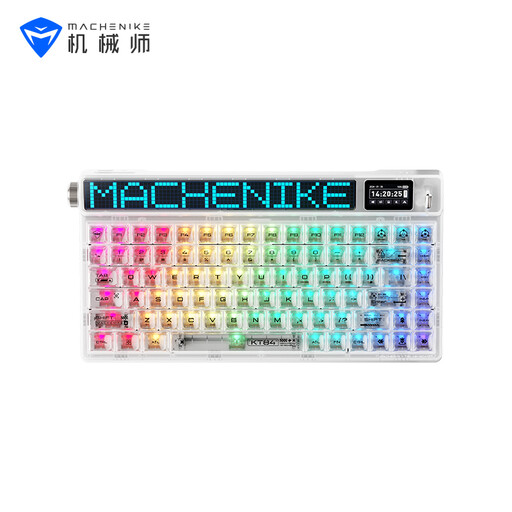 No image available
Consider this compact option if desk space and custom shortcuts matter more than a conventional full-width layout. The title specifies tri-mode connection, a US QWERTY layout and Gateron Yellow switches; check number entry, paired-device switching and shortcut-software compatibility before buying.
No: a full-size keyboard or separate number pad is most relevant when you enter quantities, timings, yields or numbered categories frequently. If desk space matters more, check that a smaller layout still gives you a number-entry method you are comfortable using.
Keep the keyboard central to the screen and just below elbow height, in line with Health and Safety Executive guidance. Arrange the rest of the workstation so you do not have to twist to see the screen, and vary your activity during extended work.
No: keyboard shape is only one part of a comfortable workstation. The Health and Safety Executive also identifies screen and keyboard position, workstation design and work routine as relevant to discomfort during display-screen work.
Confirm that every device supports the keyboard’s connection method, then check pairing limits and operating-system support for any shortcuts you want. Logitech says MX Keys S can switch across up to three devices, but optional software features still need checking against your particular setup.