Small-desk long-form editors
If a book review shares desk space with a mouse, notes and a screen stand, keyboard width matters alongside access to everyday editing keys.


For book-review editing on a small desk, start with a keyboard that leaves room for your mouse while keeping your most-used cursor and shortcut keys accessible. A compact scissor-switch model suits a preference for shallow keys; a 75% mechanical model offers switch choice, but its feel and sound depend on the selected switches. Consider a larger compact or tenkeyless (TKL) layout if a smaller key map puts important commands on layers, provided the keyboard still fits your workspace.
If a book review shares desk space with a mouse, notes and a screen stand, keyboard width matters alongside access to everyday editing keys.
Frequent cursor movement, document navigation and application shortcuts make the exact key map more important than the keyboard's compact label.
Writers moving between a laptop, desktop or tablet need to check how many devices the keyboard can pair with and which connection methods each device supports.
Measure the usable desk space and identify the editing keys you use most before choosing between a shallow compact keyboard, a 75% mechanical model and a larger layout. Then check the selected variant's key feel, connections and UK layout.
| Concern | What to check | Who this matters to |
|---|---|---|
| Desk space and editing keys | Compare the keyboard's dimensions with usable desk space, then inspect its arrows, function row and navigation-key access. | I need room for a mouse and review notes, but I do not want cursor movement buried in shortcuts; around 36% of consumers put that balance first. |
| Key feel and noise | Identify the exact switch or scissor mechanism; try it or seek a sound demonstration if shared-space noise matters. | During long revisions, I want keys that feel comfortable to me without distracting someone nearby. For around 29% of consumers, feel and noise are the primary concern. |
| Devices and workflow | Check pairing capacity, receiver or wired options, and software support for the shortcuts you intend to customise. | If I switch between writing devices, I need a connection and shortcut setup that works with each one; around 21% of consumers prioritise that workflow. |
| UK layout and setup | Confirm the selected variant's physical UK key layout, receiver requirements and charging or cable arrangements. | I rely on familiar punctuation positions and want the connection ready for my desk setup; that certainty comes first for around 14% of consumers. |
A smaller layout may move navigation commands onto an Fn layer, making frequent revisions less convenient even when the keyboard fits the desk.
Compare the exact key map with the arrows, document-navigation keys and shortcuts you use while editing.
A model family may include different physical layouts, changing the placement of punctuation you use in quotations and citations.
Check the selected variant for an explicit UK-ISO or English UK layout designation rather than relying on its product photograph.
Switch choices can feel and sound different, so the keyboard's mechanical label alone cannot settle whether it suits a shared workspace.
Identify the selected switch and, where possible, try it or listen to a demonstration of that exact configuration.
Bluetooth pairing, a wireless receiver and a wired data connection are different arrangements; a receiver may also need a suitable port.
List the devices you will use, then check the keyboard's pairing capacity, receiver requirements and cable functions.
The MX Keys Mini family is a compact productivity option for desks shared with other work materials and for compatible multi-device setups.
The K3 Max UK-ISO is a low-profile mechanical option for editors interested in switch choice and configurable shortcuts.
The KW 9200 MINI is a compact scissor-switch option for editors who prefer a slim keyboard.
These compact models offer different layouts and connection options for a small editing desk. Check each variant's physical key map and regional layout against your book-review workflow before choosing.
 No image available
Consider this compact wireless model if you want editing-key access without moving to a full-size keyboard.
The product name identifies a UK variant. Check its exact navigation-key positions, physical dimensions and selected switch sound against your desk and workspace.
 No image available
This is an option for a compact multi-device desk if a US physical layout works for your punctuation and editing habits.
The product name specifies 78 keys, 2.4 GHz and Bluetooth 5.0/4.0 connections, and support for four devices. Check the arrow and navigation-key map; choose a UK-layout variant instead if UK key placement is essential.
 No image available
Consider this 75% mechanical option only if its US key layout and exact editing-key arrangement suit your work.
The product name specifies hot-swappable switches and Bluetooth 5.0, 2.4 GHz and USB-C connection modes. Check the selected variant's navigation keys and switch sound before ordering.
 No image available
This compact wired model is worth checking if UK key placement matters more to you than wireless switching.
The product name identifies the UK variant. Inspect the exact function-row and navigation-key access, and confirm compatibility with your editing device.
 No image available
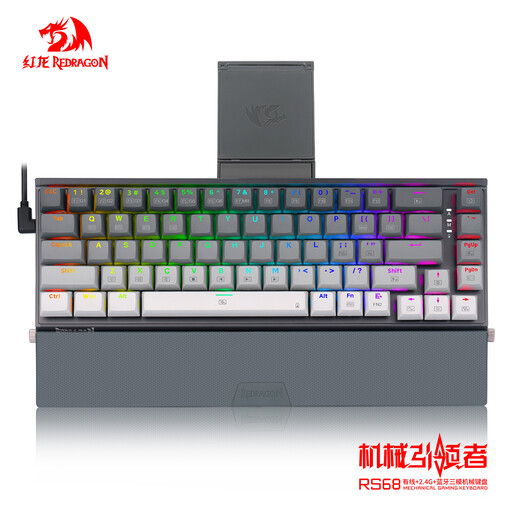
Assess this compact mechanical model against your desk space and the editing commands you use most.
The product name describes wired, wireless and Bluetooth use and a detachable wrist rest. Confirm the selected keyboard's physical layout, arrow and function-key access, and footprint with the wrist rest attached.
It may be if you use arrows, function keys or navigation commands frequently. Compare the exact key map with your revision shortcuts; a 75% or other compact layout with more directly accessible controls may be easier to work with.
Choose a UK-ISO or explicitly English UK variant if you want familiar physical key placement for punctuation. Check the selected variant, since the same model family can include several regional layouts.
Bluetooth can be enough if each device supports it and the keyboard has enough pairing channels for your setup. If you also want a receiver or direct cable connection, check that the exact model offers the relevant mode and that your devices have suitable ports.
Check which electrical-equipment collection or retailer take-back options are available to you. The UK Office for Product Safety and Standards and Department for Environment, Food & Rural Affairs describe waste electrical and electronic equipment regulation as intended to reduce electrical waste sent to landfill or incineration.