Parents buying a first connected gaming device
Compare the child’s intended games across console, tablet and computer before choosing hardware. Plan for a separate child account and check its age, content and communication settings as part of setup.


Start with the games the child wants to play and the platform their friends use: a console suits console-focused play, a tablet suits portable, touch-based games, and a Windows computer suits PC games and other computer use. Whichever route fits, set up a separate child account with the correct date of birth, then review communication, multiplayer, content and purchase settings before online play. Check how those settings apply to the particular account, device, browser and games the family will use.
Compare the child’s intended games across console, tablet and computer before choosing hardware. Plan for a separate child account and check its age, content and communication settings as part of setup.
Voice, text and other player interactions make communication permissions as important to check as the device itself. Review the platform settings and the social features of each intended game.
Find out whether restrictions follow an individual child account or apply to the device. Nintendo UK says parental controls on Switch and Switch 2 can be set for the console rather than each user.
Choose a route for the games and ways of playing the child needs, then check where its family settings take effect.
Consider it: when the child mainly plays console games with friends and the household wants controls tied to that platform.
Trade-off: settings differ between Xbox, PlayStation and Nintendo; Nintendo UK says some Switch restrictions apply to the whole console.
Consider it: when portable, touch-based games are central and a parent can manage a separate Apple or Google child account.
Trade-off: check each game’s account and chat features; Google Play purchase approvals apply to purchases using Google Play billing.
Consider it: when the child needs PC games or will also use the computer for other household tasks.
Trade-off: Microsoft warns that an administrator can change Family Safety settings, while its web and search filters require a supported browser.
| Priority | What to check | Your needs |
|---|---|---|
| Communication | Review the child account’s communication and multiplayer permissions. Check voice, text, video and friend features in the games the child will play. | I want my child to play with friends, with clear limits on who can contact or interact with them. |
| Age and content | Enter the correct date of birth; check platform age settings, game ratings and access to online features. Ofcom notes that services can restrict features, games or content for younger users. | The games and account features should suit my child’s age without relying on an adult account. |
| Downloads and purchases | Check the child account’s game and app restrictions, plus purchase approvals for the relevant store. Google says its Play purchase approvals cover purchases made through Google Play billing. | I want to allow suitable games while retaining control over downloads and purchases. |
| Where controls apply | Check whether rules follow an account, a whole console or a browser. Nintendo UK describes console-wide Switch controls; Microsoft warns about child administrator access and requires supported browsers for web and search filtering. | If siblings share a device, I need rules that work for their different ages. For a PC, I want to know which account and browser the child will use. |
PlayStation and Apple advise giving a child their own account, so settings intended for that child can be managed separately.
Create the child account with the correct date of birth and add it to the parent-managed family group before enabling online play.
Nintendo UK says Switch and Switch 2 parental controls can apply to the console rather than to an individual user, affecting others who share it.
Choose console-wide restrictions with the youngest shared player in mind, and check separate Nintendo Account settings where relevant.
Microsoft warns that an administrator can change or break Family Safety settings.
Use a standard Windows account for the child, add it to the Microsoft family group and test the intended settings on that account.
Platform controls and individual games can expose different communication and purchase options. Google also limits Play purchase approvals to Google Play billing.
Check multiplayer, friends, each type of chat and purchasing in the specific games and services the child will use.
These account systems are relevant to different device routes; their controls are not interchangeable.
Relevant to Xbox consoles and Windows households using a Microsoft family group.
Relevant to families choosing a PlayStation console and managing online play through family accounts.
Relevant to households considering Nintendo Switch or Switch 2, particularly a shared console.
Relevant to an iPad route managed through the family’s Apple accounts.
Relevant to Android tablets or Chromebooks using a supervised Google Account.
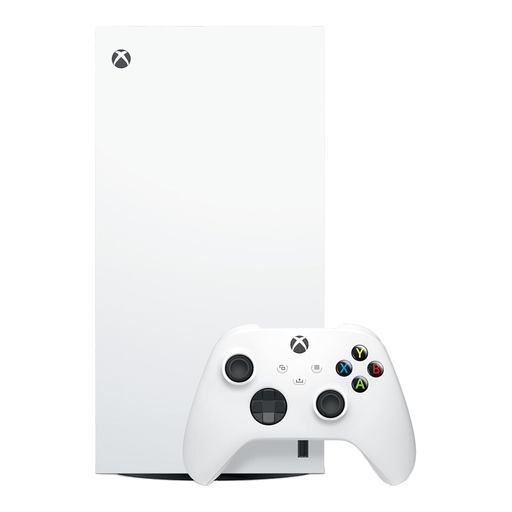
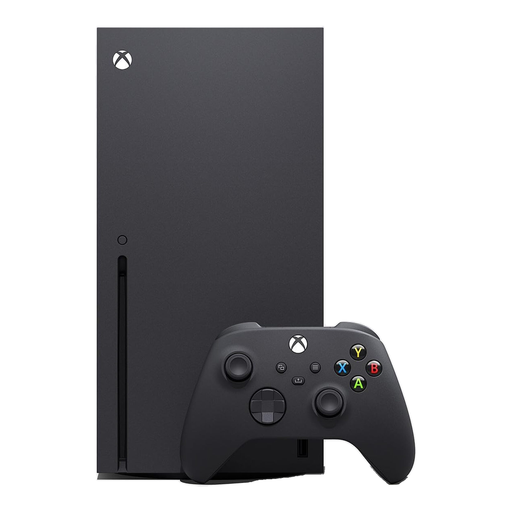
These Xbox Series X consoles represent the console route. Check that the child’s games and friends can play together on Xbox before choosing either version.
 No image available
An Xbox console option for a family whose child plays compatible games with friends on Xbox. This 1TB Digital Edition has no optical drive, so check access to the intended games in digital form. Xbox Support describes family settings for age-based content, communication and multiplayer; set up a separate child account with the correct date of birth.
 No image available
An Xbox console option to consider if the child’s games and friends use compatible Xbox online play. The listed capacity is 1TB. Xbox Support describes family settings for age-based content, communication and multiplayer; create a separate child account with the correct date of birth and review those settings before play.
Yes. Ofcom advises parents to register a child with their correct age because platforms can restrict features, games or content for younger users. Xbox Support says its account age category also depends on the account’s country or region and date of birth.
Use a separate child account where the platform supports one. PlayStation and Apple both advise separate accounts for children; set it up within the parent-managed family arrangement before reviewing child-specific controls.
Device type alone does not settle it. Xbox Support describes communication and interaction settings, while other platforms and individual games have their own controls. Check the child account’s voice, text, video, friend and multiplayer permissions for the games they will use.
It may not suit everyone. Nintendo UK says parental controls on Switch and Switch 2 can apply to the console rather than each user. Set a shared baseline with the youngest player in mind and check separate account controls.
No. PEGI presents age ratings alongside parental-control tools. Check the game rating, then review the platform’s child-account, communication and purchase settings for online play.