What should you check before buying?
Choose the type of device around the child’s intended games and other uses, then check the account arrangement and online features before settling on a model.
| Priority | What to check | Your needs |
|---|
| Type of use |
Check the child’s intended games and whether play will mainly be on a television, on a handheld or alongside other tablet or phone apps. A headset still needs an underlying gaming device. |
I’m choosing mainly for games at home, or I also want the device to handle apps, browsing or communication. |
| Child account |
Check how to create a separate managed account and which adult will control it. Apple says a child should have their own Apple Account; Xbox family settings operate through a family setup. |
Adults share devices in our household, but I want the child’s permissions kept separate from theirs. |
| Play time |
Check whether limits apply to the account, an individual game or each device. Google says Family Link can set limits on supervised Android devices and Chromebooks; review settings on every device the child uses. |
Some days I need a clear stopping point for play without changing the limits on an adult’s account. |
| Games and content |
Check each game’s PEGI rating as well as the platform’s content and store settings. PEGI says its rating concerns age suitability of content, not game difficulty; Google says Play restrictions do not prevent restricted material appearing in search results or through direct links. |
I want to judge the games themselves, not assume a device setting covers everything the child might encounter. |
| Online contact |
Check multiplayer, messaging and voice-chat settings in both the child account and the intended game. Nintendo’s parental-control app and GameChat have distinct settings and conditions. |
The child may play with others, but I want to decide which communication features are appropriate. |
| Ongoing access |
Check each intended game’s online-play and membership requirements. Nintendo describes online play in supported Switch titles as a Nintendo Switch Online benefit; PlayStation includes online multiplayer with PlayStation Plus memberships. |
I need to know what access the child’s chosen games require beyond owning the device. |
Which platform controls are relevant?
These platform references help identify account and supervision questions; they do not indicate which brands are included in the product options below.
Nintendo
A Nintendo Switch or Nintendo Switch 2 is a gaming-focused handheld and home-console route.
- Nintendo says its linked parental-control app lets adults check what and how children play.
- Check communication settings separately for features such as GameChat, and check whether the intended game needs Nintendo Switch Online for online play.
PlayStation
A home-console route for families considering television-based games and a managed child account.
- PlayStation describes child spending controls in its Family app, including a monthly spending limit.
- PlayStation lists online multiplayer with PlayStation Plus memberships; check the intended games and service terms.
Xbox
A console route that can fit a household already using Xbox or Windows family accounts.
- Xbox says its family settings cover screen time, privacy, social interactions and access to mature content across supported Xbox and Windows devices.
- Set up the child’s place in the Microsoft family group before relying on those settings.
Apple
An iPad or iPhone route when gaming will share a device with other apps and communication.
- Apple describes Screen Time and Family Sharing tools for managing a child’s device use.
- Apple advises giving the child their own Apple Account; check which controls are available on the exact device.
Google / Android
An Android tablet or phone route for a child using games alongside other apps.
- Google says Family Link can set screen-time limits on supervised Android devices and Chromebooks.
- Google says Play content restrictions do not prevent restricted material appearing through searches or direct links; check settings on each device the child uses.
Joybuy console and tablet options
These options cover Xbox consoles for home gaming and children’s tablets for games alongside other apps. Compare the child-account arrangements and intended games as well as the hardware.
 No image available
Xbox Series X Console, 1TB, Black
A home-console option for a child playing on the household’s Xbox setup. Xbox family settings cover screen time, privacy and social interactions, but the child needs an appropriately configured family account. Check the intended games’ online and membership requirements.
View on Joybuy
 No image available
Xbox Series X 1TB Digital Edition, White
A digital-edition home-console option; check that its game-access format suits the household’s intended games. Xbox family settings require a managed family arrangement, and online or membership requirements should be checked for each game.
View on Joybuy
 No image available
HONOR X8A Kids 11-inch WiFi, 128GB, Space Grey
A tablet option when games will share the device with other apps. Before choosing it for supervised play, confirm the exact model’s child-account compatibility and how purchases, messaging and multiplayer are managed.
View on Joybuy
 No image available
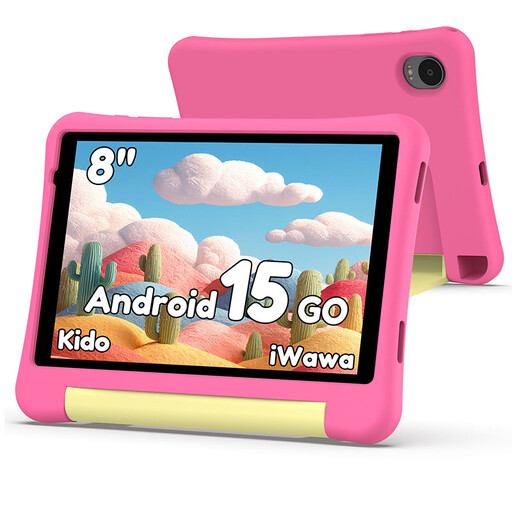
Alldocube Kido 8-inch Android 15 tablet, 3GB+32GB, pink case
A children’s tablet option for games alongside other apps, with an 8-inch display and a protective case stated in its title. Check how the exact device handles a child account, purchases, communication and multiplayer. Its listing says a power adapter is not included.
View on Joybuy
Questions about children’s gaming devices
Is a games console automatically safer than a tablet or phone?
No. Consoles offer gaming-focused family settings, while Apple and Google describe controls for wider device and app use. Check the exact device’s child-account, content, purchase and communication settings against what your household needs.
Should a child use an adult’s account on a shared device?
Use a separate managed child account where the platform provides one, so the child’s permissions can differ from an adult’s. Apple explicitly advises that a child have their own Apple Account; check the family-account arrangement for the console or Android device you intend to use.
Do parental controls replace checking a game’s PEGI rating?
No. PEGI says its rating describes age suitability of content, not difficulty. Check the individual game’s rating and online features as well as the child account’s settings.
Will a child need a membership to play online?
That depends on the game and platform. Nintendo describes online play in supported Switch titles as a Nintendo Switch Online benefit, and PlayStation includes online multiplayer with PlayStation Plus memberships. Check the chosen games and current service terms before buying.
Can a gaming headset control who a child chats with?
No. A headset is an audio accessory; check chat permissions in the game and the child’s platform account. Nintendo also describes separate parent-approval conditions for children using GameChat on Switch 2.


