Parents setting up a child’s first device
If you are weighing up a personal phone or tablet, check how its child account connects to your family group and which content, communication and purchase settings you can manage.


Choose a tablet or smartphone with a separate child account when portable apps, video or communication matter and your household can manage the account. A games console makes more sense when gaming is the main activity, but its controls depend on the platform; on a shared device, check whether restrictions apply to each child or to everyone using it. None of these settings replaces reviewing games, contacts and spending with your child.
If you are weighing up a personal phone or tablet, check how its child account connects to your family group and which content, communication and purchase settings you can manage.
If gaming is the main activity, compare console controls for play time, game access, communication and spending with the controls available on a phone or tablet.
If more than one person uses the same tablet or console, find out whether each child can have separate account settings or whether restrictions apply to everyone using the hardware.
Start with what your child will use the device for, then check the account and controls on the particular platform—not just the hardware description.
| Priority | What to check | Your needs |
|---|---|---|
| Child account | Check whether the child can use their own account in a family group, which adult manages it and whether settings follow the account on a shared device. | I want controls attached to my child’s account, rather than letting them use an adult login. |
| Content access | Check age and content settings for the games, apps and store your child will use. PEGI says its game ratings address age suitability of content, not difficulty. | The games and apps my child can open should fit our household rules; an age label alone would not answer every question about a game. |
| Spending | Check purchase approvals, account balances, gift cards and renewal settings in the relevant store. Google Play Help limits its approvals to Google Play billing; Xbox Support says existing Microsoft-account money and gift cards can still be spent. | Before adding a payment method or subscription, I want to know which purchases the setting actually covers. |
| Time and contact | Check play-time or device-use settings and the available communication controls. Apple Support describes Screen Time controls for apps, content, communication and device use; Nintendo UK Support describes Switch play-time and feature restrictions. | I need rules for when play happens and how my child can interact online, alongside regular conversations about their activity. |
| Device fit | For portable apps, video and communication, compare child-account tablets and smartphones. For gaming-focused use, compare console family settings; on shared hardware, check whether restrictions are account-specific. | If my child mainly plays games at home, a console may fit. If they also need portable video, apps or communication, I would compare a tablet or phone instead. |
An age setting does not necessarily provide the account-specific time, communication and spending controls your household wants. Nintendo UK Support says its Switch console parental-control restrictions apply to everyone using that console.
List the controls you need, then check each one on the operating system or console platform before choosing a device.
Store settings have boundaries: Google Play Help limits its approvals to Google Play billing, while Xbox Support says a child can still spend gift cards or money already in their Microsoft account.
Check the payment method, account balance, store and subscription-renewal settings, then configure the relevant controls before the child starts using them.
Shared credentials make it harder to manage the child’s access separately. Apple Support advises giving a child their own Apple Account rather than sharing another family member’s account.
Where supported, create a child account and connect it to the family group before setting content and purchase rules.
PEGI says its rating concerns age suitability of game content, not game difficulty. It does not by itself tell you how your child will communicate or make purchases in a particular game.
Check the game’s online features, chat and spending options as well as its age rating.
The controls below relate to the named accounts and platforms; check the setup that applies to the device your family would use.
For iPhone and iPad households using a child Apple Account in Family Sharing.
For Android phone and tablet households considering a managed child Google Account.
For console gaming with Xbox child accounts and Microsoft family settings.
For Nintendo Switch and Nintendo Switch 2 households checking play and store restrictions.
These tablets are options for a child’s portable app and video use. Check their account and control setup if a tablet fits your household; this selection does not compare phone or console models.
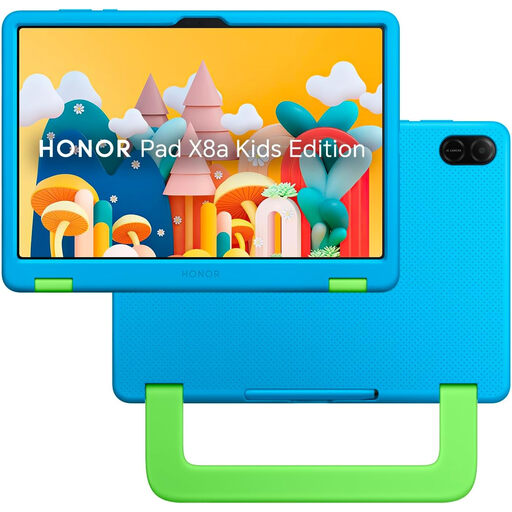 No image available
For a child-account tablet setup, check that the listed parent and child account, approved-content and screen-time settings work as your household needs on this model. The product name specifies an 11-inch Wi-Fi tablet with 128GB storage; confirm purchase-approval and subscription settings separately if those are important to you.
 No image available
For supervised portable play, check what the stated Child Lock feature controls and whether a separate child account is available. The product name specifies a Unisoc T310 processor, 5G Wi-Fi and a 5000mAh battery. No adapter is included, so check what compatible charging equipment you will need.
Use a separate child Apple Account. Apple Support advises against sharing a family member’s account; adding the child account to Family Sharing lets a parent or guardian manage its Screen Time settings from their own device.
No. Google Play Help says its approvals apply only to Google Play billing, and Xbox Support says a child can still spend gift cards or money already in their Microsoft account. Check the relevant store, account balance and renewal settings before relying on approval requests.
Not for the console restrictions described by Nintendo UK Support: they apply to everyone using that Switch. If the children need different limits, compare account-specific controls on another platform or consider how shared restrictions would work for both children.
PEGI rates the age suitability of a game’s content, not its difficulty or whether it suits a particular child. Check online interaction and spending options alongside the rating and your household rules.
No. Device and account controls manage defined functions, and their coverage varies by platform, service and payment route. Review the games and services your child uses, and keep discussing contacts, content and spending with them.