Families sharing one main TV
A living-room setup needs to account for when other people use the screen, whether someone can join a game locally and where play will take place when the TV is occupied.


Choose the console platform that has the child’s intended games and friends, then decide whether the household needs a shared TV, private audio or another controller. PlayStation’s child-account controls, Xbox’s family-group settings and Nintendo’s console-wide Switch restrictions work differently, so set up the appropriate accounts before online play. Check each game’s local-player and online requirements before buying accessories or changing the display.
A living-room setup needs to account for when other people use the screen, whether someone can join a game locally and where play will take place when the TV is occupied.
Online play makes the child’s games, friends and communication settings part of the hardware decision. Ofcom’s UK research on children aged 8–17 documents online gaming, while platform guidance from PlayStation, Xbox and Nintendo describes different ways to manage child access.
Different ages may call for different access arrangements. Nintendo says its main Switch and Switch 2 parental restrictions apply to the whole console, so settings chosen for a younger child can affect everyone using it.
Start with the games and people the child wants to play with; then work through the screen, account and accessory requirements of that choice.
| Priority | What to check | Your needs |
|---|---|---|
| Games and friends | Confirm that the intended games run on the chosen platform, that friends can play together as intended, and whether online play needs an account or membership. Check local-player support separately. | I want the child to play their actual games with the people they know, rather than choose a console on appearance alone. |
| Shared screen | Decide who uses the main TV and when. If considering a separate display, check its connections against the exact console and the games’ supported video modes. | When the living-room TV is occupied, we need a workable place for the child to play without assuming a new screen is necessary. |
| Child accounts | Set up the parent and child roles before play. PlayStation describes a family manager and child account; Xbox uses a family group. Nintendo says its main Switch parental restrictions apply across the console, with separate Nintendo Account settings for some functions. | I need to manage content, communication, playtime or purchases without assuming every person sharing a console has independent limits. |
| Voice chat | Check the game’s chat features, friend permissions and headset connection. Nintendo says Switch 2 GameChat needs Nintendo Switch Online and a persistent internet connection; supervised users under 16 need app-configured parental controls. | Private audio may suit a shared room, but I also want to decide who the child can contact. A headset cannot make that decision for me. |
| Controllers and local play | Check how many people the intended game supports locally, which controllers it accepts and whether it needs features such as motion controls. Allow for the seating arrangement if choosing a wired controller. | We may want to join a game on the same screen; an extra controller is useful only if it works with our console and games. |
| Display modes | Check the console, game, cable and display together before upgrading. Xbox Support specifies an Xbox Series X, an Ultra High Speed HDMI cable and an HDMI 2.1 TV for 4K gaming at 120 Hz; PlayStation says PS5 120 Hz output also depends on TV and game support. | I would keep a working family TV unless a capability we plan to use is missing from the current setup. |
A display specification alone does not establish what a game will show. Xbox Support’s 4K-at-120 Hz requirements include the Series X console, a suitable cable and an HDMI 2.1 TV; it also warns that equipment between console and TV can affect video features.
Check the exact console, games, existing TV ports and cable path before deciding whether a display change would serve this household.
Using a particular video mode may also call for a different cable or changes to equipment connected between the console and TV.
A headset changes how the child hears or speaks; it does not set friend permissions, restrict contacts or approve purchases.
Configure the child account and the game’s communication settings first. For Switch 2 GameChat, follow Nintendo’s parental-controls and friend-approval steps before deciding whether to add chat accessories.
Nintendo says the main parental controls apply to everyone using the same Switch or Switch 2 console. Restrictions appropriate for the youngest child can therefore affect an older sibling or adult.
Decide whether one shared restriction level works for the household, and check which additional permissions must be managed through Nintendo Accounts.
Joybuy describes its PS5 Digital Edition Slim listing as an all-digital console with no disc drive. That distinction matters to a family intending to use physical games.
Check the exact edition against games the household already has, preferred game formats and the practicality of downloading games before choosing a digital-only model.
The platform that fits the child’s games still needs an account arrangement that works for everyone sharing the device.
Switch and Switch 2 can suit a household choosing between TV play and play away from the main screen, provided the child’s intended games are on Nintendo’s platform.
PlayStation is a route to consider when the child’s games or friends are there and an adult can manage a child account.
Xbox is a route to consider when the child’s games or friends use it and the family wants to manage a child account through a Microsoft family group.
These options include Nintendo Switch 2 consoles, a headset, a Nintendo Switch controller and a TV for a shared space. Choose the games and platform first, then check whether an accessory or different screen answers a specific household need.
 No image available
This bundle is worth checking if the child’s intended games and friends are on Nintendo Switch 2. Confirm the bundle contents and any online-service terms on the product page; Nintendo says supervised users under 16 need app-configured parental controls to use GameChat.
 No image available
Consider this console if Nintendo is the right platform for the child’s games and friends. Check game compatibility and the exact display mode you plan to use before choosing a screen. Nintendo says Switch 2 GameChat needs Nintendo Switch Online and a persistent internet connection, with app-configured parental controls for supervised users under 16.
 No image available
A headset may suit a child who uses voice chat in a shared room. Check its connection against the exact console, controller and game; set contact and chat permissions through the platform and game rather than relying on the headset.
 No image available
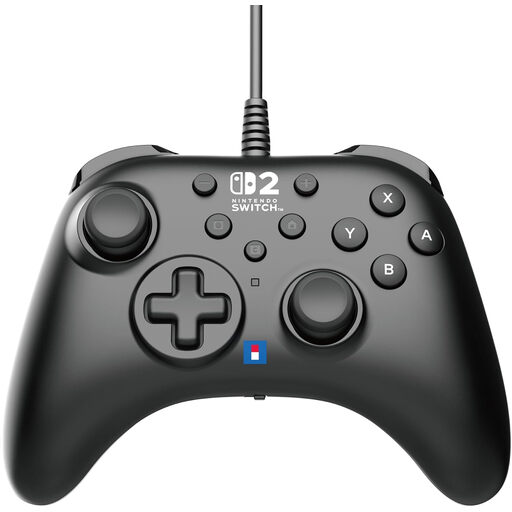
This wired controller is an option to investigate when another person wants to play locally. Confirm compatibility with the household’s exact Nintendo Switch model and intended games, including any required controller features, before adding it to the setup.
 No image available
This 4K TV is a screen option for a shared-room setup if the current display lacks a capability the family intends to use. Check room fit and the exact console, game, cable and display settings before replacing a working TV; a screen does not manage child accounts or communication.
Yes: establish the child’s games and platform first, then check which screen modes and accessories that setup can use. A 120 Hz display upgrade, for example, depends on the console, supported game mode, cable and display working together; a headset also needs to connect to the intended console and game.
Do not assume adult-account use will apply the child settings you want. PlayStation describes a family manager with a managed child account, and Xbox uses a child account in a family group; Nintendo combines console-wide Switch restrictions with separate Nintendo Account settings for some functions. Set up the relevant roles before online play.
Nintendo says a supervised user under 16 can use GameChat once parental controls have been configured through its smart-device app. GameChat also needs a persistent internet connection and Nintendo Switch Online; video chat additionally needs a compatible USB-C camera.
Not for the main console parental controls: Nintendo says they apply to everyone using the same Switch or Switch 2. Set those shared restrictions with the youngest player in mind and check Nintendo Account settings for the additional controls that are managed separately.
No. PEGI distinguishes a game’s content rating from its difficulty, and its parent guidance recommends checking online access and interaction as well as age, time and spending controls. Review the particular game’s communication features and the child’s account permissions before they play online.