
24/7 Customer Support

Free returns

Same-day & Next-day Delivery

Quality Guaranteed

Unlock Your Welcome Offers: FREE Delivery | Up to 80% OFF | Free 30-day JoyPlus trial
Download the APP
Finding a toy that is both entertaining and educational can be a challenge. In a world full of screens, many parents and gift-givers are looking for ways to introduce technology to children in a structured, beneficial way. A kids learning laptop can be an excellent tool for this, blending play with foundational learning in literacy, numeracy and even basic computer skills.
This guide is designed to help you navigate the options. We will outline key features to consider when making your choice and present a few of our top recommendations to help you find a suitable children's toy laptop for the little learner in your life.
Choosing the right educational toy requires considering the child's age, developmental stage and interests. Here are a few practical points to keep in mind.
The most important factor is choosing a device designed for the child's specific age group. An educational laptop for toddlers will have large, simple buttons and a robust, drop-proof design, focusing on basic concepts like colours and shapes. For older children, a more advanced model with a QWERTY keyboard and complex activities will provide a greater challenge and help develop more refined skills. Always check the manufacturer's recommended age and any safety warnings, particularly regarding small parts.
A quality preschool computer toy should offer a variety of activities that support early years curriculum goals. Look for electronic learning games that cover phonics, letter recognition, counting and simple maths. Some models also introduce basic logic, problem-solving and even foreign languages. For a child who is showing an interest in your own computer, finding their first laptop for a child with a realistic keyboard and mouse can be a great way to introduce early computer literacy in a safe, controlled environment.
To hold a child's attention, a learning laptop needs to be engaging. Features like lights, sounds, music and encouraging voice prompts can make learning feel like a game. Many devices feature familiar characters from popular children's shows, which can provide extra motivation. Look for models with progressive learning levels, which automatically adjust the difficulty as your child masters new skills, ensuring they remain challenged and interested over time.
Here are a few standout options that cater to different ages and learning stages.
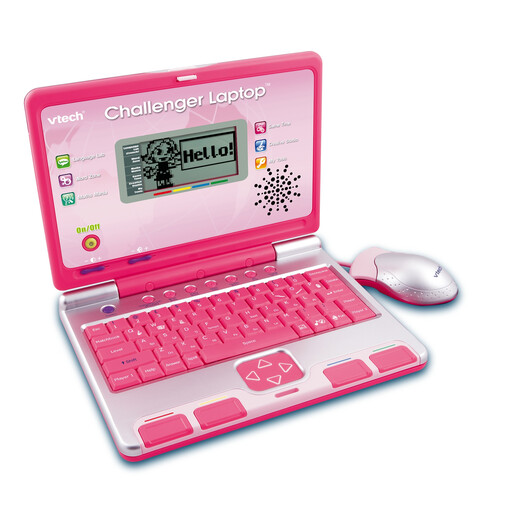
Why It Stands Out: This sleek laptop is geared towards school-ready children, offering a wide range of curriculum-based activities. Its 2-player mode is a notable feature, encouraging social play and collaboration with friends or siblings.
Pros:
Who is it for: Ideal for children aged 4 and up who are ready for more structured learning and enjoy a quiz-show style of play.
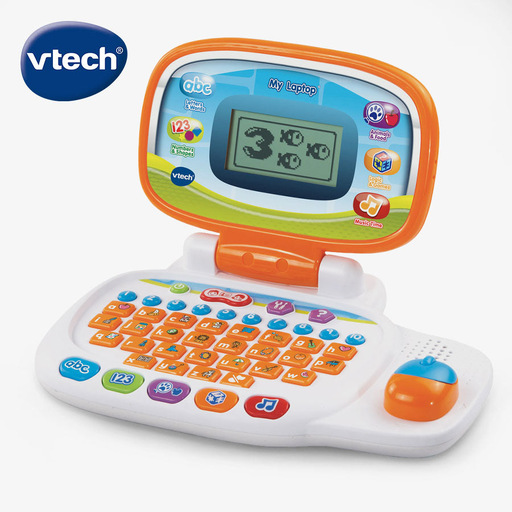
Why It Stands Out: This model excels at personalisation, allowing a child to make the laptop truly their own. With a simplified mouse and a broad age range, it serves as an excellent introductory computer toy.
Pros:
Who is it for: A great all-rounder for preschoolers aged 3 to 6, especially those who enjoy seeing their own name and preferences reflected in their toys.
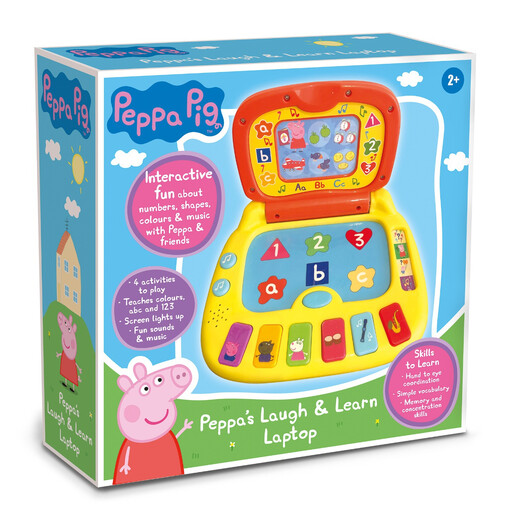
Why It Stands Out: Leveraging the immense popularity of Peppa Pig, this laptop is perfectly tailored for the youngest users. Its chunky, simple design and focus on core basics make it an accessible first step into electronic learning.
Pros:
Who is it for: The perfect choice for toddlers from 2 years old, particularly for fans of the show who are just beginning their learning journey.
While learning laptops are fantastic tools, sometimes a different approach is needed. If you're seeking a screen-free option or a gift for a younger child, building an early love for reading is always a wonderful choice. Foundational learning often begins with the simple act of turning a page.
Explore our curated collection of engaging baby books to help foster imagination and literacy from the very start.
This can vary, but many children are ready for a simple educational laptop for toddlers around the age of 2. These models focus on cause-and-effect with large buttons and sounds. More complex laptops with structured games and QWERTY keyboards are generally suitable for children aged 4 and up.
Yes, they are specifically designed as educational tools. They use interactive play to introduce foundational concepts like letters, numbers, shapes and colours in a way that children find engaging. They also help develop important skills like hand-eye coordination, fine motor control and logical thinking.
VTech offers a wide range of learning laptops. When choosing, consider the recommended age range first. Then, look at the specific features: does it have a simplified directional mouse for a younger child or a full QWERTY keyboard for an older one? Compare the number and type of activities to match your child's interests and developmental needs.