Who is this choice for?
The right setup depends on whether the child is starting online play, sharing a device or using it for activities beyond gaming.
Parents setting up a first online-gaming account
Start with the games the child wants to play, then set up a separate child account with accurate age details. Check content, communication and purchase settings before online play begins. Ofcom identifies contact with strangers, violent content and bullying among parents' concerns.
Households sharing a console
Find out whether restrictions apply to each child or to everyone using the device. Nintendo UK says parental-control restrictions on Nintendo Switch and Switch 2 are set for the console, not for individual users.
Families considering a tablet or computer
A device used for games, schoolwork and other apps calls for checks beyond its child account. Review the operating system, app store and individual game services; PlayStation UK, for example, says several of its console controls do not apply to PlayStation games played on PC.
What matters when choosing the device?
Confirm game access first, then check how the household will manage accounts, contact, purchases and play time on the chosen platform.
| Priority |
What to check |
Your needs |
| Games and friends |
Check each intended game's device availability, online multiplayer requirements and support for playing with friends on other platforms. |
I want the child to play the games they have in mind, with the friends they expect to join. A device choice should follow those checks, not just a preference for console, tablet or computer. |
| Accounts and content |
Check how to create separate adult and child accounts, enter the child's correct age and restrict accessible games or content. Review each game's PEGI rating as well as account settings. |
I need age settings that apply to the child's own account, including on a device adults also use. |
| Communication |
Review platform and game settings for voice chat, messages, friend requests and player reporting. Check whether a game has communication features outside the device's family controls. |
Before online multiplayer starts, I want to know who can contact the child and how they can report upsetting interactions. Ofcom identifies contact with strangers and bullying as concerns for parents of children who game. |
| Purchases |
Check approval settings alongside stored balances, gift cards and the game's billing route. Xbox Support says a child account can use gift cards or existing Microsoft-account funds; Google Play Help limits its purchase approvals to Google Play billing. |
I want to approve purchases where the chosen store allows it, without assuming that one setting covers every in-game transaction. |
| Play time |
Check whether limits apply per child, per game or to the whole device, and whether an adult needs a companion app or connected family account. Nintendo UK says Switch restrictions apply to everyone using the console. |
On a shared device, I need rules that work for every child who uses it, including when their routines differ. |
| More than one device |
Check controls on each operating system, store and game account the child will use. PlayStation UK says several console controls, including play-time and monthly spending limits, do not apply to PlayStation games on PC. |
If the child moves between a console and computer, I want to know which settings carry over and which must be set again. |
Which platform controls are relevant?
Compare the controls for the platform and account arrangement the child will actually use; a brand's family settings need not cover every game or payment route.
Nintendo
Relevant to households considering a shared Nintendo Switch or Switch 2.
- Nintendo UK describes parental-control restrictions for the console and separate Nintendo Account settings for eShop viewing and purchases.
- Nintendo UK says console restrictions apply to everyone using that Switch, rather than separately to each user.
PlayStation
Relevant when an adult family manager will administer a child account on a PlayStation console.
- PlayStation UK describes child-account controls for communication, play time and spending limits.
- PlayStation UK says several console controls do not apply to PlayStation games played on PC; check the PC platform's settings separately.
Xbox
Relevant to Xbox or Windows households using a Microsoft family group.
- Xbox Support describes age-related content restrictions, while Microsoft Support describes an adult organiser who manages family-group limits and permissions.
- Xbox Support says gift cards and funds already in a child's Microsoft account can still be used for purchases.
Apple
Relevant to an iPad used for games alongside other apps.
- Apple Support UK describes Screen Time parental controls used with Family Sharing and individual Apple Accounts.
- Apple's family-managed setup calls for a Child Account within the Family Sharing group; check the intended games' own online settings too.
Google
Relevant when considering an Android tablet or Chromebook with a managed Google account.
- Google Play Help describes purchase approval for eligible new-app and in-app purchases through Google Play billing.
- Google says that approval setting does not cover transactions made through other billing systems.
Joybuy tablets and computers to consider
These tablets and Windows computers represent options for a household considering portable app-based games or PC gaming alongside other uses. Check each child's intended games and the account controls needed for online play before choosing among them.
 No image available
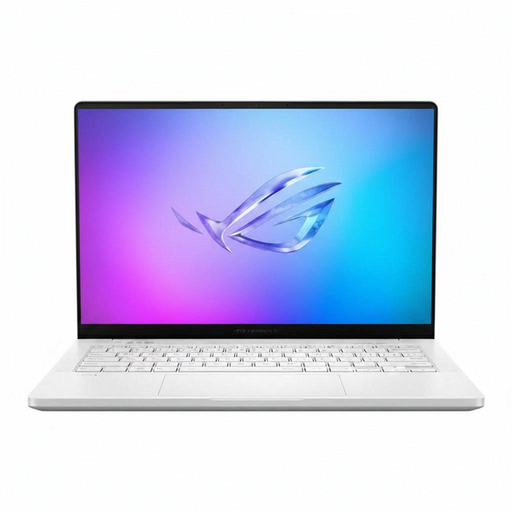
ASUS ROG Zephyrus G14 GA403WR-QS088W, Ryzen AI 9 HX 370, RTX 5070 Ti
A portable Windows gaming computer for a household prepared to set up child-account and game-specific controls. The listed configuration has a 14-inch WQXGA+ display, 32 GB RAM, a 2 TB SSD, Wi-Fi 7 and Windows 11 Home. Check the intended games and their chat and payment settings; confirm the supplied colour variant if it matters to you.
View on Joybuy
 No image available
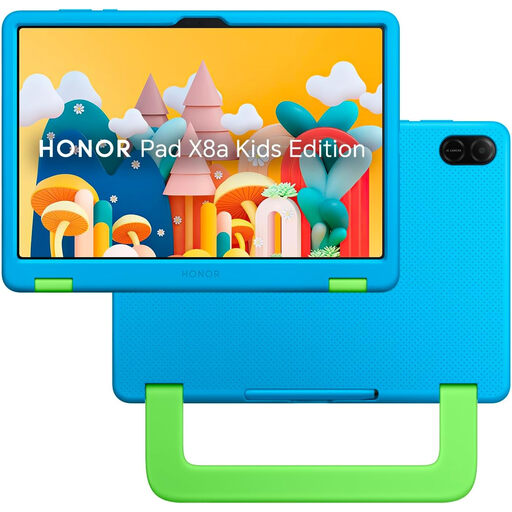
HONOR X8A Kids 11-inch Wi-Fi tablet, 128 GB, Space Grey
An 11-inch tablet option for games and other apps, with 128 GB storage. Before choosing it for online play, check that it supports the child's intended games and find out exactly how its child mode handles communication, purchases and adult account setup.
View on Joybuy
 No image available
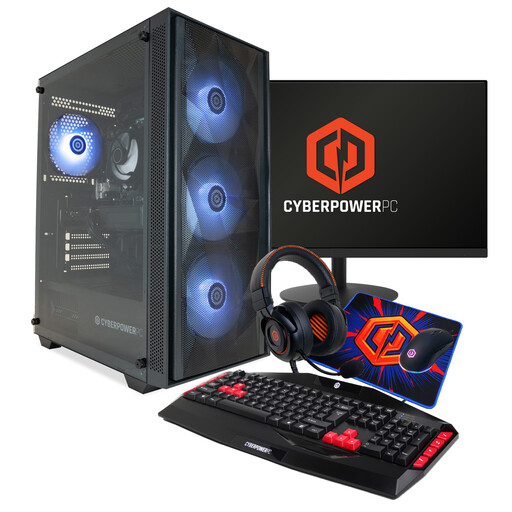
CyberPowerPC JOYB1004 gaming PC bundle, Ryzen 5 7500F, RTX 5060
A Windows desktop option for a household planning a computer-gaming setup. Its listed configuration includes 16 GB DDR5, a 1 TB NVMe SSD and Windows 11 Home; the bundle lists a monitor, keyboard, mouse, headset and mousepad. Confirm the supplied monitor and peripheral details, then set up the child's Windows, store and game accounts separately.
View on Joybuy
 No image available
Alldocube Kido 8-inch Android 15 tablet, 3 GB/32 GB, blue case
A smaller Android tablet option with Wi-Fi and an included protective case. Check compatibility with the intended games, Google Play and Family Link before relying on their controls; also review each game's chat and purchase settings. The listing says a charging adapter is not included.
View on Joybuy
Questions about children's online gaming devices
Can parental controls prevent all contact with strangers in games?
No. Controls can restrict particular communication features, but you should check both the child's platform account and each game's voice chat, messages and friend settings. Ofcom identifies contact with strangers among parents' concerns; discuss with the child who they play with and how to report upsetting contact.
Do I need an adult account to manage the child's gaming account?
That depends on the platform. PlayStation UK describes an adult family manager for child accounts, Apple requires Family Sharing with individual accounts for its child controls, and Microsoft uses an adult family-group organiser. Nintendo allows some Switch restrictions on the console, while eShop restrictions are managed through Nintendo Account settings.
Will purchase approval stop every in-game purchase?
No. Xbox Support says a child account can still use gift cards or existing Microsoft-account funds, and Google Play Help says its approvals apply to Google Play billing-system purchases. Check the game's billing route, account balance and stored payment methods as well as the approval setting.
Can children have different restrictions on one Nintendo Switch?
Nintendo UK says Switch and Switch 2 parental-control restrictions apply to the console rather than to individual users. For a shared console, choose restrictions that work for everyone using it and review Nintendo Account settings separately for eShop access and purchases.
What should I check about PEGI ratings in the UK?
Check the rating of each intended game, not just the device's content setting. The UK Government Kids Online Safety campaign says games rated PEGI 12, 16 or 18 cannot be sold or hired to someone below the stated age. A rating alone does not tell you which online communication features a game offers.


