Families considering a first smartphone
If calls, messages or access away from a shared home device are becoming necessary, decide what independent access your child needs and how you will manage it.


Choose a smartphone if your child needs their own device for calls, messages or internet access away from home; a tablet may suit mainly home-based learning, reading and entertainment. Whichever you choose, check that you can set up a child-specific account and manage the controls you need before handing it over. Parental controls help, but they do not replace household rules and conversations.
If calls, messages or access away from a shared home device are becoming necessary, decide what independent access your child needs and how you will manage it.
If learning, reading, video and creative apps are the main uses, a tablet with a child account or profile may fit without introducing a personal phone yet. It still needs internet and app settings.
A child-specific account gives you a clearer route to age-appropriate settings than handing over a device signed in as an adult. Check the requirements of your chosen account system before setup.
Consider it when: your child needs their own device for communication or access away from home.
Trade-off: more personal access makes account, communication, app and purchase settings especially important to review.
Consider it when: use will mainly be at home for learning, reading, video or creative apps.
Trade-off: starting with a tablet does not remove the need to manage its browser, apps, purchases and time settings.
| Priority | What to check | Your needs |
|---|---|---|
| Independent access | Decide whether calls and messages away from home are needed. Check how the child will connect when away from household Wi-Fi. | I need my child to contact me when they are away from home, rather than use a device mainly in the house. |
| Child account | Check the provider’s age and family-account requirements. Set up the account with the child’s correct birth date before adding apps. | A separate account matters to me because I do not want to hand over a device signed in with my adult login. |
| Control coverage | Check app, website, purchase, communication and screen-time settings individually. Test the settings you intend to use before handover. | I want to know which activities I can manage and which will still need household rules or regular conversations. |
| Device compatibility | Confirm that both the child’s device and the parent-management device work with the chosen system. Google says Family Link cannot supervise an iPhone or iPad; Samsung says its child-account controls require eligible Galaxy devices with One UI 6.1 or later. | Before choosing a device, I want to be able to manage its settings from the equipment our family uses. |
| Everyday handling | Check the device size, any included case and the accessories needed for the intended use. Confirm what comes with the exact model. | For use mainly at home, I care whether my child can handle the device comfortably and whether its setup fits our routine. |
The controls you expect may not apply to that device. Google says Family Link cannot supervise iPhones or iPads, while Apple’s parental-control setup uses a child Apple Account and Family Sharing.
Choose an account-management route, then check the child’s device, the parent’s device and any software requirements before ordering.
Apple advises giving a child their own Apple Account rather than sharing a family member’s account. Account age also affects the setup process.
Create a child-specific account using the correct birth date and complete its family settings before installing optional apps.
A tablet can still provide access to websites, apps and purchases. Its larger screen does not determine what its account controls cover.
Set up and test browser, app, purchase, time and profile settings even if the tablet will mainly stay at home.
Google says Family Link purchase approvals apply to Google Play billing, while UK government guidance says parental controls cannot address every online-safety issue.
Check device, app-store, browser and individual-service settings, and revisit them when your child starts using new apps or accounts.
An iPhone or iPad route for families prepared to use a child Apple Account, Family Sharing and Screen Time.
A supervised-account route to consider with an eligible Android device or Chromebook.
Samsung Kids and Galaxy for Families offer different child-use routes on supported Galaxy devices.
An Amazon Kids profile may suit a compatible device used mainly for child-focused content rather than as an independent phone.
These tablets relate to the home-based learning and entertainment route. If your child needs their own phone for communication away from home, decide that separately rather than treating a tablet as a substitute.
 No image available
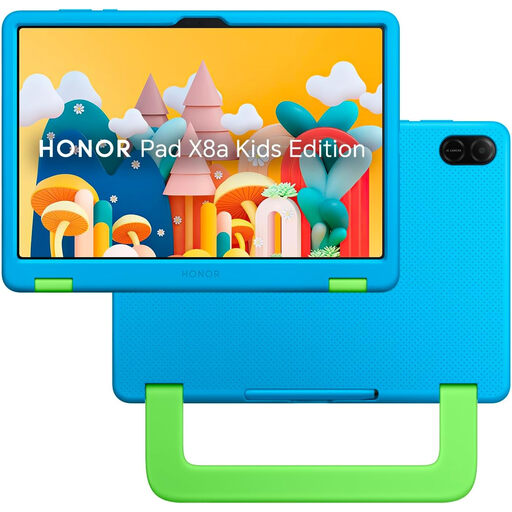
An 11-inch Wi-Fi tablet to consider when your child’s main uses are at home. Before relying on child-account or remote-management features, check the exact controls and their compatibility with the parent’s device.
 No image available
An 8-inch tablet with 3GB RAM, 32GB storage and a protective case for the tablet route. Check what its advertised child lock covers and whether it works with your intended account setup. An adapter is not included, so check that you have a compatible one.
 No image available
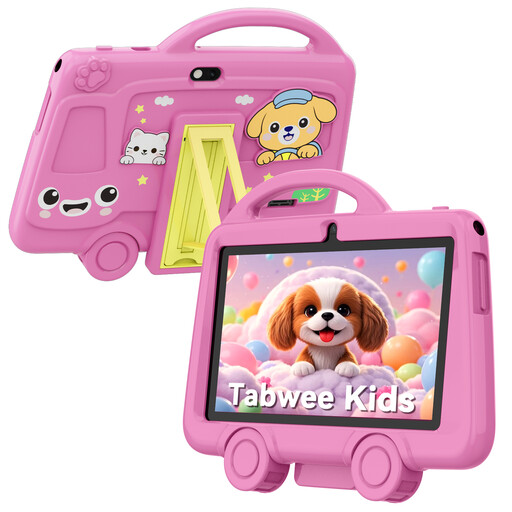
A 7-inch Wi-Fi tablet with a stated weight of 285g and an included protective case. Check its operating system and child-account options before choosing it for independent use. The listing calls for adult supervision and warns against use by children under 3 because of small parts.
Yes. Apple says a parent or guardian must help create the account for a UK child under 13. Set up an account for the child in Family Sharing rather than sharing an adult login.
Google sets 13 as the age to manage a Google Account independently in countries without a different listed age, and says a parent can create and manage an account for a younger child with Family Link. Use the child’s correct birth date and check the account’s country setting during setup.
No. Google says Family Link cannot supervise an iPhone or iPad as the child’s device. If you are choosing an Apple device, check Apple’s child-account and Family Sharing setup for the controls you need.
No. UK government guidance says parental controls are helpful but cannot fix everything. Test the settings before handover, review them as apps change and agree household rules with your child.