Choose the account and controls you can manage before choosing the tablet: a supervised Google Account points towards a compatible Android device, Family Sharing and a Child Account towards an iPad, and an Amazon Kids profile towards a Fire tablet. Whichever route fits your household, check the exact model’s remaining security support and the settings a child can reach outside their profile, particularly when buying refurbished.
Who is this for?
Parents managing apps and screen time remotely
If you want to approve or restrict apps and set time limits from your own device, compare the account setup required by Google Family Link, Apple Family Sharing and Amazon Parent Dashboard. The controls are not interchangeable, so start with the tasks you need to manage.
Families setting up a child’s first tablet
A separate child account or profile gives you a clearer starting point than sharing an adult account. Apple’s setup guidance calls for a Child Account in Family Sharing; Amazon offers child profiles with parent-managed limits.
Buyers considering an older or refurbished device
Confirm the exact model and software version before buying. A tablet must still run the controls you intend to use, and a brand’s general update policy does not establish how much support remains for an individual device.
What should you check?
Start with the account arrangement, then check whether the exact tablet supports the controls you plan to use. A refurbished device needs the same checks, with particular attention to its current software and security updates.
Android with Family Link
Consider it when: You want to manage a child’s supervised Google Account from a parent device.
Keep in mind: Google’s device supervision and Google Play app management have different Android-version requirements.
iPad with Screen Time
Consider it when: Your household can set up Family Sharing and a separate Child Account.
Keep in mind: The Screen Time passcode must remain private if it is to prevent changes to locked settings.
Fire tablet with Amazon Kids
Consider it when: An Amazon Kids child profile and Parent Dashboard suit the content and limits you want to manage.
Keep in mind: Amazon says a child can exit the Kids profile to the lock screen, so protect access to the main device profile too.
| Priority | What to check | Your needs |
|---|
| App controls |
Check how the child account is created and whether you can approve, block or limit the apps that matter to you. Google Play Help specifies Android 6.0 or later for its managed app controls; Apple Support calls for Family Sharing and a Child Account. |
I want a say in which apps my child uses, rather than relying on an unrestricted adult account. |
| Time and content |
Look for schedules, app or content restrictions, and a practical way to adjust them. Amazon describes daily limits and category restrictions in Parent Dashboard; Google’s Android Help describes screen-time, app and web-content controls. |
Bedtime and content boundaries matter in our household, so I need settings I can review as routines change. |
| Protected settings |
Check what happens when the child leaves their profile and who can change restrictions. Apple Support says locked Screen Time settings require the passcode; Amazon says exiting an Amazon Kids profile leads to the lock screen. |
I need to know whether leaving the child profile or opening settings changes what my child can access. |
| Software support |
Confirm the exact model’s current operating system, available updates and security-support status. Google For Families Help specifies Android 5.0 or later for device supervision; Google Play app management requires Android 6.0 or later. |
If I choose an older or refurbished tablet, I want its remaining support and control compatibility established before purchase. |
| Privacy settings |
Review location, communications and purchasing settings on the tablet and in individual apps. The UK Information Commissioner’s Office highlights high privacy by default and controls over children’s information for online services likely to be accessed by children. |
I want to check what each new app or service can access, even after the tablet’s parental controls are set. |
What can be overlooked?
-
Assuming any version of the right operating system will do
Google specifies Android 5.0 or later for Family Link device supervision but Android 6.0 or later for managed Google Play apps. A compatible account alone does not settle which functions an older tablet can run.
Check the exact model’s installed and available Android version, or the iPadOS version needed for your planned Apple setup, before buying. Plan to use a separate child account.
-
Treating a child profile as a device-wide lock
Amazon says a child can exit an Amazon Kids profile to the lock screen. The protection on the main device profile therefore matters as well as the restrictions inside the child profile.
Set an appropriate device passcode and check what can be reached after leaving the child profile.
-
Stopping the privacy check at tablet settings
Apps and online services can have their own privacy and location settings. The UK Information Commissioner’s Office highlights privacy protections for services likely to be accessed by children.
Review location, communications and purchasing settings during setup and whenever you add a service.
-
Taking a refurbished label as proof of support
Samsung’s 2021 announcement promised at least four years of security updates for eligible Galaxy products launched since 2019, including the Tab series. That launch-based policy does not establish a particular older tablet’s support status today.
Ask for the exact model and variant, then check its current operating system and security-update status against the controls you need.
Relevant brand approaches
These are account and control approaches to consider, not a claim that every tablet from a brand has the same features or remains supported.
Apple
An iPad route built around a Child Account, Family Sharing and Screen Time.
- Apple Support describes setting up a child’s account within Family Sharing and protecting Screen Time settings with a passcode.
- For an older iPad, check its current iPadOS compatibility before relying on the controls you intend to use.
Samsung
A Galaxy Tab can be considered for supervised Android use when its software version and child-account setup meet Google’s requirements.
- Samsung Newsroom UK announced in 2021 a minimum four-year security-update commitment for eligible Tab-series products launched since 2019.
- Check the exact Tab model’s present support status; the published baseline alone does not confirm remaining updates.
Amazon Fire
A Fire-tablet route centred on Amazon Kids child profiles and Parent Dashboard.
- Amazon describes daily limits and restrictions on content categories in Parent Dashboard.
- Amazon says a child can exit a Kids profile to the lock screen; secure the main device profile as part of setup.
Google
Family Link provides an account-based supervision route for compatible Android tablets, rather than identifying a particular tablet model.
- Google For Families Help specifies Android 5.0 or later for device supervision; Google Play Help specifies Android 6.0 or later for managed app controls.
- Google says supervision arrangements can change once a child passes the applicable account-age threshold, so revisit the setup as they get older.
Child-oriented tablet options on Joybuy
These two tablets are presented for child use. Check their precise account controls and current security support against your supervision plans; their inclusion does not establish that they offer the same setup as Family Link, Screen Time or Amazon Kids.
 Image unavailable
HONOR X8A Kids 11-inch WiFi, 128GB, Space Grey
For a household wanting a child-focused setup, the product description describes parent and child accounts, approved apps and time limits. Confirm how those controls work on this model, along with its operating-system version and current security-update status.
View on Joybuy
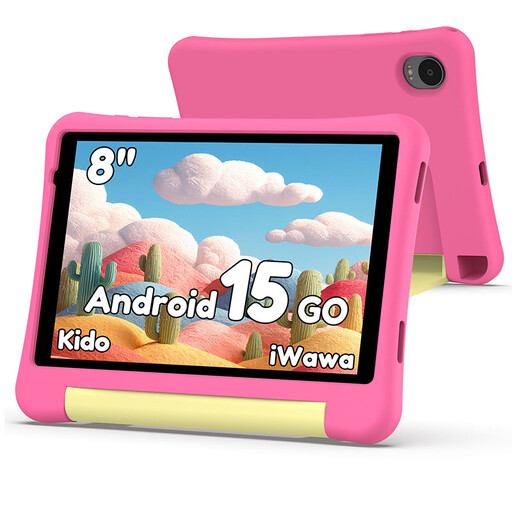 Image unavailable
Alldocube Kido 8-inch Android 15, 3GB+32GB, pink case
For screen-time and content boundaries, the product description presents Child Lock as a way to manage time and filter content. The title specifies an 8-inch display, Android 15 and a protective case, but no charging adapter. Check Child Lock’s app and privacy controls, the account setup and current security-update support before choosing it.
View on Joybuy
Common questions
What does a child’s Android tablet need for Family Link?
Use the child’s supervised Google Account and check the tablet’s Android version. Google For Families Help specifies Android 5.0 or later for device supervision, while Google Play Help specifies Android 6.0 or later for managed app controls. Check the exact device’s installed and available version before purchase.
How should I set up Screen Time on a child’s iPad?
Apple Support advises setting up Family Sharing and a separate Child Account, then configuring the child’s Screen Time controls. If you lock those settings, keep the Screen Time passcode separate from any code the child knows.
Can a child change locked Screen Time settings?
Apple Support says a child cannot change locked Screen Time settings without the Screen Time passcode, although they can view the settings. Keep the passcode private and retain the account details needed to manage it.
When might Family Link supervision change?
Google says that a parent or a child above 13 or the applicable local age can stop supervision under its account rules. Review the child’s account status and your household arrangement as that stage approaches rather than assuming the initial controls will continue unchanged.
How should I check a Fire tablet’s security support?
Check Amazon’s stated security-update date and purchase conditions for the exact Fire tablet. Amazon describes a minimum update commitment for qualifying new devices bought from Amazon as seller on Amazon.co.uk; a refurbished tablet or one bought elsewhere needs an exact-device check rather than an assumed purchase-based term.


