
24/7 Customer Support

Free returns

Same-day & Next-day Delivery

Quality Guaranteed

Unlock Your Welcome Offers: FREE Delivery | Up to 80% OFF | Free 30-day JoyPlus trial
Download the APP
Navigating the world of technology for your children can be a challenge. You want a device that entertains and educates, but finding a kids tablet that is also safe, durable and fits your budget can feel overwhelming. From a simple toddler tablet for learning numbers to a more advanced device for an older child, the options are vast.
As the Joybuy Product Recommendation Officer, my role is to help you find practical solutions. This guide cuts through the clutter, offering clear advice on what to look for in a children's tablet and highlighting a few standout options available in 2026.
Before diving into specific models, consider these key factors. Focusing on these areas will help you select a device that meets your family's needs.
The ideal tablet for a three-year-old is very different from one for a ten-year-old. For younger children (ages 3-6), a dedicated children's learning tablet with pre-loaded educational games and a simplified interface is often a great starting point. For older children (ages 7-12), a more versatile Android tablet for kids or even an iPad for kids offers access to a wider range of apps, web browsing and creative tools, making it crucial to have robust parental controls.
A tablet with parental controls is non-negotiable. Modern operating systems and kid-specific devices offer comprehensive tools that allow you to:
Always check the specifics of the parental control software before purchasing to ensure it offers the level of control you require.
Accidents happen, especially with little hands. Look for tablets that are built to withstand bumps and drops. Many kids' tablets come with a pre-installed, thick protective case made from silicone or rubber. A lightweight design is also important, ensuring the device is comfortable for a child to hold and carry.
Here are a few recommendations that cater to different age groups, budgets and needs.
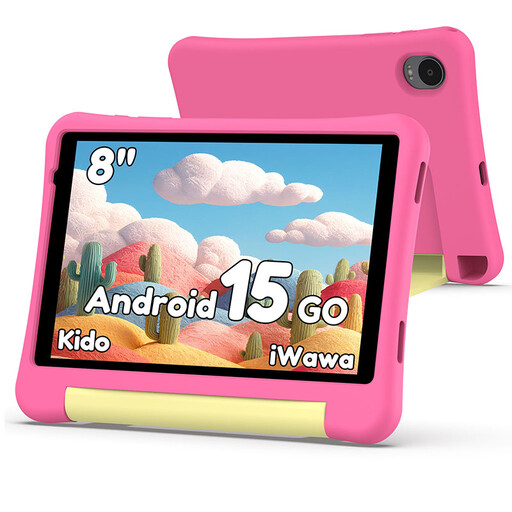
Why It Stands Out: The Alldocube Kido is a purpose-built Android tablet that strikes an excellent balance between performance, safety and value. It runs on a modern Android 15 operating system, providing a familiar interface with access to a vast library of apps. The integrated Child Lock feature is comprehensive, giving parents granular control over content and usage.
Pros:
Who is it for? This is an excellent candidate for the best first tablet for a child aged 5-9. It offers the functionality of a real tablet within a secure, parent-managed environment, all at an accessible price point.

Why It Stands Out: For families invested in the Apple ecosystem or seeking a premium, long-lasting device for an older child, the iPad Mini 7 is a powerful contender. Its A17 Pro chip delivers exceptional performance for everything from homework and creative projects to high-end gaming. The beautiful 8.3-inch Liquid Retina display makes learning and entertainment incredibly immersive.
Pros:
Who is it for? The iPad Mini 7 is best suited for older children (9+) and teens who need a device for both schoolwork and entertainment. It's a significant investment, but its performance, build quality and longevity can justify the cost for many families.
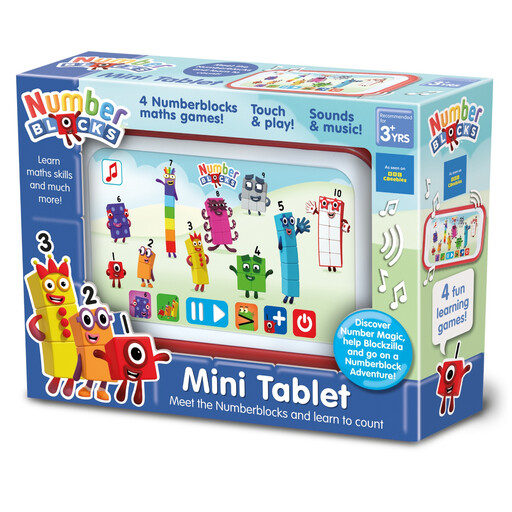
Why It Stands Out: This isn't a tablet in the traditional sense, but an interactive educational toy that serves as a perfect, screen-safe introduction to technology. Based on the popular CBeebies show, this toddler tablet focuses entirely on building foundational maths skills in a fun and engaging way.
Pros:
Who is it for? This is the ideal choice for preschoolers (ages 3-5). It provides the interactive feel of a tablet without the associated risks of internet access or a complicated interface, making it a superb children's learning tablet.
If these specific models don't quite match what you're looking for, there are many other excellent devices to consider. From different screen sizes to alternative operating systems, you can find a tablet to suit any need and budget.
Explore our full collection of children's tablets to compare more models.
There is no single right answer, but many parents introduce a simple educational tablet or toy like the Numberblocks Mini Tablet around age 3 or 4. For a more functional device like the Alldocube Kido, ages 5 to 7 are a common starting point, as children can better navigate the interface and benefit from the wider range of educational apps.
Kids' tablets often come with key differences: a durable, child-proof case, pre-installed parental control software and a curated selection of age-appropriate apps and content. Regular tablets like an iPad can be configured for a child using built-in parental controls, but they typically require more setup from the parent and are not physically designed to withstand rough handling without a separate, robust case.
Regardless of the device you choose, always activate and configure the parental controls. Set up a child-specific user profile, use content filters to block inappropriate websites, set strict screen time limits and disable in-app purchases. Regularly talk to your child about online safety and what to do if they see something that makes them uncomfortable.