Choose a USB visualiser to capture printed knitting charts through a compatible laptop. A visualiser with HDMI output offers a route to a compatible TV or projector without a computer; a projector is worth considering when several people need a larger image, but it cannot capture paper charts on its own. Check the complete connection chain, chart coverage, room lighting and your accommodation rules before buying.
Who each setup suits
Laptop-based chart sharers
If you place a printed chart beneath a camera for a laptop screen or an online craft session, a USB visualiser is a starting point. IPEVO UK describes its V4K as a USB document camera; check that your laptop and chosen software recognise its video feed.
Flatmates viewing one chart together
When several people need to follow a chart from across the room, plan both how to capture the chart and where to display it. ELMO Europe SAS lists direct display outputs for its MX-P3 visualiser, while Epson United Kingdom lists HDMI input for its CO-FH02 projector.
Small-desk, pack-away users
A foldable or slim visualiser may be easier to put away between sessions. AVer Europe describes its M5 as foldable, and ELMO Europe SAS lists the MX-P3 as 22 mm slim and weighing 460 g; check that the stand still leaves enough space for your chart.
What matters when choosing
USB visualiser and laptop
Choose when: You want to share a printed chart through a compatible laptop application.
Allow for: The camera depends on a computer and does not create a room-sized display by itself.
Visualiser with HDMI output
Choose when: You want to show a paper chart on a compatible TV or projector without using a computer.
Allow for: You still need a receiving display with the right input and a place to position it.
Projector and chart source
Choose when: A larger shared image matters and you have a suitable wall or screen.
Allow for: A projector needs a digital chart or a separate device to capture paper, as well as workable placement and room lighting.
For printed charts in a student flat, check whether the symbols remain readable, whether the image can reach your existing devices and how many people need to see it.
| Concern |
What to check |
Who this matters to |
| Chart-symbol clarity |
Check focus and whether the whole chart area fits beneath a stable, adjustable camera. |
When the grid and small symbols are hard to distinguish, I need a clear view without repeatedly moving the paper. Around 42% of consumers put chart-symbol clarity first. |
| Connections and desk space |
Match the camera output to your laptop ports and software, then check any adapters or display connections. |
If my desk is crowded, I need a setup that works with the laptop I already use and can be put away afterwards. For roughly 33% of consumers, that straightforward laptop setup is the primary concern. |
| Shared room viewing |
Check display inputs, usable wall or screen area, projector position and normal room lighting. |
When flatmates follow one chart together, I need the image to be visible beyond a laptop screen. A larger shared view comes first for about 25% of consumers. |
Buying pitfalls
-
Expecting a projector to capture a printed chart
A projector enlarges an image it receives; it is not a document camera.
For a paper chart, choose a capture route first. Add a projector if you also need a larger shared display.
-
Assuming USB connects directly to every TV
A USB visualiser needs a compatible camera connection through a computer, while direct display requires a visualiser with a suitable output.
Trace the connection from visualiser to computer or display, including ports and any adapters, before ordering.
-
Choosing by resolution alone
Glare, focus, camera position and the area visible beneath it also affect whether chart symbols can be read. Projection adds room lighting and placement to the decision.
Check that your chart fits beneath the camera and, if projecting, that you have a usable surface in the room.
-
Overlooking accommodation rules
The Health and Safety Executive does not set a blanket requirement for annual portable appliance testing. An accommodation provider can have its own procedures: Newcastle University Accommodation, for example, applies a testing policy to portable electrical equipment in university-owned accommodation.
Check your residence rules for personal electrical equipment before use, and do not use equipment with damaged leads, plugs or casings.
Brands to consider
IPEVO
IPEVO UK presents the V4K as a USB document camera for showing materials through a computer.
- The V4K is listed with an 8 MP camera and resolution up to 3264 × 2448; its adjustable stand offers a way to position a printed chart.
- This USB route still needs a compatible computer and software, plus another display if viewers need a larger image.
ELMO
ELMO Europe SAS describes the MX-P3 as a slim document camera with HDMI, RGB and USB outputs.
- The listed HDMI output offers a direct-display option when the receiving screen has a compatible input.
- Check which output suits your own devices and where the camera and display will stand.
AVer
AVer Europe presents the AVerVision M5 as a foldable USB visualiser.
- Its foldable design is relevant when equipment needs to be stored between chart-sharing sessions.
- As a USB visualiser, it still needs a compatible computer and a separate arrangement for larger shared viewing.
Epson
Epson United Kingdom presents the CO-FH02 as a Full HD projector with HDMI input.
- It offers a large-image display route for a chart supplied by a compatible source.
- It cannot capture a paper chart; check available wall space, placement and room lighting.
Joybuy projector choices
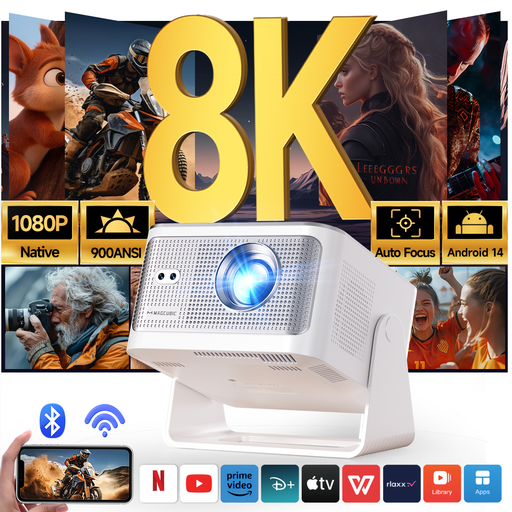
This projector is a display option for a digital knitting chart or an image supplied by a separate compatible device. It does not replace a visualiser for capturing a printed chart.
 No image available
Magcubic HY350Max projector, native 1080p
Consider this projector when several flatmates need to view a chart from a compatible digital source on a larger surface; it cannot capture a printed chart itself.
The product title lists native 1080p resolution, HDMI compatibility and automatic keystone correction. Check the complete source connection, power supply, available projection space and readability in your room lighting.
View on Joybuy
Common questions
Is a USB visualiser enough to share a knitting chart?
A USB visualiser can share a printed chart through a laptop application that recognises its camera feed. If people need to view the chart from across the room, plan a compatible larger display as well.
Can a visualiser connect directly to a TV or projector?
A visualiser with HDMI output can connect directly when the TV or projector has a compatible input. Check the exact model and ports; a USB visualiser intended for laptop capture is a different connection route.
Does a visualiser or projector need annual PAT testing in a student flat?
There is no blanket legal requirement for every portable appliance to have annual PAT testing, according to the Health and Safety Executive. Your accommodation provider may set its own testing or approval rules, so check the policy for your residence before using the equipment.
What should I do with an unwanted visualiser or projector?
Use an appropriate electrical-recycling or retailer take-back route where available rather than putting it in ordinary waste. UK government guidance describes the waste electrical and electronic equipment framework as supporting recovery, reuse and recycling.


