Phone-first craft-room organisers
If you want coordinated labels with different text styles, frames or symbols, a phone-led design process may suit you. Brother describes these options for its Bluetooth-connected P-touch CUBE.


Choose a phone-connected label printer if you want to design labels as you move around the craft room, or a standalone keyboard model if you mainly want to type and print shelf names. A compatible Cricut Joy workflow is another option when removable, decorative labels matter more than direct text printing. Whichever route you take, check the usable shelf space, the machine’s supported label width and the exact supplies it accepts.
If you want coordinated labels with different text styles, frames or symbols, a phone-led design process may suit you. Brother describes these options for its Bluetooth-connected P-touch CUBE.
If shelf, box and equipment names are your priority, a physical keyboard avoids starting each label in a phone app. DYMO says its LabelManager 280 works standalone and accepts 6 mm, 9 mm and 12 mm D1 labels.
If you already have a compatible Cricut Joy machine, removable writable material offers a different way to label changing storage categories. Cricut specifies its removable Smart Label Writable Vinyl for Cricut Joy machines; compatible writing tools are also needed.
Choose it when: You want to design and print labels from a phone while moving between shelves.
Trade-off: The Brother P-touch CUBE uses an app and six AAA batteries, and accepts tape no wider than 12 mm, according to Brother.
Choose it when: Typing shelf names directly on the machine matters more than graphical layouts.
Trade-off: DYMO’s LabelManager 280 uses D1 labels up to 12 mm wide, so check whether that width works on your shelf fronts.
Choose it when: You already own a compatible Cricut Joy machine and want writable, removable labels.
Trade-off: This is a cutting-machine workflow, not a standalone label maker; Cricut says its removable Smart Label Writable Vinyl needs compatible writing tools and should not be used with Transfer Tape.
| Concern | What to check | Who this matters to |
|---|---|---|
| Design and appearance | Choose between phone editing, direct keyboard entry and a compatible cutting-machine workflow; check the design tools you would actually use. | If I want the shelves to have coordinated text and decorative details, layout flexibility comes before printing speed. Around 40% of consumers would put design and appearance first. |
| Quick text labelling | Check for a physical keyboard and standalone operation if you do not want to start each label in an app. | When I am naming several boxes in one session, I want to type and print without picking up my phone. Roughly 30% of consumers would make quick, independent text labelling their priority. |
| Width and surface fit | Measure a shelf edge or bin face, then check the supported tape width and compatible material; consider how often labels will change. | My label needs to fit the available space and suit the surface, especially if a storage category may change. About 30% of consumers would prioritise width, adhesion and replaceability. |
Brother specifies a maximum of 12 mm for the P-touch CUBE, and DYMO lists D1 labels up to 12 mm for the LabelManager 280. Brother’s P-touch CUBE Plus accepts tape up to 24 mm, but a wider tape still has to fit the place you intend to label.
Measure a representative shelf edge and bin face before choosing a machine and tape width.
Brother tapes, DYMO D1 labels and Cricut Joy writable material belong to different machine-specific workflows. A supply that looks suitable for a shelf is of no use if it does not fit your device.
Check the exact model, supply family, available width and any writing tools required before choosing materials.
Brother describes strong-adhesive laminated tape for rough or textured surfaces. For storage that you regularly reorganise, a removable material may better match the way you use the label, provided you have the compatible machine.
Match the adhesive to both the shelf surface and how permanent you want the label to be.
Brother’s P-touch CUBE uses an app and six AAA batteries. DYMO describes the LabelManager 280 as a standalone model with a rechargeable battery, while Brother specifies USB recharging for the P-touch CUBE Plus.
Choose a design workflow and power arrangement that suit where you will make labels.
The P-touch CUBE’s AAA batteries may need replacing during continued use.
Brother’s P-touch CUBE models are relevant if you want to design shelf labels on a mobile device, with a wider-tape option in the CUBE Plus.
DYMO’s LabelManager 280 is a keyboard-led option for typing shelf and storage labels directly on the machine.
Cricut offers a craft-led route for people who already have a compatible Cricut Joy cutting machine and want writable, removable labels.
These models offer phone-led label making and a computer-connected label printer for craft-room shelves. Compare their workflows with the space you need to label, and confirm the exact supplies for your chosen surface.
 No image available
Consider this portable model if you want to prepare shelf labels on a phone; its described workflow uses the Print Master app on an iOS or Android device.
Check that a compatible roll fits the shelf space and has suitable adhesive for the surface you intend to label.
 No image available
Consider this model if you would rather prepare labels at a computer than design them while moving between shelves; its described setup uses wired USB and P-touch Editor software.
Confirm computer compatibility, a suitable desk location and the DK roll size and adhesive needed for your shelves.
 No image available
Consider this phone-led model if you want to create labels while moving around the craft room; its described printing workflow uses a mobile device and app.
Confirm the compatible label type and the width and adhesive suitability of the supplies you plan to use.
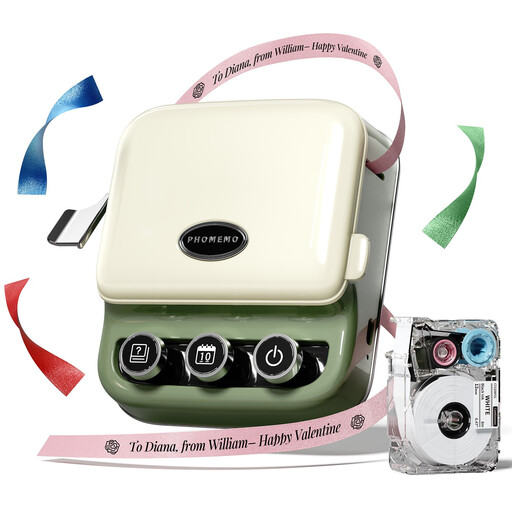 No image available
Consider this app-led model if you also want to make gift ribbons as well as shelf labels; the described workflow requires the Print Master app.
The named bundle includes one label refill, while ribbon tape is sold separately. Check the supported label width, compatible supplies and adhesive before choosing it for shelves.
Choose a width that fits the usable shelf edge or bin face and remains readable where you will view it. Brother specifies tape up to 12 mm for the P-touch CUBE and up to 24 mm for the CUBE Plus; DYMO lists D1 labels up to 12 mm for the LabelManager 280.
No; match the adhesive to the surface and how often you expect to change the label. Brother describes its strong-adhesive laminated tape for rough or textured surfaces, while Cricut offers removable writable material for a compatible Cricut Joy workflow.
Yes. DYMO says its LabelManager 280 has a physical keyboard and works standalone, so you can type labels on the device. Brother’s P-touch CUBE, by contrast, uses a Bluetooth-connected mobile app for label design.
Keep electrical equipment and batteries out of household rubbish when disposing of them in the UK. The Office for Product Safety and Standards advises using appropriate recycling routes for electrical waste and batteries; check local collection arrangements and handling guidance for the battery type.