For ribbons and decorative project labels, look at a craft-oriented maker such as the Brother PT-H200; for repeatable storage labels, a DYMO LabelManager may better suit the way you work, particularly if you want computer design or saved labels on a model that offers them. Check the exact machine’s refill family, available materials and maximum width before choosing: those differences can matter more than the printer name alone.
Who needs which kind of label?
Craft-room organisers
If you regularly rename boxes, drawers or jars, legible text and a convenient way to make repeat labels may matter more than decorative finishes. DYMO’s LabelManager range includes models with computer connection or saved-label functions, depending on the model.
Decorative project makers
If labels appear on gifts, handmade items or event materials, the available ribbons, patterns and finishes become part of the choice. Brother UK lists craft-oriented labels and ribbons for its PT-H200; check which supplies fit the particular machine.
Mixed-material crafters
Labelling a storage box is different from choosing a material for fabric, gift wrapping or a textured surface. Match the cassette and adhesive to the surface as well as to the printer; Brother UK distinguishes specialist materials from its standard laminated labels.
What matters when choosing?
Decide whether the label’s appearance, a repeatable storage workflow or its fit with the surface is your main priority. Then check the refill options for the exact machine, since tape families and supported widths differ.
| Concern |
What to check |
Who this matters to |
| Decorative materials and style |
Check the compatible cassette family, desired ribbon or patterned material, and maximum width. Brother UK lists PT-H200 supplies from 3.5 mm to 12 mm. |
If my labels will be visible on gifts or finished projects, I want their material and appearance to suit the presentation. Around 42% of consumers put decorative output first. |
| Repeatable storage labels |
Choose between direct keyboard entry, saved labels and computer design; check the relevant model’s software compatibility and widths. |
When I am relabelling drawers and supply boxes, I want to make clear names without recreating each layout. For around 33% of consumers, an efficient storage workflow is the primary concern. |
| Material fit and readability |
Confirm the refill type, adhesive and intended surface. Check resistance claims for the selected tape, not just the printer. |
I need a label suited to the surface and the way it will be handled, especially when my craft supplies span different materials. Material fit comes first for around 25% of consumers. |
Buying pitfalls to avoid
-
Choosing the printer before its refills
A machine that makes plain storage labels may not accept the ribbon, fabric-oriented cassette or adhesive type you want. Width and cassette family both affect what you can use.
Choose the material and label size first, then confirm that the exact printer accepts them. Try a small amount on your own containers before committing to more refills.
Ribbons and specialist-material cassettes are ongoing supplies to account for.
-
Assuming every label from a durable-label printer has the same resistance
Brother UK’s stated resistance to water, sunlight, chemicals, abrasion and temperatures from −80°C to +150°C applies to specified laminated P-touch labels. It does not establish the same properties for every ribbon or other label material.
If a label will face demanding handling or storage conditions, check the selected tape’s stated properties and compatibility with your printer.
-
Forgetting how the machine is powered
Brother UK specifies six AAA batteries for the PT-H200 unless a compatible adapter is obtained separately; DYMO lists a rechargeable battery for the LabelManager 360D. The practical choice depends on where you make labels and how you prefer to power the device.
Check the exact model’s power requirements and what comes with it. Follow local collection guidance for used batteries and unwanted electrical equipment.
A PT-H200 user may need replacement AAA batteries or a separately purchased compatible adapter.
Brands to consider
Brother
Brother UK positions the P-touch Craft PT-H200 for labels and ribbons used in crafts, gift wrapping and events. Other P-touch label types serve different surfaces and handling needs.
- Brother UK lists compatible PT-H200 supplies in 3.5 mm, 6 mm, 9 mm and 12 mm widths, including craft-oriented choices.
- The PT-H200’s maximum width is 12 mm, and it uses six AAA batteries unless a compatible adapter is purchased separately. Resistance claims for laminated P-touch labels should not be extended to every ribbon.
DYMO
DYMO’s LabelManager models are relevant when craft labelling is chiefly a storage-organisation task. Features vary by model rather than applying across the range.
- According to DYMO UK, the LabelManager 280 works on its own or connects to a PC or Mac and accepts 6 mm, 9 mm and 12 mm D1 labels. The 360D offers saved labels and widths up to 19 mm.
- Check the chosen model’s D1 cassette widths and computer requirements before buying; do not assume the 360D offers the 280’s computer-design workflow.
Joybuy products for craft labelling
These machines offer different starting points for craft labelling: portable storage labels, gift-ribbon presentation and labels for organised supplies. Choose by the output and refill type you need rather than treating them as interchangeable.
 No image available
Phomemo D30 portable label maker, 0.59-inch label width
Consider this portable maker for naming craft-supply storage where its stated 0.59-inch label width fits. Check the compatible refills and their suitability for your containers before choosing labels for a particular surface.
View on Joybuy
 No image available
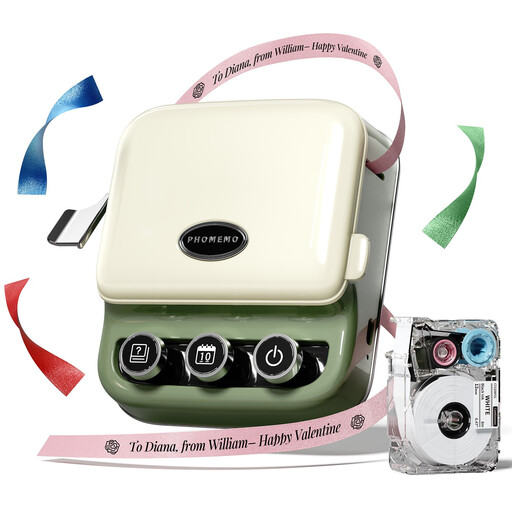
Phomemo P15 Bluetooth ribbon label printer, gift box and one label refill
This ribbon label printer is worth considering when gift or craft presentation is part of the task. The named bundle includes one label refill; confirm which ribbon materials and widths fit the P15, and what is supplied, before planning a project around them.
View on Joybuy
 No image available
Brother QL-600B label and address printer
Consider this printer if your main task is making labels to organise stored supplies rather than decorating finished crafts. Check the exact label format, computer requirements and adhesion needed for your containers.
View on Joybuy
Frequently asked questions
Can I use any tape in a craft label maker?
No: match the cassette family and width to the exact printer. Brother UK specifies 3.5 mm, 6 mm, 9 mm and 12 mm supplies for the PT-H200, while DYMO UK specifies 6 mm, 9 mm and 12 mm D1 labels for the LabelManager 280. Material and adhesive choice still need a separate check for the surface you are labelling.
What should I choose for decorative labels and ribbons?
Start with a maker that explicitly accepts the decorative supply you want. Brother UK lists patterned labels, fabric ribbons and iron-on fabric tape among its PT-H200 craft options; confirm the exact cassette material and width before ordering.
Do I need computer connection for craft-supply storage labels?
Not if direct text entry meets your needs. Computer connection is useful when you specifically want to prepare labels with computer fonts or graphics; according to DYMO UK, the LabelManager 280 supports both standalone entry and PC or Mac connection. Check compatibility with your own computer before relying on that workflow.
What should I do with an old label maker and its batteries?
Use an appropriate collection route for unwanted electrical equipment and batteries rather than putting them in household rubbish. UK government guidance describes the crossed-out wheelie-bin symbol used on these products; check your local collection arrangements for the device and its batteries.


