Choose a label maker with a built-in keyboard if you want to label craft-room shelves without using another device. A phone-led model suits you if designing labels on a mobile device matters more; if the label area needs more than 12 mm tape, look at a wider-format printer instead. Check the exact label width, compatible supplies and device requirements before choosing.
Who is making the labels?
Long-term craft-room organisers
If you regularly handle and reorganise supplies, choose the label material and compatible refill family as carefully as the printer. Brother UK lists laminated TZe tape among the supplies for its PT-D210 range, but check the material you intend to use on each shelf or box.
Decorative-label makers
If fonts, frames, colours or ribbons are part of your organising scheme, check which options the exact printer and its compatible supplies offer. Brother presents P-touch labels and ribbons for craft uses; those options should not be assumed to work with every model.
Phone-first occasional label makers
If you would rather design a label on a phone or tablet than type on a printer, check the required app and your device’s operating-system version before buying. DYMO’s LetraTag 200B is one example of an app-led label maker.
What matters when choosing?
Start with the space available for each label, then decide how you want to create it. The refill material matters too, particularly for labels on storage that is handled often.
| Concern |
What to check |
Who this matters to |
| Readability over time |
Check the label material and adhesive for the shelf or box, and confirm that the refill fits the exact printer. |
When I handle storage boxes regularly, I want their labels to remain legible rather than choosing on appearance alone. Around 33% of consumers put lasting readability first. |
| Creative formatting |
Check the model’s fonts, frames and supported tape formats; ribbon printing is model-specific. |
If I organise supplies by colour or project, I want labels that make those groups easy to distinguish. Around 25% of consumers prioritise formatting and material choice. |
| Preferred device |
Check whether label creation uses a built-in keyboard, a computer or an app, and confirm device compatibility. |
When I add new supplies, I would rather create a label using the device already at hand. For around 17% of consumers, that workflow is the primary concern. |
| Width and refills |
Measure the label area and compare it with the exact model’s supported widths and compatible refill lengths. |
For broad bins or several shelves, I need labels that fit the available space and a refill system I can keep using. Around 25% of consumers put format and refill fit first. |
Mistakes to avoid
-
Choosing a printer before measuring the label area
A compact tape may fit a drawer edge but be too narrow for the label you have in mind for a large bin. Brother UK lists a 12 mm maximum for the PT-D210VP, as does DYMO UK for the LabelManager 280; the NIIMBOT B21 product page lists widths from 0.8 to 2 inches.
Measure the usable surface, then compare it with the supported widths of the exact printer and refill.
-
Overlooking the refill system
A shelf-labelling project may need several labels now and replacements when storage changes. A printer is useful only with supplies that fit it and suit the intended surfaces.
Check the compatible cassette or roll family, material and length, and plan for the labels in your initial project.
Keeping labels consistent later also means retaining access to the same compatible refill family.
-
Assuming all inkless labels last the same way
Print method and label material vary by model. NIIMBOT describes its B series as thermal printers and its M and N lines as thermal-transfer products; its descriptions of the latter do not establish how a B21 label will perform on your shelves.
Check the exact printer’s method and the stated material, adhesive and longevity characteristics of the labels you intend to use.
-
Forgetting the device an app-led printer needs
A mobile-led workflow is convenient only if the required app works with your phone or tablet. DYMO states Android 10 or later or iOS 13 or later for the LetraTag 200B.
Compare your device version with the requirements for the exact model before choosing an app-led printer.
Brands to consider
These brands illustrate different label-making workflows and refill families; check features against the particular model rather than the brand name alone.
Brother
Brother’s P-touch range includes keyboard-led tape makers and craft-oriented label options. The PT-D210VP is a compact choice for labels made at the craft-room table.
- Brother UK lists 3.5, 6, 9 and 12 mm tape widths for the PT-D210VP and compatible TZe supplies for the PT-D210 range.
- The PT-D210VP’s 12 mm maximum does not cover wider labels; check another model’s limit separately.
DYMO
DYMO offers different routes for this task: the keyboard-led LabelManager 280 and the mobile-app-led LetraTag 200B.
- DYMO UK states that the LabelManager 280 works standalone or with a PC or Mac, while the LetraTag 200B uses 12 mm LetraTag tape in several formats.
- D1 and LetraTag are different supply families. Check the exact refill and, for the LetraTag 200B, mobile-device requirements.
NIIMBOT
The phone-led B21 is worth considering when a broad bin or shelf front calls for more width than a 12 mm tape maker provides.
- NIIMBOT’s B21 product page lists label widths from 0.8 to 2 inches and Android, iOS and PC use.
- Check the compatible roll’s dimensions, material and adhesive for the intended surface. NIIMBOT’s descriptions of other printer lines should not be applied to the B21.
Joybuy products for craft-room labels
These products offer portable, ribbon-oriented and address-label approaches to organising craft-room storage. Compare the label area and your preferred design device before choosing among them.
 No image available
Phomemo D30 portable label maker, 0.59 inch width
Consider this for compact craft-room labels made through a mobile-device workflow. The product title states a 0.59 inch label width; measure a wider shelf front before relying on that format.
Check the compatible refill, label material and mobile-device requirements for your intended use.
View on Joybuy
 No image available
Phomemo M110 portable label maker with 1 label roll
Consider this model if you want to create storage labels using a mobile-device workflow. The product title identifies a bundle with one label roll.
Before using it for shelf fronts, check the compatible roll widths, label material and requirements for your device.
View on Joybuy
 No image available
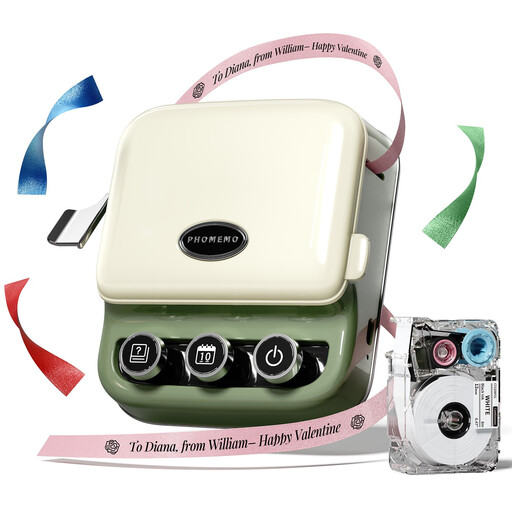
Phomemo P15 Bluetooth ribbon label printer, gift box and 1 label refill
Consider the P15 if your craft-room organising also involves decorative ribbons. The product title identifies Bluetooth use and a bundle with a gift box and one label refill.
Check the supported label width and material for shelf use, and confirm which ribbon supply you would need separately.
View on Joybuy
 No image available
Brother QL-600B label and address printer
Consider this printer if you plan to design storage labels at a computer rather than on a handheld keyboard or phone.
Check the compatible label rolls, their usable widths and their material for your shelf surface, as well as the computer setup you intend to use.
View on Joybuy
Common questions
Is 12 mm tape wide enough for craft-room shelf labels?
It can suit a narrow shelf edge, drawer or small box, but measure a broad bin or shelf front before choosing it. Brother UK lists a 12 mm maximum for the PT-D210VP and DYMO UK lists the same maximum for the LabelManager 280; NIIMBOT lists 0.8 to 2 inch labels for the wider-format B21.
Do inkless label printers still need refills?
Yes. The DYMO LetraTag 200B and NIIMBOT B21 are described as printing without ink or toner, but they still use their respective compatible tapes or label rolls.
Can I use any label tape or roll with my printer?
No; match supplies to the exact model. Brother UK identifies compatible TZe tapes for its PT-D210 range, while DYMO’s LetraTag 200B uses LetraTag tapes rather than the D1 labels used by the LabelManager 280.
What should I do with an old label printer or its batteries in the UK?
Use an appropriate electrical or battery recycling route rather than putting items marked with the crossed-out wheelie-bin symbol in household rubbish. The UK Office for Product Safety and Standards advises taking electrical products to a suitable collection point or household waste recycling centre.


