What matters when choosing?
Start with the label material and box surface, then decide how large the text needs to be and where you want to design the labels.
| Concern |
What to check |
Who this matters to |
| Durability and adhesion |
Match the tape family and adhesive to the actual box surface. Check resistance claims for the particular label material, especially if boxes are wiped or rubbed. |
If I move and clean boxes regularly, I want labels to remain attached and readable; around 33% of consumers put durability and adhesion first. |
| Appearance and width |
Measure a flat area on your smallest and largest boxes. Check the printer’s maximum width and its compatible colours or decorative materials. |
I want to spot beads, ribbon and other craft categories at a glance; for around 25% of consumers, visual organisation is the primary concern. |
| Batch workflow |
Check how labels are edited on your preferred device and whether the exact model supports reusable layouts or text from a file. |
When I have many boxes to name, entering each label separately would slow me down; roughly 25% of consumers prioritise a repeatable labelling workflow. |
| Quick, low-maintenance labels |
Check whether the printer uses direct-thermal labels or thermal-transfer supplies, plus the compatible roll format and material. |
For sheltered boxes whose contents change, I would rather make a quick new label than keep one for years; around 17% of consumers put simple, low-maintenance labelling first. |
Brands to consider
These brands offer different printer and label-material routes. Compare exact models and compatible supplies rather than treating a brand name as a durability specification.
Brother
P-touch includes compact craft and connected printers alongside a range of TZe tapes.
- Brother describes laminated TZe tapes as resistant to water, abrasion, chemicals and temperature extremes. Its tape selector lists widths from 3.5 mm to 36 mm across different products.
- Widths and tape types vary by printer: Brother lists up to 12 mm for P-touch CUBE and up to 24 mm for P-touch CUBE Plus. Check the exact model and cassette family.
DYMO
LabelManager printers use D1 tape, including standard and permanent-plastic options for organising at home.
- DYMO says its permanent D1 plastic tape adheres to surfaces including plastic, paper, metal, wood and glass, and is water resistant.
- Do not apply permanent-tape claims to every D1 variant. Match the material and width to the exact LabelManager printer.
NIIMBOT
NIIMBOT lists portable direct-thermal printers and separate thermal-transfer lines.
- The two technologies give consumers distinct label-material routes for changing labels and longer-term identification.
- Check the exact printing technology and consumable. LabelZone cautions that direct-thermal labels can fade with prolonged heat or direct sunlight; a durability claim for a thermal-transfer line should not be applied to a direct-thermal model.
Epson
LabelWorks includes app-led label design and decorative tape choices for selected models.
- Epson describes templates and other design tools in Label Editor Mobile, and lists 12 mm, 18 mm and 24 mm tape options for selected LabelWorks products.
- Check the exact printer and supplies before choosing a tape: Epson marks its LabelWorks LW-C610 product page as discontinued.
Joybuy product choices
These label printers offer different ways to make storage-box labels, from portable designs to a computer-based address-label printer. Before choosing one for boxes you handle often, check the compatible label material, adhesive and size for that particular model.
 No image available
Phomemo D30 Portable Label Maker, 0.59-inch Label Width
Consider this compact format for short labels on smaller craft-room containers. Its product title states a 0.59-inch label width; compare that with the space on your boxes and check the compatible label’s adhesive and resistance to handling.
View on Joybuy
 No image available
Phomemo M110 Portable Label Maker with 1 Label Roll
For a collection of boxes, consider whether its label-making workflow suits repeated category names. The product title includes one label roll; check the compatible roll format, available dimensions and label material before relying on it for long-term box labels.
View on Joybuy
 No image available
Brother QL-600B Address Label Printer
An address-label printer may suit a desk-based labelling routine. For frequently handled craft boxes, check the exact compatible DK roll’s size, adhesive and durability; do not assume that an address-label format has the same resistance as laminated TZe tape.
View on Joybuy
 No image available
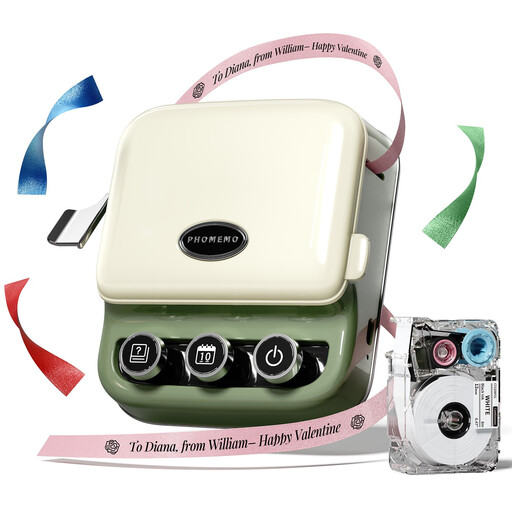
Phomemo P15 Bluetooth Ribbon Label Printer with Gift Box and 1 Label Refill
Consider this model if connected label design and ribbon printing appeal to your craft-room plans. The named bundle includes a gift box and one label refill; check compatible label widths, materials and adhesive before using it for storage-box fronts.
View on Joybuy
Frequently asked questions
Should I use tape or direct-thermal labels on craft storage boxes?
Start with laminated or permanent plastic tape if the boxes will be handled often or kept labelled for a long time. Brother and DYMO describe resistance properties for specific tapes, while UK suppliers LabelZone and AM Labels caution that direct-thermal labels can be affected by sunlight, heat, rubbing and moisture. Check the exact material and adhesive for your boxes.
How wide should a storage-box label be?
Choose a width that fits a flat area of the box and leaves your category name easy to read. Brother lists a 12 mm maximum for P-touch CUBE and up to 24 mm for P-touch CUBE Plus; check both the printer’s limit and the compatible tape widths before deciding.
Can I label plastic storage boxes?
Yes, with a label material intended to adhere to the surface. DYMO says its permanent D1 plastic tape adheres to plastic as well as paper, metal, wood and glass. Clean and dry the box first, and check for a suitable adhesive option if its surface is rough or textured.
Can I design the labels on my phone?
Yes, if the exact printer supports your phone and its design app. Brother describes Bluetooth phone or tablet design for P-touch CUBE and smartphone or computer design for P-touch CUBE Plus. Check current device compatibility and the functions you need before buying.
Where can I take an old label printer for recycling in the UK?
GOV.UK says waste electrical products can be taken to a local household waste recycling centre. Check your local centre’s arrangements for the printer and any removable batteries before taking them in.


