Choose a narrow-tape label maker if your priority is labelling craft drawers, jars and small boxes; check that its supported width fits the text you need. Consider a wider-label printer for large tubs or packaging, or app-based editing for decorative layouts, but check the exact compatible labels and the editing method before buying.
Who needs which labels?
Craft-room organisers with mixed storage
If your supplies live in drawers, jars, boxes and folders, you need labels that remain readable across surfaces of different sizes. Brother UK and DYMO UK both describe storage or filing uses for their label printers.
Makers who value decorative labels
For project storage, gifts or handmade items, you may want colours, patterned tape or ribbons as well as plain text. Brother UK describes these options for parts of its P-touch range; check which materials fit the particular model.
Makers organising larger bins or batches
Larger containers, packaging and groups of project materials may call for wider labels or a repeatable layout. NIIMBOT lists a 20–50 mm print-width range for its B21; the label material still needs to suit the intended surface.
What matters when choosing?
Start with the surfaces you need to label, then choose the material and editing method that suit your projects. The priorities below distinguish consumers by the need they would put first.
| Concern | What to check | Who this matters to |
|---|
| Label size and readability |
Measure the usable surface and compare it with the supported label or print width in mm. |
When labelling large tubs or packaging, I need enough room for text I can read easily; roughly 31% of consumers put label size and readability first. |
| Creative materials and finish |
Check which compatible colours, patterned tapes, ribbons or iron-on materials the model accepts. |
If labels are part of a gift or textile project, I want the material to suit the design, not just identify the contents. Around 25% of consumers make creative materials their primary concern. |
| Editing method |
Choose between an on-device keyboard, a compatible mobile app or computer editing. |
For repeated project labels, I would rather work with layouts on a device I already use; about 19% of consumers prioritise how they create and edit labels. |
| Material and refills |
Confirm the exact tape or roll family and whether its adhesive and material suit your storage conditions. |
Supplies may stay stored for a long time, so I want suitable labels and refills I can keep using; roughly 25% of consumers put material and consumable compatibility first. |
Mistakes to avoid
-
Choosing the printer before checking label width
A compact machine may suit small drawers yet leave too little room for a large tub label. Brother UK specifies labels up to 12 mm for the PT-H200, while NIIMBOT lists a 20–50 mm print-width range for the B21.
Measure both your smallest and largest intended label areas, then compare those dimensions with the particular printer and media.
-
Assuming tape and rolls are interchangeable
Brother TZe tape and DYMO D1 labels belong to different printer systems; choosing a width alone does not establish compatibility.
Check the exact printer model, consumable family, width and material before choosing refills.
An incompatible cassette or roll cannot serve as the refill you intended to use.
-
Choosing an app-led printer for keyboard-only use
Brother UK says P-touch CUBE labels are edited in its mobile Design&Print app. DYMO describes the LabelManager 280 as a keyboard-led model with computer connectivity.
Decide whether you normally want to make a quick label on the printer or design it on a phone, tablet or computer.
-
Putting an old electrical printer in household rubbish
A battery-powered or rechargeable printer needs an appropriate electrical-waste route at the end of its life.
GOV.UK says waste electrical products can be taken to a local household waste recycling centre; follow local instructions for the printer and any removable batteries.
Relevant brands to consider
Brother
Brother UK offers handheld, desktop and phone-connected P-touch label printers relevant to craft storage and decorative projects.
- Brother UK lists patterned tapes, fabric ribbons and iron-on tape for the PT-H200, and app editing for P-touch CUBE.
- Media compatibility depends on the model; the PT-H200 supports labels up to 12 mm wide.
DYMO
DYMO offers keyboard-led label makers for practical storage labels, including models with computer connectivity.
- DYMO UK specifies 6 mm, 9 mm and 12 mm D1 labels and PC or Mac connectivity for the LabelManager 280.
- Check whether those widths are sufficient for your largest labels and whether the precise D1 tape you want fits the model.
NIIMBOT
NIIMBOT makes portable thermal label printers that may interest makers labelling larger containers, tags or packaging.
- NIIMBOT lists direct-thermal printing and a 20–50 mm print-width range for the B21.
- Check the exact compatible roll, adhesive and material for your project; thermal rolls are not interchangeable with TZe or D1 tape.
Joybuy product options
These options cover small craft labels, decorative ribbon projects, larger container labels and computer-led filing labels. Match the editing method and compatible supplies to the labels you plan to make.
 No image available
Phomemo D30 portable label maker, 0.59-inch label width
Consider this for craft-room labels if you prefer creating layouts on a phone or tablet. The product title states a 0.59-inch label width; check which compatible rolls suit your surfaces and storage conditions.
View on Joybuy
 No image available
Phomemo M110 portable label maker with 1 label roll
Consider this for labels on larger craft containers or for repeated packaging layouts. One label roll is named in the product title; confirm the compatible roll dimensions, material and adhesive for the labels you intend to use.
View on Joybuy
 No image available
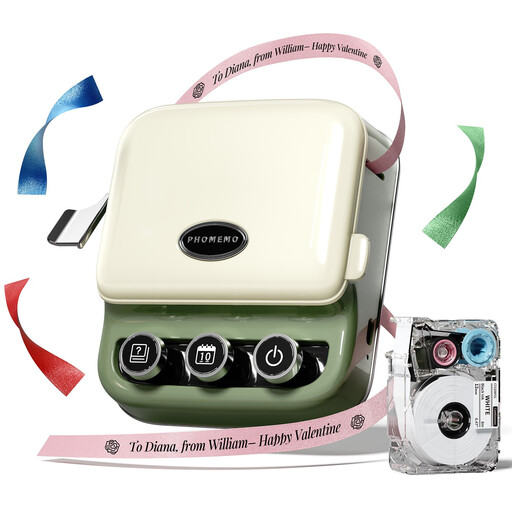
Phomemo P15 ribbon label printer with gift box and 1 label refill
Consider this if you want to design labels or decorative ribbons for craft projects. The title includes one label refill; ribbon tape is sold separately. Check the supported widths and materials before choosing supplies.
View on Joybuy
 No image available
Brother QL-600B label and address printer
Consider this for filing or storage labels that you prefer to prepare on a computer, rather than for a portable labelling routine. Check the compatible DK roll size, material and adhesive against your craft-storage surfaces.
View on Joybuy
Common questions
What label width should I choose for craft-supply storage?
Choose a width that fits your smallest surface while leaving enough room to read labels on your largest container. Brother UK specifies up to 12 mm for the PT-H200, DYMO UK lists 6 mm, 9 mm and 12 mm D1 labels for the LabelManager 280, and NIIMBOT lists a 20–50 mm print-width range for the B21. Measure the intended label areas before settling on a format.
Do label printers need ink?
Some do not: DYMO UK says its D1 Standard Labels use thermal-transfer printing without ink or toner. You still need the compatible tape or roll for the particular printer, so check its consumable system before buying.
How should I dispose of an old battery-powered label printer?
Use an electrical-waste collection route rather than ordinary household rubbish. GOV.UK says waste electrical products can be taken to a local household waste recycling centre; follow local instructions for any removable batteries.


