Occasional home organisers
If you label toy boxes, pantry containers or clothing storage one at a time, a compact printer that makes short labels without a separate device may suit you.


For occasional household storage boxes, choose a tape label maker with a built-in keyboard if you want to print directly, or a Bluetooth model if you prefer designing labels on your phone. Consider wider tape or a desktop roll-label printer when labels need to be larger or you have many to print; check the label format, compatible supplies and suitability for the box surface before buying.
If you label toy boxes, pantry containers or clothing storage one at a time, a compact printer that makes short labels without a separate device may suit you.
If you prefer arranging text and symbols in an app while moving between storage areas, consider a portable Bluetooth label maker and check that its app works with your device.
If you manage many boxes, files or stock locations, wider labels, repeat printing or a desktop workflow may matter more than portability.
Choose the label format and printing workflow first, then check width, supplies and the surface where each label will go.
| Concern | What to check | Who this matters to |
|---|---|---|
| Direct printing | Look for a built-in keyboard and preview screen; check tape width and power requirements. | If I only make short labels as boxes are filled, I want to type and print without opening an app. Around 40% of consumers would put straightforward, standalone labelling first. |
| Phone-based design | Check app compatibility, Bluetooth connection and supported label widths. | When I organise boxes across several rooms, I want to compose and adjust labels on my phone. For around 30% of consumers, that mobile design workflow would be the main priority. |
| Visibility and durability | Check the width and type of compatible tape, plus its stated surface and storage conditions. | If boxes are handled often or stored where labels need to be read from farther away, I care most about a suitable, legible label. This would be the primary need for around 20% of consumers. |
| Repeated label jobs | Decide whether you need continuous tape or larger pre-cut rolls; confirm the printer’s compatible supplies. | For a large archive or stock area, I need to produce many consistent box or asset labels. Around 10% of consumers would prioritise that repeated-printing workflow. |
A 12 mm tape maker, a wider tape printer and a desktop roll-label printer produce different label formats. A printer that suits short box names may not suit larger shelf-facing labels.
Measure a flat area on one representative box, decide between continuous tape and pre-cut labels, and check the printer’s supported widths and supplies.
DYMO states that its LabelWriter 5-series printers work exclusively with DYMO-branded labels and specifies LabelWriter labels manufactured after April 2020.
Before buying extra rolls or tape, check the exact printer family, label generation, width and format.
DYMO describes its standard D1 labels as adhering to most clean, flat surfaces. That condition should not be extended to textured, dirty, damp or flexible boxes.
Clean and dry the intended area, then try a label on the actual box material. Check whether a more durable tape is compatible if the storage conditions call for one.
Wider tape, automatic cutting and roll-label workflows address larger or repeated jobs; they do not remove the need to choose the right label format for a small household task.
Match the printer to the labels you expect to make regularly, rather than choosing features you may not use.
Brother UK offers P-touch models ranging from compact home tape makers to wider-tape desktop printers.
DYMO UK offers portable LabelManager tape makers and desktop LabelWriter roll-label printers for different labelling workflows.
These choices cover a desktop label printer and portable label makers for storage organisation. Choose by the label workflow you need, then check compatible supplies and the intended box surface.
 No image available
Consider this model if you want a desktop workflow for organising many boxes or files. Check that you have a suitable computer and workspace for its wired connection, and confirm which compatible labels suit your box surfaces.
 No image available
Consider this portable model if you prefer creating labels on a phone or tablet while moving between storage areas. The product name states a 0.59-inch label width; check the exact compatible supplies, label dimensions and suitability for your boxes before buying.
 No image available
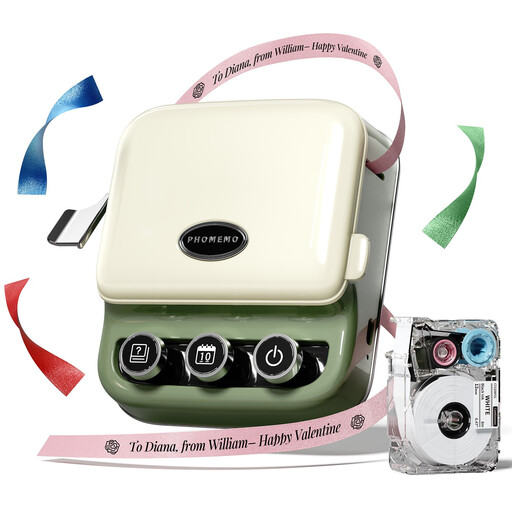
Consider this model if you want a mobile-device labelling workflow and also have a use for ribbon printing. Its listed bundle includes one label refill; check app compatibility, supported label width and supplies, and whether the labels suit your boxes.
A 12 mm tape maker can suit short household box names; consider wider tape if the label needs larger text or must be read from farther away. Brother UK lists the PT-N20 and PT-P300BT as supporting up to 12 mm tape and the PT-D610BTVP as supporting up to 24 mm, so check the limit of the exact model you choose.
DYMO states that its D1 standard labels adhere to most clean, flat plastic surfaces. Clean and dry a small area and try a label there; do not assume the same result on textured, oily, damp or flexible plastic.
DYMO states that its LabelWriter 5-series printers work exclusively with DYMO-branded labels and specifies compatibility with LabelWriter labels manufactured after April 2020. Check the printer generation and the exact roll before ordering supplies.
The Brother and DYMO tape models discussed here and DYMO’s direct-thermal LabelWriter 550 do not require separate ink or toner for their stated printing methods. You still need tape cassettes or label rolls compatible with your exact printer.