What matters when choosing?
Start with the accessibility tools and operating system your team needs, then decide whether two people will mainly use the built-in screen or a shared monitor. For consumers choosing a laptop for accessible-colour checks at a shared desk, the concerns below distinguish the need each puts first; the percentages are approximate.
| Concern |
What to check |
Who this matters to |
| Accessibility checks |
Confirm that your required browser and checking tools work on the laptop. Plan to measure text contrast and inspect cues other than colour. |
I need to check text and status cues with tools, not assume a vivid screen makes the content accessible. Around 33% of consumers put these checks first. |
| Shared viewing space |
Check the built-in screen size and the connections needed for your desk monitor, if you use one. |
When a colleague sits beside me, I need us both to see interface details without crowding around a compact screen. Roughly 27% of consumers make shared viewing their primary concern. |
| Consistent colour review |
Confirm the exact panel’s stated colour coverage and the brightness, colour-profile and automatic-adjustment controls you intend to use. |
I compare colours across review sessions and need a stable viewing setup rather than changing display settings. About 20% of consumers place consistency first. |
| Portable workflow |
Check operating-system compatibility, the ports and the external-display limits for your intended desk setup. |
I take the laptop between work locations but still need it to connect to our tools and shared desk. For around 20% of consumers, that workflow is the leading need. |
Brands to consider
These examples show why the exact model and display configuration matter; a brand name alone does not establish colour accuracy or accessibility compliance.
Apple
Apple’s current UK MacBook Air M5 specifications describe an IPS Liquid Retina display, P3 wide colour, 500-nit brightness and support for up to two external displays. That makes the range worth examining if your tools run on macOS and you move between portable and shared-desk work.
- External-display support provides a route to a larger shared workspace, subject to compatible connections.
- A 13-inch built-in screen gives two reviewers less room than a larger laptop or monitor. Apple also notes that ambient light and viewing angle affect perceived colour, so keep review conditions consistent.
Dell
Dell’s Inspiron 16 5640 specifications illustrate a Windows laptop family with several 16-inch display configurations, including anti-glare 100% sRGB options.
- The documented 16-inch options give shared-desk consumers a concrete larger-screen specification to compare with other configurations.
- The same Dell specifications also list a 45% NTSC panel, so check the precise display before choosing. Dell identifies the cited Inspiron 16 listing as unavailable.
ASUS
ASUS markets its Lumina OLED display line to consumers looking for stated colour specifications. According to ASUS’s own display-line claims, it offers 100% DCI-P3 coverage, Pantone validation and Delta E < 1 colour accuracy.
- Those stated attributes give you specific questions to ask about an ASUS model intended for visual review.
- The claims do not establish independent measurements for every laptop or prove accessibility compliance. Confirm that the exact model and screen variant carry the specifications you need.
Joybuy laptop choices
These laptops offer built-in screens of 15 inches or more for shared-desk review. Their stated configurations differ, so check the exact display and any monitor connections you need; whichever you choose, use separate contrast and non-colour checks for the interface.
 No image available
Lenovo LOQ Essential 15ARP11, 15.6-inch FHD, Ryzen 7 170, 16GB RAM, 1TB SSD, RTX 5050
The stated 15.6-inch screen is an option to consider when two people will review an interface on the laptop itself.
The product name also specifies a 144Hz FHD display. Confirm the panel’s colour specifications and keep viewing settings consistent; neither screen size nor refresh rate establishes accessibility compliance.
View on Joybuy
 No image available
ASUS ProArt P16 H7606WW-SE006W, 16-inch 4K OLED touchscreen, 64GB RAM, 2TB SSD
The stated 16-inch touchscreen gives colleagues a larger built-in display to consider for detailed interface review.
This variant is named with an AMD Ryzen AI 9 HX 370, NVIDIA GeForce RTX 5080 16GB and Windows 11 Home. Check its exact colour coverage, finish and display behaviour before relying on it for consistent visual comparisons; its OLED label alone does not answer those questions.
View on Joybuy
 No image available
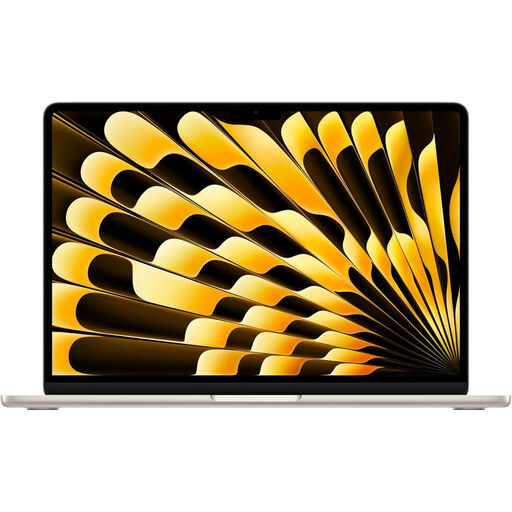
Apple 15-inch MacBook Air (2026) M5, 10-core CPU and GPU, 16GB, 512GB SSD, Starlight
Consider this 15-inch variant if you work away from the shared desk but also want a larger built-in screen for reviewing with a colleague.
Check the display specifications and the external-display connections required by your particular desk setup before choosing it. As with any laptop, judge accessible colours through content checks rather than screen appearance.
View on Joybuy
 No image available
Stormforce Exobook 16 QHD+, Ultra 9, 32GB, 4TB, 5080
The named 16-inch format is worth considering if shared viewing space is a priority.
Check the exact screen’s brightness and colour coverage, along with the operating system and connections your desk requires. A QHD+ label does not establish colour accuracy or accessibility compliance.
View on Joybuy
 No image available
Lenovo Legion Pro 7 16IAX10H, 16-inch, 64GB RAM, 2TB SSD, RTX 5090, 83F5000UUK
The stated 16-inch screen and Windows 11 Home make this a configuration to examine for a Windows-based shared desk.
Its name also specifies an Intel Core Ultra 9. Confirm the exact screen’s brightness, finish and colour coverage, and check your intended monitor connections before ordering; those decisions cannot be settled by the graphics specification.
View on Joybuy
Common questions
Can I judge accessible colours by looking at a laptop screen?
No: a visual review cannot replace checking the content against WCAG criteria. The W3C Web Accessibility Initiative specifies at least 4.5:1 contrast for normal text and 3:1 for large text under its contrast-minimum criterion, subject to its exceptions, and says colour must not be the only visual way to convey information or indicate an action.
Do I need a 100% sRGB or P3 screen for this work?
Neither specification is a universal requirement for checking whether interface colours are accessible. Stated colour coverage can help you compare panels for visual review, but confirm it for the exact configuration and use contrast and non-colour checks for the content; a gamut claim does not measure the accuracy of an individual screen.
How should we prepare two laptops for a colour review?
Set up as consistent a viewing environment as practical, including brightness and the intended colour profiles, before comparing what you see. Microsoft describes adjustable display behaviour in Windows, and Apple notes that ambient light and screen angle affect perceived colour; manage automatic adjustments where the devices offer them.
Will calibrating a Mac prove that a design meets accessibility criteria?
No. Apple provides Display Calibrator Assistant to create a display colour profile, which can support a consistent visual-review workflow, but calibration does not measure an interface’s WCAG contrast ratios or establish that it conveys information without colour alone.
What UK after-sales and disposal questions are worth asking?
For a UK consumer purchase, the Consumer Rights Act 2015 requires goods to be of satisfactory quality; check the seller’s warranty and returns information separately rather than treating its voluntary terms as your statutory rights. When the laptop reaches the end of its life, ask the retailer or your local authority about an available electrical-equipment collection route under the UK waste-electrical-equipment framework described by GOV.UK.


