Connection-dependent hybrid workers
If you attach a display, USB peripherals, Ethernet or card media at either location, a compatible compact hub may replace several separate adapters. Check the laptop’s capabilities before choosing the hub’s ports.


Choose accessories around what you repeatedly need at both locations: a charger and cable matched to your laptop, a hub for connections you actually use, and a sleeve that fits the laptop in transit. Add a portable monitor if you regularly need a second screen away from a fixed desk. Before buying electronic accessories for a managed work laptop, check its port capabilities and your employer’s peripheral policy.
If you attach a display, USB peripherals, Ethernet or card media at either location, a compatible compact hub may replace several separate adapters. Check the laptop’s capabilities before choosing the hub’s ports.
If keeping the same laptop charged is your main difficulty, start with a charger and cable that meet its requirements rather than carrying a dock for ports you do not use.
If you repeatedly need a second display away from fixed desks, consider a portable monitor after confirming that your laptop supports its required USB-C video and power standards.
Start with the problem that most affects your moves between home and work, then check the exact laptop, cable and accessory combination before adding more to your bag.
| Concern | What to check | Who this matters to |
|---|---|---|
| Reliable charging | Check whether the laptop accepts USB-C Power Delivery, its required charging output and the cable’s power capability. If using a hub, check the power it can pass through to the laptop. | If I mainly need dependable power at both locations, extra ports can wait until my charger and cable suit the laptop. Around 36% of consumers put charging first. |
| Recurring connections | List the display, USB, Ethernet or card connections you use regularly. Confirm the laptop’s video capability and the hub’s supported display connections. | When I reconnect a screen and peripherals after each move, carrying separate adapters becomes the problem I want to solve; roughly 29% of consumers prioritise these connections. |
| Transit protection | Compare the laptop’s physical dimensions with the sleeve’s internal dimensions, and check whether accessories can be carried without pressing against it. | I carry the laptop often enough that fit and keeping its cables together matter more to me than adding another electronic accessory. For around 21% of consumers, protection and organisation come first. |
| A mobile second screen | Check the monitor’s stated USB-C video and power requirements against the laptop, as well as what you would need to carry with the display. | If I regularly work where there is no usable second screen, I need one I can bring with me and connect to my laptop; around 14% of consumers make that their primary concern. |
A USB-C connector alone does not establish whether a laptop port supports the video, data or charging function you need. Microsoft Support notes that USB-C functionality can depend on the PC, device and cable combination.
Check the exact laptop’s technical specifications, then match its supported video and charging functions to the hub or monitor and cable.
A hub can use some of the incoming power itself. Anker says its 341 hub accepts up to 100W for pass-through charging but reserves 15W for operation; the input figure is therefore not the power delivered to the laptop.
Compare the hub’s stated delivered power with your laptop’s charging requirement, and check whether the charger and cable you need are included.
An employer-managed laptop may have restrictions on external devices. The National Cyber Security Centre advises organisations to assess the risks of peripheral connections and apply controls where appropriate.
Ask your IT team about a personal hub, dock, storage reader or monitor before purchasing one for a managed laptop.
A screen-size label does not establish whether a particular laptop chassis will fit the sleeve or leave comfortable room for accessories.
Compare the laptop’s physical dimensions with the sleeve’s internal dimensions, and check where the charger and cable will go.
Anker’s USB-C hub range includes models for combining display, USB and charging connections.
UGREEN offers USB-C hubs for adding display, USB and charging connections without a fixed desk dock.
ThinkVision portable monitors are relevant when a second display is repeatedly needed away from a fixed desk.
tomtoc’s size-specific sleeves and briefcases are relevant when laptop fit and carrying accessories are the main concerns.
These choices address different parts of a regular home-to-work carry setup: laptop power, a portable second screen, transit protection and recurring connections. Choose the function you need before comparing individual models.
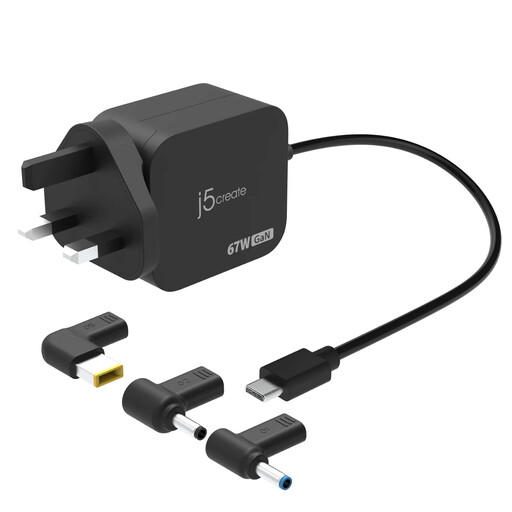 No image available
Consider this for carrying laptop power between locations if its output and connector suit your machine. The product name specifies 67W USB-C Power Delivery, three types of DC connector and a UK plug; confirm the required charging output and exact connector fit before buying.
 No image available
Consider a portable display when you repeatedly need a second screen away from fixed desks. Confirm that your laptop supports the monitor’s required USB-C video connection and check its power and cable requirements before planning a single-cable setup.
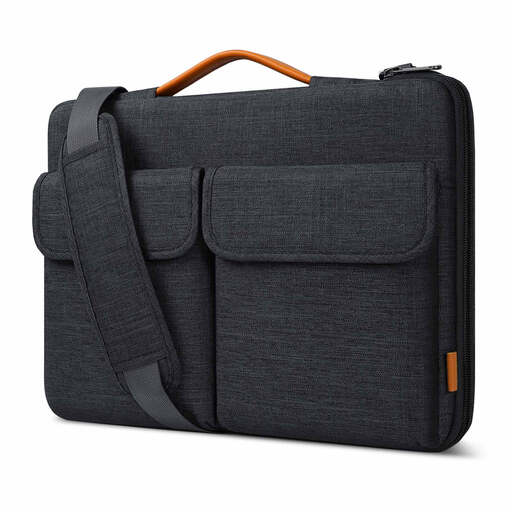 No image available
Consider this carrying option if transit protection is your main concern. Its name identifies a 15.6-inch laptop bag sleeve with a shoulder-carrying option; compare its internal dimensions with your laptop’s physical dimensions rather than relying on screen size alone.
 No image available
Consider this adapter if HDMI, VGA, wired networking and USB connections recur at your work locations. The product name lists 4K HDMI, VGA, Gigabit Ethernet, dual USB 3.0 ports and 100W Power Delivery; check your laptop’s video support and the power delivered through the adapter rather than treating its port rating as laptop charging output.
 No image available
Consider this hub if you regularly use several kinds of connection, rather than assuming every port will be useful on each move. Its product name lists two HDMI outputs, USB-A and USB-C connections, RJ45, SD/TF and USB-C Power Delivery input. Check your laptop’s video capabilities and the hub’s size for daily carrying; the listed display and power-input ratings do not establish what your laptop can drive or receive.
Check the laptop’s supported USB-C functions, the connections you repeatedly need and your employer’s peripheral policy. Microsoft Support notes that some USB-C hardware and software combinations can have limited functionality, so match any required video and charging features to the exact laptop, hub and cable.
Carry a hub if your recurring problem is connecting existing screens, USB devices or wired networking; consider a portable monitor if you repeatedly need a second screen where none is available. For either choice, confirm the laptop supports the required USB-C video function, and check the monitor’s power requirements before buying.
A portable monitor is less useful if you can regularly use those fixed screens. It becomes worth considering when you also work in places without a usable second display, provided your laptop supports the monitor’s video and power requirements and you are willing to carry the extra equipment.
Check your employer’s IT policy before connecting a personally purchased hub, dock, storage device or monitor. The National Cyber Security Centre advises organisations to assess the risks of external interfaces and restrict peripheral access where needed; what you can use therefore depends on the controls applied to your work device.