Buying priorities
Work out whether your main limitation is workspace, connections or meeting equipment, then check that the accessory matches the laptop you already use.
| Priority |
What to check |
Your needs |
| Desk workspace |
Check whether an external monitor or stand fits the desk arrangement; if raising the laptop, plan for separate keyboard and mouse placement. Consider the screen, input devices, desk and chair as one setup. |
I spend long periods doing documents or calls at one desk and need a layout that works beyond the laptop screen alone. |
| Hub or dock compatibility |
Confirm the laptop’s exact USB-C functions, including DisplayPort Alt Mode, USB Power Delivery and any USB4 or Thunderbolt requirement. Compare laptop input, charger output, cable rating and the hub’s pass-through limit. |
I need display, USB or charging expansion, but I want to avoid buying ports that my laptop cannot use. |
| External displays |
Match the intended monitor count, resolution and refresh rate to the laptop model. Check the video connection at both ends, including any dock, cable or adapter. |
I want more room for documents, spreadsheets or meetings and need to know whether one or more monitors will work with my laptop. |
| Meeting devices |
Check webcam connector, operating-system requirements and mounting method. For headsets, confirm USB-A, USB-C, Bluetooth or receiver compatibility and any platform-specific controls you require. |
I make regular video calls and need a camera or headset that works with my work laptop and calling routine. |
Joybuy product options
Joybuy product options for building a laptop-centred hybrid desk, covering connection accessories, meeting headsets and a fixed external monitor.
 No image available
V7 V7UC-U3CRJ45HDVG-BLK USB-C Adapter
For a portable desk connection point with display, wired network and USB peripheral access.
Specified HDMI up to 4K at 30 Hz, VGA up to 1920×1200 at 60 Hz, Gigabit Ethernet, two 5 Gbps USB ports and up to 100 W Power Delivery. It specifies a single external display in SST mode; check USB-C DisplayPort Alt Mode and laptop, charger and cable compatibility first.
Joybuy
 No image available
Targus USB-C Universal Dual HDMI 4K Docking Station
For a predominantly home-based desk that needs one connection for displays, peripherals and charging.
Specified two HDMI 2.0 outputs up to 4K at 60 Hz, Gigabit Ethernet, USB-A ports, SD and microSD readers, and up to 100 W PD pass-through. Check laptop support for two displays and the intended resolution; an external 100 W or higher adapter is stated as the power source.
Joybuy
 No image available
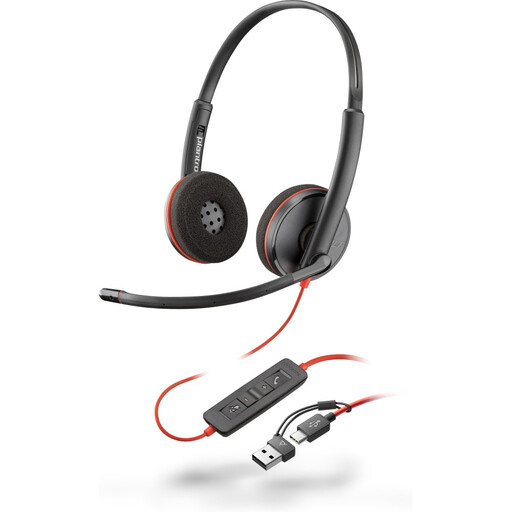
Poly Blackwire 3220 Stereo USB-C Headset with USB-C/A Adapter
For regular laptop meetings where a wired microphone and direct call controls are more useful than wireless movement.
Specified USB-C connection, included USB-C-to-USB-A adapter, adjustable microphone, volume, mute and call controls, plus Windows, macOS and ChromeOS compatibility. Check whether platform-specific call-control certification is required for your workflow.
Joybuy
 No image available
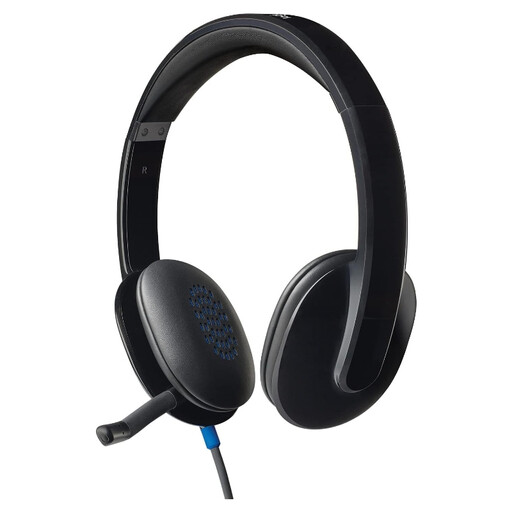
Logitech H540 Wired Headset
For desk-based calls on a laptop with a free USB-A port.
Specified USB-A connectivity, noise-cancelling boom microphone, inline volume and mute controls, 1.8 m cable, and Windows, macOS and ChromeOS compatibility. This is a wired model, so it does not suit phone switching or wireless movement away from the laptop.
Joybuy
 No image available
AOC Q32V4 31.5-inch QHD IPS Monitor
For a regular home desk where documents and spreadsheets need more dedicated visual workspace.
Specified 2560×1440 IPS panel, HDMI 1.4, DisplayPort 1.2, matte surface, VESA 100×100 mounting and integrated speakers. Check that the laptop and connection path support QHD at the refresh rate you need; this 5 kg display is intended for a fixed desk.
Joybuy
Frequently asked questions
Will any USB-C hub connect my laptop to an external monitor?
No. USB-C is a connector format, not proof of video capability. Check the laptop documentation for DisplayPort Alt Mode or the required video-output capability, then confirm that the hub’s HDMI or DisplayPort output supports the monitor mode you need. Anker’s UK support guidance says a hub cannot provide external display output when the connected laptop USB-C port does not support DP Alt Mode.
Can a USB-C hub charge my laptop at the same wattage as my charger?
Not automatically. Verify the laptop’s accepted USB-C charging input, charger wattage, cable rating and the hub’s pass-through limit. Anker UK gives an example of a hub paired with a 65 W charger that specifies up to 53 W pass-through charging to the laptop because the hub can reserve power for its own operation.
How many external monitors can my laptop use?
Check the exact laptop model rather than relying on USB-C, HDMI or Thunderbolt alone. Apple states that simultaneous display count depends on the Mac model and on the displays’ resolution and refresh rate; check those limits before selecting a dock or dual-monitor hub.
What should I check before buying a webcam for work calls?
Check the connector, supported operating system, minimum computer requirements, mounting method, privacy-shutter preference and meeting-platform compatibility. Logitech UK lists USB-A, Windows 10 or later, macOS 10.15 or later, ChromeOS and 2 GB RAM for 1080p streaming for its Brio 105 Business Webcam.
Should I choose a USB, Bluetooth or receiver-based headset?
Choose based on the devices and meeting controls you use. USB gives a direct laptop connection, Bluetooth can suit switching to a mobile device, and a receiver can be needed for some platform features. Check the precise product version, as Logitech notes that compatibility and receiver hardware can vary by version and native Bluetooth Teams support can have Windows and firmware conditions.


