Buying priorities
Work through compatibility first, then decide which fixed-desk or portable accessories solve the tasks you do most often.
| Priority |
What to check |
Your needs |
| Laptop and dock compatibility |
Confirm the exact laptop model, operating system and whether the port supports video output. Compare supported display count, resolution, refresh rate and charging requirement with the dock, hub or monitor. USB-C describes a connector shape, not a guaranteed set of capabilities. |
I need the display, charging and peripherals to work with my own laptop rather than relying on a port label alone. |
| Sustained desk-work arrangement |
Consider the screen position, keyboard, mouse, desk footprint and whether equipment must be packed away. A raised laptop normally calls for separate input devices. |
I want a practical arrangement for parallel documents, calls and regular desk sessions, not a single accessory chosen in isolation. |
| Video-call clarity and privacy |
Check the required calling platform, operating-system support, camera mounting position, lighting and privacy controls. For a headset, confirm microphone needs and Bluetooth or receiver permissions. |
I need call equipment that suits my room, avoids exposing more of my home than intended and works with approved work software. |
| Employer provision and approval |
Ask about the DSE process, supplied equipment, approved-accessory list, support arrangements and reimbursement route before a personal purchase. Check any rules for managed hardware or software. |
Before paying personally, I want to know whether the item is already supplied, required or supported by my employer. |
Joybuy product options
Joybuy product options for a laptop-based home or hybrid workspace, covering calls, docking and fixed-desk display setups.
 No image available
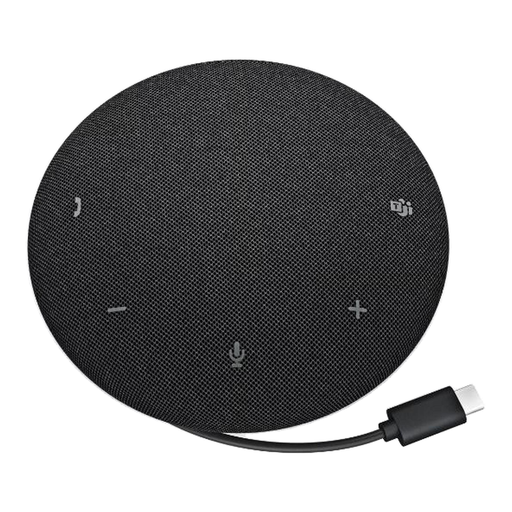
DELL Pro Wired Speakerphone SP325
For recurring calls in a home office or small shared meeting space where a USB-C speakerphone suits the room.
Listed with four omnidirectional microphones, AI noise cancellation, a stated 2.5 m pickup range and onboard mute and volume controls. The listing also states Microsoft Teams and Zoom certification and compatibility with Windows, macOS, Chrome OS and Linux.
Consider a headset instead where calls must remain private or may disturb other people, and check whether a call device is already supplied or approved by your employer.
Joybuy
 No image available
Targus USB-C Universal Dual HDMI 4K Docking Station with 100W Power Delivery Pass-Thru
For a compatible fixed desk that needs displays, wired network and peripherals through one laptop connection.
The listing specifies two HDMI outputs, Gigabit Ethernet, USB ports, card readers and up to 100W USB-C Power Delivery pass-through, with support stated for Windows, macOS, Chrome OS, iPadOS and Linux.
Verify the laptop's USB-C video capability, supported external-display count, resolution, operating system and charging requirement. The listing requires an external 100W or higher adapter; confirm whether it is included.
Joybuy
 No image available
ASUS PROART PA248CRV IPS WUXGA
For regular fixed-desk work with parallel documents or windows beyond the laptop screen.
The listing states a 24.1-inch 1920 × 1200 IPS display, USB-C video, data and 96W Power Delivery, plus HDMI, DisplayPort, a USB hub and height, swivel, pivot and tilt adjustment.
USB-C needs to support DisplayPort Alt Mode, and the laptop's charging need must be within the stated 96W delivery. Check the supplied UK configuration if downstream USB ports are important.
Joybuy
 No image available
Targus 2K Webcam with Auto Focus
For frequent video calls where camera placement and a physical privacy control matter.
The listing states autofocus, auto-lighting correction, dual microphones, a 67-degree field of view, a rotating monitor or laptop clip, tripod thread and physical privacy slider. It also states Zoom certification and compatibility with Teams, Skype, FaceTime, Windows, macOS, Android and Chrome OS.
The title calls it a 2K webcam, while the technical details state 1920 × 1080 at 30 fps; confirm the supplied resolution. Check that external webcams are permitted on the managed work device.
Joybuy
 No image available
ASUS PROART PA278CV IPS WQHD
For a fixed home desk that needs more room for documents and applications.
The listing states a 27-inch 2560 × 1440 IPS panel, HDMI, DisplayPort, USB-C and USB-hub connections, along with height, tilt, swivel and pivot adjustment.
Verify video-output capability and supported display settings for the exact laptop. The USB-C Power Delivery wattage is not stated, so check whether it meets the laptop's charging requirement; this full-size monitor is less suitable for frequent carrying.
Joybuy
Frequently asked questions
Should I ask my employer before buying a monitor, dock or headset for regular home working?
Yes. Ask whether the employer supplies, approves, supports or reimburses the item before you buy it. HSE says employers have the same health and safety responsibilities for home workers, and where DSE regulations apply, assessments should cover both home and office; where an assessment indicates equipment is needed, workers cannot be charged for it.
Does a USB-C port guarantee that a dock or monitor will run external displays and charge my laptop?
No. Microsoft notes that USB-C hardware and software combinations can have limitations. Check the exact laptop model's supported video output, display count, resolution, refresh rate and charging requirements, then compare them with the dock or monitor specification and cable used.
Can every Mac run two external displays through a dock?
No. Apple says the number of simultaneous external displays depends on the Mac model and the resolution and refresh rate of each display. CalDigit also states that original Apple M1-based computers support one external monitor through the Thunderbolt port on its cited TS4 product page, so verify the exact Mac model before choosing a dual-display dock.
Can an employer reimburse homeworking equipment without tax consequences?
GOV.UK says equipment, services and supplies provided or reimbursed for an employee working from home do not need to be reported or taxed where they are only used for business purposes or any private use is insignificant. This guidance concerns employer arrangements and does not guarantee that an employer will reimburse a purchase.
What should I check before using a powered dock or monitor at home?
Use the supplied or specified power equipment, inspect sockets, plugs and leads for damage, and avoid overloaded extension cables. HSE advises employers to have home workers visually check work-related electrical equipment and to provide advice about overloaded extension-cable hazards.


