What matters when choosing a laptop?
Start with the applications your library service requires, then match memory and storage to the files you work with. Whether records identify people, and how often you carry the laptop, can change the choice.
| Concern |
What to check |
Who this matters to |
| Software compatibility |
Confirm the operating system, required applications and Office add-ins. Microsoft describes Power BI Desktop as a Windows application. |
If my reporting depends on Power BI Desktop or a particular library-system tool, I need that software to run locally. Around 31% of consumers put software compatibility first. |
| Memory and file capacity |
Consider 16GB of memory and an SSD for recurring spreadsheet work; assess 32GB for larger models. Check whether required add-ins work with 64-bit Office. |
When I refresh larger workbooks alongside other applications, I want enough capacity for the way I work. For around 31% of consumers, handling growing files is the primary concern. |
| Sensitive-data security |
Establish whether files contain identifiable information. If they will be stored locally, confirm encryption, access controls and the employer-approved setup. |
If loan records can identify borrowers, I need a device and storage process my organisation permits. Protecting those records comes first for around 23% of consumers. |
| Portability and workspace |
Compare the built-in screen with how often you travel; check ports and external-display arrangements where relevant. |
Moving between branches makes carrying size important, but I still need to read tables and reports comfortably. Around 15% of consumers prioritise that balance. |
Joybuy laptops for library-loan analysis
These Windows laptop choices cover spreadsheet-led library-loan work across compact and larger-screen formats. Check each required application before buying, particularly on the Snapdragon-based Vivobook, and confirm your organisation’s security setup if you will store identifiable records.
 No image available
Lenovo LOQ Essential 15ARP11, 16GB, 1TB
Consider this for desk-based spreadsheet work if its configuration meets your application requirements.
The listed variant has an AMD Ryzen 7 170 processor, 16GB of memory, a 1TB SSD, GeForce RTX 5050 graphics and a 15.6-inch 144Hz Full HD display.
Check whether the memory capacity suits your expected data models and whether the device meets your organisation’s security requirements.
View on Joybuy
 No image available
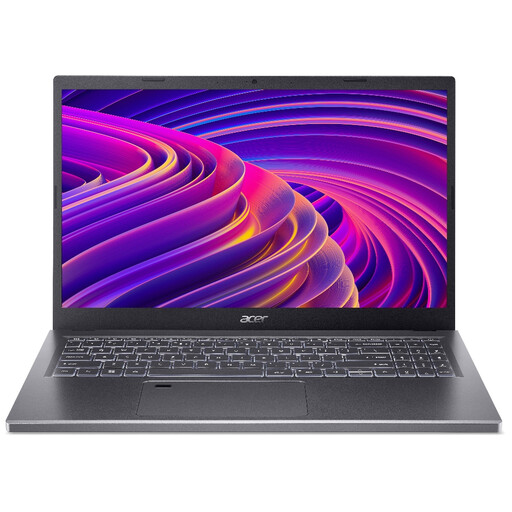
Acer Aspire 5 A515-48M, 16GB, 512GB, silver
Consider this configuration if you want a 15.6-inch screen for regular spreadsheet work.
Its product title lists a 1920 × 1080 Full HD display, 16GB of memory and a 512GB SSD.
Confirm the exact processor and wireless configuration before buying, and check memory upgradeability if your data models may grow.
View on Joybuy
 No image available
ASUS Zenbook DUO UX8406CA-QL135W, 16GB, 1TB
The dual-screen format may appeal if you work with tables and reports side by side.
This variant’s title lists two 14-inch OLED touch displays, an Intel Core Ultra 7 255H processor, 16GB of LPDDR5X memory and a 1TB SSD.
Confirm the exact display resolution before buying; also check whether the onboard memory and your organisation’s security setup meet your needs.
View on Joybuy
 No image available
HP OmniBook X Flip 16-as0004na, 16GB, 512GB
Consider the 16-inch format if the built-in display will be your main workspace for tables.
The listed variant has a touchscreen, a 2-in-1 design, an Intel Core Ultra 5 226V processor, 16GB of memory, a 512GB SSD and Windows 11 Home.
Check its weight and connections if you will travel between sites or use an external display.
View on Joybuy
 No image available
ASUS Vivobook 14 X1407QA-LY003W, 16GB, 512GB
This compact option is worth considering for spreadsheet work between locations, provided your required software works with its Snapdragon platform.
The listed variant has a Snapdragon X processor, 16GB of memory and a 512GB SSD, in Quiet Blue.
Check Power BI Desktop, Office add-ins and your organisation’s applications on this Windows-on-ARM configuration before buying. Consider whether its listed 16GB maximum memory meets your longer-term needs.
View on Joybuy
Questions about library-loan analysis laptops
Do I need Windows to analyse library-loan data?
No, not if your work uses tools confirmed to run on macOS. Microsoft offers Excel for Mac, but describes Power BI Desktop as a Windows application; check your organisation’s add-ins and internal systems before choosing an operating system.
Is 8GB of memory enough for library-loan spreadsheets?
It may be enough for occasional small, simple files, but 16GB is a more practical purchase target for recurring imports and reporting. Microsoft notes that Excel workbook capacity depends on available memory and system resources; larger models or several simultaneous applications may justify considering 32GB.
Should I use 64-bit Office for larger loan datasets?
Consider 64-bit Office if you work with large datasets, complex calculations, data connections or Power Pivot, provided your required add-ins are compatible. Microsoft identifies these as situations where access to more memory matters, so check legacy add-ins before changing installations.
Does a laptop holding borrower-level records need encryption?
Check whether the records contain personal information and follow your organisation’s approved safeguards before storing them locally. The UK GDPR requires security measures appropriate to the processing risk, and the Information Commissioner’s Office advises enabling storage encryption on laptops that store personal information; encryption alone is not the whole security setup.
Are public library-loan files handled like borrower-level exports?
Not necessarily: the London Borough of Barnet’s public library-loans dataset reports fields such as month, item type and loan counts rather than individual borrower records. Check the fields in the particular export and your organisation’s data-handling policy before copying it to a personal device.


