For repeated warranty forms, spreadsheets and receipt filing, start with a 13- to 14-inch laptop that works with a raised screen, separate keyboard and mouse; high-end graphics hardware is not the deciding feature for these tasks. Consider a convertible if touch input helps you record details away from the desk, and check that your registration sites and required software work with the operating system you choose.
Who is this setup for?
Standing-desk warranty administrators
For people repeatedly entering serial numbers, purchase dates and warranty terms, screen position and comfortable typing matter throughout the session. The Health and Safety Executive advises using a separate keyboard and mouse when a laptop screen is raised.
Household document organisers
For consumers keeping registration details, receipts, PDFs and spreadsheets together, the useful checks are software compatibility, storage and the connections needed for their desk accessories.
Mobile inspection and registration users
For people reviewing labels or manuals away from the desk, touch or detachable handling may be useful. Dell describes optional keyboard and pen accessories for its Latitude 7350 Detachable; a longer desk session still calls for a suitable screen-and-input arrangement.
What matters when choosing?
Plan the standing-desk arrangement first, then check the software and storage you need for records; give touch and portability more weight if registration regularly takes you away from the desk.
| Concern |
What to check |
Who this matters to |
| Standing-desk ergonomics |
Check connections for a separate keyboard and mouse, and whether your chosen riser and charging arrangement suit the laptop. |
If I spend long sessions entering serial numbers, I want to raise the screen without having to type on the raised laptop. Around 42% of consumers put standing-desk ergonomics first. |
| Everyday recordkeeping |
Check the exact operating system, memory, SSD capacity and compatibility with your registration sites and files. |
I need to file receipts and retrieve warranty details without choosing hardware around tasks I do not perform; around 33% of consumers make dependable recordkeeping their primary concern. |
| Flexible capture |
Check the device format and whether any pen or detachable keyboard is included; confirm it can also connect to your desk setup. |
When I register appliances away from the desk, touch or tablet-style handling could make the task easier. Around 25% of consumers prioritise flexible capture. |
Mistakes to avoid
-
Raising the screen but continuing to type on the laptop
The Health and Safety Executive advises separating the keyboard and mouse from a laptop so its screen can be elevated on a riser or similar support.
Check the laptop’s connections against the keyboard, mouse and charging arrangement you intend to use.
A riser and separate input devices may be needed alongside the laptop.
-
Choosing a product family instead of an exact configuration
Screen size, memory and storage can differ within a business-laptop range; HP’s EliteBook listings, for example, include several configurations.
Compare the exact model number, operating system, keyboard layout, ports, included charger and support terms before ordering.
-
Assuming convertible accessories are included
Dell describes the detachable keyboard and active pen for its Latitude 7350 Detachable as optional. Touch capability also does not remove the need for separate input devices during prolonged raised-screen use.
Check the contents of the exact bundle and plan how the device will connect to your standing-desk setup.
A keyboard, pen, dock or adapter may need to be obtained separately, depending on the configuration.
Relevant brands to consider
Lenovo
Lenovo’s ThinkPad L Series includes conventional business laptops and some 2-in-1 configurations relevant to administrative work.
- Lenovo lists keyboard, security and web-conferencing features for the range.
- Check the exact model’s ports, memory, storage, keyboard and support terms; range-level features are not a specification for every configuration.
Dell
Dell’s Latitude range includes conventional work laptops and the tablet-style Latitude 7350 Detachable.
- Dell describes an optional detachable keyboard and active pen for the Latitude 7350 Detachable, which may suit work away from the desk.
- Confirm bundle contents and plan separate keyboard-and-mouse input for longer raised-screen sessions.
HP
HP’s EliteBook business-laptop range includes Windows configurations for administrative and collaboration work.
- HP lists EliteBook models in several screen sizes and memory and storage configurations.
- Compare the exact configuration rather than assuming that a range-level feature applies to every model.
Apple
MacBook Air is an option when the required warranty websites, files and software work on macOS.
- Apple’s MacBook Air specifications list Thunderbolt 4 USB-C connections and external-display support.
- Check software compatibility first, then plan how charging, displays and other desk accessories will use the available connections.
Joybuy laptops for warranty records
These laptops offer conventional and convertible formats, including a Chromebook, for recording appliance warranties. Choose against your required websites, software and standing-desk accessories rather than treating the list order as a performance comparison.
 Image unavailable
ASUS Vivobook 14 X1407QA-LY003W Copilot+ PC, Snapdragon X, 16GB RAM, 512GB SSD, Quiet Blue
A conventional 14-inch option for forms and receipt files; check that your required registration sites and applications work with this Snapdragon X model.
16GB RAM and a 512GB SSD. For prolonged use with the screen raised, plan a separate keyboard and mouse and check accessory connections.
View on Joybuy
 Image unavailable
HP OmniBook Ultra Flip 14-fh0006na 2-in-1 Copilot+, 16GB RAM, 1TB SSD
Consider this 2-in-1 if touch use away from the desk is part of your warranty-recording routine; use separate input devices for longer raised-screen sessions.
16GB RAM, a 1TB SSD and Windows 11 Home. Check the exact ports before choosing a dock or other desk accessories, and confirm compatibility with required registration sites.
View on Joybuy
 Image unavailable
Acer Chromebook Plus 514 CB514-5H, 14-inch WUXGA, Intel Core 5 120U, 8GB RAM, 512GB SSD, Iron
A Chromebook to consider for a browser-led recordkeeping routine, provided your appliance-registration sites and any required applications work on ChromeOS.
14-inch WUXGA display, Intel Core 5 120U, 8GB RAM and a 512GB SSD. Check your desk-accessory connections and plan separate input devices if the screen will be raised for long sessions.
View on Joybuy
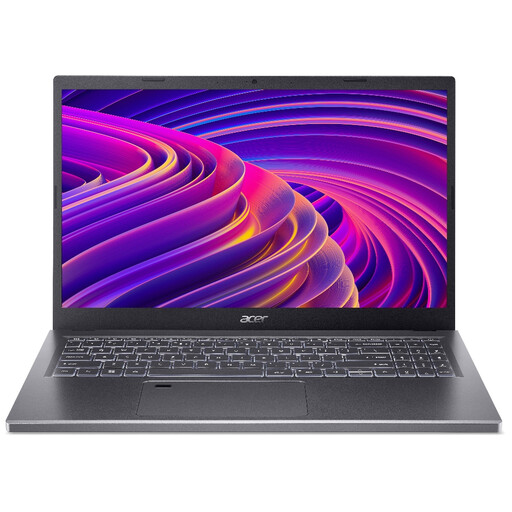 Image unavailable
Acer Aspire 5 A515-48M, 15.6-inch Full HD, AMD Ryzen 5 7530U, 16GB RAM, 512GB SSD, Silver
Consider the larger screen if you prefer that format for viewing warranty records at the desk; check whether the laptop and riser fit your available space.
15.6-inch Full HD display, AMD Ryzen 5 7530U, 16GB RAM and a 512GB SSD. Confirm that required registration sites work with your configuration and use separate input devices for prolonged raised-screen work.
View on Joybuy
 Image unavailable
HP OmniBook X Flip 16-as0004na 16-inch 2-in-1 Copilot+, Intel Core Ultra 5 226V, 16GB RAM, 512GB SSD
This larger 2-in-1 is worth considering if you want touch use as well as a laptop for desk-based records; check that its 16-inch format suits your standing-desk space.
Intel Core Ultra 5 226V, 16GB RAM, a 512GB SSD and Windows 11 Home. Confirm the exact ports and compatibility with your required websites and accessories before choosing a desk setup.
View on Joybuy
Frequently asked questions
Do I need a special laptop for a standing desk?
No particular laptop format is required just because the desk is height-adjustable. For prolonged laptop use, the Health and Safety Executive advises a separate keyboard and mouse so the screen can be raised; choose ports and charging arrangements with that setup in mind.
Does workplace display-screen guidance apply to this setup?
If workers use display screen equipment daily as part of their normal work, continuously for an hour or more, the Health and Safety Executive says employers must carry out a workstation assessment. That employer duty in the stated work circumstances is not a requirement for every private purchaser to arrange a formal assessment.
Can I cancel an online laptop order in the UK if I change my mind?
For UK distance sales, GOV.UK says consumers can tell the seller within 14 days of receiving an item that they want to cancel. Follow the applicable return instructions; a change-of-mind cancellation is distinct from remedies for goods that are faulty or misdescribed.
Should I use macOS, Windows or ChromeOS for warranty registration?
Choose the operating system supported by the appliance-registration sites, file workflow and any required applications you actually use. Check those requirements before choosing a MacBook, Windows laptop or Chromebook; a device’s display and accessory connections do not establish software compatibility.


