Warranty-document organisers
If you keep receipts, serial-number photos, manuals and registration confirmations together, you need a way to move between email, appliance-maker sites and your chosen folders.


A Windows 11 laptop is a practical choice if recording appliance warranties may involve downloaded forms, scanner utilities and local folders. A Chromebook can suit a confirmed browser-only workflow, while a MacBook makes sense if you already use macOS and have checked your portals and peripherals; whichever route you take, match storage and connections to the records and equipment you will actually use.
If you keep receipts, serial-number photos, manuals and registration confirmations together, you need a way to move between email, appliance-maker sites and your chosen folders.
If you connect a monitor, printer, scanner, external drive or phone while filing records, check both the laptop's connections and whether the equipment's software works with its operating system.
If registrations and documents stay in websites and cloud storage, a Chromebook may be enough. Which? identifies basic online tasks as a suitable use for Chromebooks; check your complete workflow and the particular device's update end date.
Choose the operating system around the sites and software you need, then compare storage, screen and connections for your home-office setup.
Consider it when: You may need downloaded forms, desktop scanner utilities or familiar local file handling.
Check: Confirm that the exact laptop comes with Windows 11. Microsoft says Windows 10 support ended on 14 October 2025.
Consider it when: Registration, email and document storage all work in the browser or suitable ChromeOS apps.
Check: Required Windows or Mac software may not work on ChromeOS. Google's automatic-update end date depends on the device's model or platform.
Consider it when: You already use macOS and have confirmed that your appliance portals, file formats and scanner workflow work on it.
Check: The MacBook Air configuration described by Apple UK has USB-C/Thunderbolt ports; existing USB-A or HDMI equipment may need adapters.
| Concern | What to check | Who this matters to |
|---|---|---|
| Portal and software compatibility | Check each registration site, downloaded utility and attachment format against the operating system you plan to buy. | If I rely on a scanner utility or downloaded warranty form, I need to know it will open before choosing a laptop. Around 36% of consumers put compatibility first. |
| Local files and multitasking | Compare the exact variant's RAM and SSD capacity with the scans and photos you intend to keep locally. | When I store original receipts and serial-number photos on the laptop, space for those files and several open documents matters most; around 29% of consumers prioritise this need. |
| Desk setup and connections | Match the laptop's screen and ports to your monitor, printer, scanner and existing cables. | I want my home-office equipment to connect without changing how I work. That is the primary concern for around 21% of consumers. |
| Browser workflow and update life | Confirm the full workflow works on ChromeOS and look up the exact Chromebook's automatic-update end date. | If all my records stay online, I would rather avoid desktop capability I will not use, provided the device remains supported; around 14% of consumers put this browser-first need ahead of the others. |
The site may open in a browser while a scanner utility, downloaded form or preferred document app still needs different software.
Before buying, list the portals, peripherals and file types you use, then check each one on the operating system you are considering.
Microsoft lists 4 GB RAM and 64 GB storage as Windows 11 minimum requirements, not as a target for an archive of scans, photos and open documents.
Compare RAM and SSD capacity on the exact variant, taking account of which original files you will keep locally rather than in cloud storage.
A monitor or older accessory may need a connection the laptop does not have. The Acer AG15-71P-59QP configuration cited by Acer United Kingdom lists USB-A, USB-C and HDMI, while Apple UK lists USB-C/Thunderbolt ports for its cited MacBook Air configuration.
Check your equipment's plugs against the exact laptop's ports before choosing between configurations.
A hub, adapter or replacement cable may be needed to keep using existing equipment.
Microsoft says Windows 10 support ended on 14 October 2025. Google's ChromeOS update policy uses a model- or platform-specific end date.
Confirm a Windows purchase is supplied with Windows 11, or check the exact Chromebook against Google's published automatic-update information.
The IdeaPad Slim range includes conventional Windows home-office configurations.
The Aspire Go range is relevant if you are comparing Windows laptops for a desk-based workflow.
A MacBook is worth considering if your warranty-recording workflow already fits macOS.
These Windows-route laptop choices are relevant to keeping warranty documents at home. Compare each listing's stated memory, storage and screen with your intended archive, and confirm your own portals and peripherals before buying.
 No image available
Consider this 14-inch model if you want a compact laptop for filing documents and working across browser tabs.
The product name specifies a Snapdragon X processor, 16 GB RAM and a 512 GB SSD. Check that any required appliance or scanner software works with this exact configuration.
 No image available
Consider this configuration if you prefer a 15.6-inch screen and plan to keep warranty files locally.
Its product name specifies an Intel Core i5-13420H, 8 GB RAM and a 512 GB SSD. Check the exact configuration before relying on a memory upgrade or connecting existing equipment.
 No image available
Consider this dual-screen model if you intend to work with several warranty documents at a desk and want substantial local storage.
The product name specifies 16 GB LPDDR5X RAM and a 1 TB SSD. Check the exact screen resolution before buying, as the listing descriptions differ.
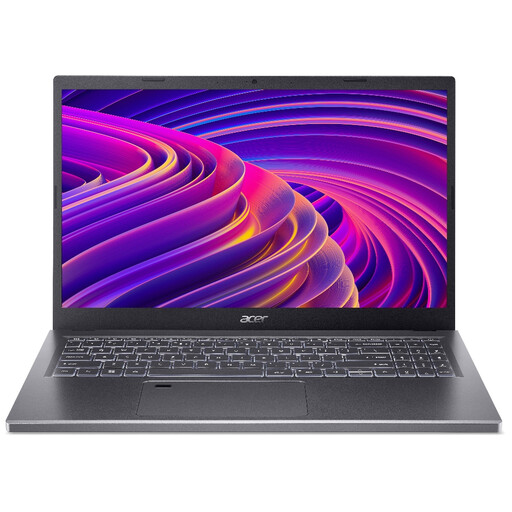 No image available
Consider the listed memory and storage combination if you keep scans locally while working with several files.
The product title identifies an A515-48M with a Ryzen 5 7530U, but the detailed description gives conflicting model and processor information. Confirm the exact model and processor before buying.
 No image available
Consider this 15.6-inch Full HD model if your warranty archive will fit within its stated local storage and you want a larger laptop screen.
The product name specifies Windows 11 Home, 8 GB DDR5 RAM and a 256 GB NVMe SSD. Check the space needed for original scans and photos; this is a different storage configuration from the 512 GB Acer AG15-71P-59QP discussed above.
A Chromebook can be enough if every registration site, email account, cloud folder and attachment task works in the browser or a suitable ChromeOS app. Which? describes Chromebooks as suited to basic online tasks; check any desktop software you need and the exact device's published automatic-update end date.
For a new warranty-recording laptop, look for a model supplied with Windows 11 rather than one supplied only with Windows 10. Microsoft says Windows 10 support ended on 14 October 2025; do not assume an older machine can be upgraded without checking the exact model.
Match the exact laptop's ports and software compatibility to the equipment you own. Acer United Kingdom lists HDMI, USB-A and USB-C on its AG15-71P-59QP configuration, whereas the MacBook Air configuration cited by Apple UK lists Thunderbolt 4/USB-C ports; other variants may differ.
Keep your order record and details of the fault, then contact the seller about the applicable remedy. GOV.UK explains that the Consumer Rights Act 2015 covers faulty goods sold by businesses to consumers; a manufacturer warranty is separate from statutory rights.
Remove your warranty documents and account data before passing on an old laptop, then look for an appropriate electrical reuse or recycling route. GOV.UK's guidance on waste electrical and electronic equipment addresses the recovery, reuse and recycling of electrical products.