Growing photo-archive organisers
Students making room for imports, working copies and exports while keeping a separate backup of their master collection.


Choose enough internal storage for the photographs you are actively organising, and keep a separate backup of the archive. A Windows laptop suits a workflow built around Windows applications and local folders; a MacBook Air is an option if macOS fits your software and devices. In either case, check the exact configuration’s screen, connections and software compatibility before buying.
Students making room for imports, working copies and exports while keeping a separate backup of their master collection.
Students whose photographs are spread across local PC folders and cloud accounts, and who need their chosen Windows applications to fit that workflow.
Students who will inspect digitised photographs on the laptop and want to check the exact screen’s stated colour coverage.
Work out how much of the archive needs to stay on the laptop and how you will back it up. Then check your required software and devices before deciding whether screen colour specifications or a smaller laptop matter more to you.
| Concern | What to check | Who this matters to |
|---|---|---|
| Storage and backup | Check the exact SSD capacity and how you will keep a separate copy of the archive. | If originals, scans and working files will accumulate, I need room for the active collection without making the laptop my only copy. Around 36% of consumers put storage and backup first. |
| Software and files | Check your photo software’s current requirements and compatibility with the operating system, drives and other devices you use. | When my photographs sit in local folders and cloud accounts, I need my applications and devices to work with those files. For around 29% of consumers, workflow compatibility is the primary concern. |
| Image review | Check the exact screen panel’s stated colour coverage and resolution rather than relying on the laptop-family name. | If I regularly compare scans on the laptop, I want to know what its particular screen can display. Screen specifications come first for around 21% of consumers. |
| Room and travel | Compare the exact laptop’s screen size, weight and connections with your desk space and carrying needs. | With a small desk and regular trips to campus, I need a laptop I can carry and put away, even if that means less screen area. Around 14% of consumers make portability their main concern. |
Storage for everyday sorting does not replace a separate preservation copy, particularly as imports and working files accumulate.
Choose capacity for the active collection, then plan and test a separate backup before importing a large archive.
That separate copy may require an external drive, cloud storage or another backup method.
Memory, storage and screens can differ between configurations in the same family. ASUS describes specifications for selected Vivobook 15 OLED M1505 configurations, not every Vivobook.
Check the retailer’s exact model and configuration, including its RAM, SSD, screen, connections and keyboard layout.
Apple’s MacBook Air battery claims refer to video streaming or wireless web use, not importing or transferring a photo archive.
Keep charging access in mind when planning lengthy imports and backups.
The MacBook Air is a macOS option if your photo applications and existing devices fit that platform.
The Vivobook 15 OLED M1505 family is worth examining if you want a Windows laptop with a published screen colour specification.
Inspiron is an everyday-computing Windows family that includes different laptop sizes and formats.
These Windows laptops and a MacBook Air offer different screen sizes and stated storage capacities for organising photographs. Choose the configuration that fits your files, software and backup connections; the product name alone cannot settle every compatibility or screen question.
 No image available
Consider this dual-screen format if you want space to arrange photographs and study materials while working on the laptop. Check the exact display resolution before buying, as the product details give conflicting figures.
 No image available
The larger screen and 2TB SSD may appeal if you expect to keep a substantial working collection on the laptop. If colour-sensitive scan review matters, check this configuration’s stated colour coverage rather than relying on its OLED name.
 No image available
This 14-inch option fits a smaller workspace if 512GB is sufficient for your active files alongside a separate backup. Check that your required photo applications and devices work with its Snapdragon Windows configuration.
 No image available
Consider this configuration if a 1TB working collection and a 14.5-inch touchscreen suit your room and study routine. Check its exact colour coverage and how your backup drive will connect.
 No image available
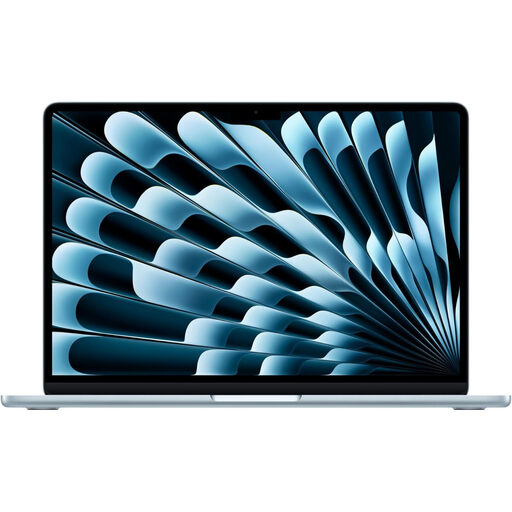
This is a macOS option if you want a 15-inch screen and 1TB of internal storage for an active photo collection. Check your applications, peripherals and this variant’s screen specification before choosing it for scan review.
Yes, for supported services and accounts. Microsoft says Windows Photos can add local folders and access media stored in OneDrive and iCloud; check that your chosen archive software supports the files and accounts you use.
Not for basic importing and folder organisation. A published colour-gamut specification becomes more relevant if you regularly assess scans on the laptop; check the exact panel, and keep a separate backup regardless of screen choice.
A laptop bought from a trader must meet statutory goods standards, including being as described, fit for purpose and of satisfactory quality, as Coventry City Council explains. Contact the seller promptly about the applicable remedy; statutory rights for a fault are distinct from a retailer’s voluntary change-of-mind returns policy.
Use an appropriate electrical-equipment collection or recycling route rather than general waste. GOV.UK explains that the UK’s waste electrical and electronic equipment rules aim to reduce disposal through landfill and incineration; check local collection instructions and erase personal and archive data before handing over the laptop.