
24/7 Customer Support

Free returns

Same-day & Next-day Delivery

Quality Guaranteed

Unlock Your Welcome Offers: FREE Delivery | Up to 80% OFF | Free 30-day JoyPlus trial
Download the APP
Juggling a laptop bag, a separate lunch box and your personal items on a crowded train is a daily struggle for many UK commuters. The promise of an all-in-one solution—a laptop backpack with lunch compartment—is appealing, but the market is filled with options that often fail to deliver. A poorly chosen bag can lead to soggy sandwiches, a damaged laptop and an aching back.
As the Joybuy Product Recommendation Officer, my role is to help you see past the marketing and focus on what truly matters. Before you make a purchase, be aware of these common pitfalls that lead to buyer's remorse.
To find a reliable and practical backpack, focus on these core specifications. They are the difference between a bag that simplifies your life and one that complicates it.
The effectiveness of an insulated lunch backpack depends entirely on its construction. Don't just look for a silver lining; check the details. A quality work backpack with cooler compartment should feature:
Your laptop is a significant investment, and its protection should be non-negotiable. When assessing a backpack, verify the following:
A truly functional backpack anticipates the needs of a daily commute. Features like a built-in USB port (which requires you to connect your own power bank inside) allow for convenient charging on the go. Furthermore, an anti-theft commuter backpack provides peace of mind in crowded spaces. Look for hidden pockets, typically located on the back panel, where you can securely store your wallet, phone or passport away from prying hands.
Based on these practical criteria, we've matched a versatile product to different user needs.
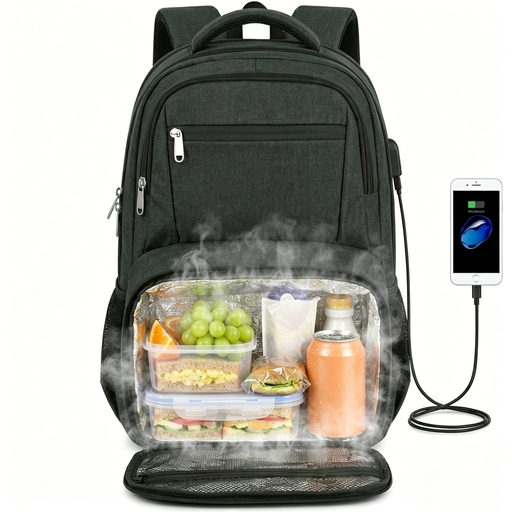
Why This Fits Their Persona: This bag consolidates a laptop case and lunch cooler into one professional-looking pack. It's ideal for navigating the London Underground or busy city streets, keeping hands free and essentials organised. The discreet anti-theft back pocket is perfect for securing a wallet or phone during a packed commute.
It features a properly separated insulated compartment with a water-resistant aluminium foil lining, avoiding the "illusion" of insulation and protecting electronics from condensation.
The collapsible lunch compartment offers excellent versatility. Padded straps and a breathable mesh back panel address ergonomic concerns for daily carrying.
Why This Fits Their Persona: For those taking short business trips from Manchester to London or flying from Heathrow, this bag is a practical carry-on. The TSA-friendly design unfolds 180 degrees for faster security checks, and the luggage strap is essential for navigating airports with a roller case.
It avoids the laptop safety compromise by providing a dedicated, padded sleeve that fits up to a 17.3-inch device, ensuring your work machine is secure during transit.
The combination of a TSA-friendly layout, USB charging port and integrated luggage strap makes it a purpose-built tool for efficient travel.
Why This Fits Their Persona: For students spending long days on campus, this bag carries a laptop for lectures, textbooks and a packed lunch to save money. The water-resistant fabric offers protection during an unexpected downpour, and the USB port is perfect for charging a phone in the library.
Its collapsible lunch compartment addresses the ergonomic pitfall. When not in use, it flattens to maximise space for books and binders, preventing the awkward, unbalanced feel of a rigidly structured bag.
The high-density polyester construction is durable enough for the rigours of student life, while multiple organiser pockets help keep stationery, cables and notes in order.
We have compiled a complete, real-time list of products that fully satisfy these strict selection criteria and UK safety regulations.
To maintain the integrity of the insulation and water-resistant materials, you should avoid machine washing. For the insulated compartment, wipe the interior aluminium foil lining with a damp cloth and a small amount of mild washing-up liquid, then wipe clean with a water-only cloth and allow it to air dry completely before closing. The exterior can be spot-cleaned with a damp cloth.
No, the USB port on a backpack is a pass-through connection. You need to connect your own portable power bank to a cable inside the backpack. The external port then provides a convenient access point for you to plug in your phone or other device's charging cable without having to open the bag.
It depends on the specific design. Laptop and backpack manufacturers can have slightly different definitions of size. The most reliable method is to ignore the "inch" label and compare the physical dimensions of your laptop (length x width x depth in cm) with the internal dimensions of the backpack's laptop compartment, which are usually provided in the product specifications. Always allow for a little extra room for a snug but not overly tight fit.