
24/7 Customer Support

Free returns

Same-day & Next-day Delivery

Quality Guaranteed

Unlock Your Welcome Offers: FREE Delivery | Up to 80% OFF | Free 30-day JoyPlus trial
Download the APP
A laptop backpack needs to do more than hold a computer. It may also carry books, chargers, lunch, a water bottle and personal items through crowded trains, wet pavements and busy university corridors. Yet product listings can make similar-looking bags appear very different.
The most common buying mistakes usually come from three marketing traps:
The suitable choice depends on how you travel, what you carry and how often the bag will be exposed to rain or heavy loads.
Screen size is only a starting point. Check the manufacturer’s stated maximum size and compare it with your laptop’s actual height, width and thickness. A padded laptop sleeve should hold the device securely without forcing the zip closed.
An elevated or cushioned base adds useful separation from the ground when the backpack is placed down. The HP Travel 18L 15.6 BNG Laptop Backpack, for example, has an independent padded laptop compartment with a pearl-cotton structure and elevated base design. It is listed for laptops up to 15.6 inches and 10.5-inch tablets.
If your computer contains important work or study files, consider placing it inside a separate protective sleeve when the backpack’s laptop compartment is not described as having a waterproof membrane.
For a daily commute, an 18-litre backpack can provide a useful balance between portability and storage. It may accommodate a laptop, notebook, charger, mouse and small personal items without becoming unnecessarily bulky.
Look for a layout that matches your routine:
A multi-compartment backpack can save time, but too many narrow sections may restrict what you can carry. Also check the recommended maximum load. The HP Travel 18L model lists a 5 kg recommended maximum load; prolonged overloading may put additional stress on stitching, straps and buckles.
For longer walks or public transport journeys, look for padded, adjustable shoulder straps and a breathable back panel. A sternum strap may help distribute the load, while a reinforced top handle is useful when lifting the bag onto a train or placing it in an overhead compartment.
Fabric descriptions also need careful interpretation. High-density polyester and Oxford fabric can offer resistance to everyday wear, splashes and light rain. However, “water-resistant”, “water-repellent” and “waterproof” are not interchangeable:
For cycling, long walks or unpredictable British weather, a separate rain cover or waterproof laptop sleeve may still be sensible.
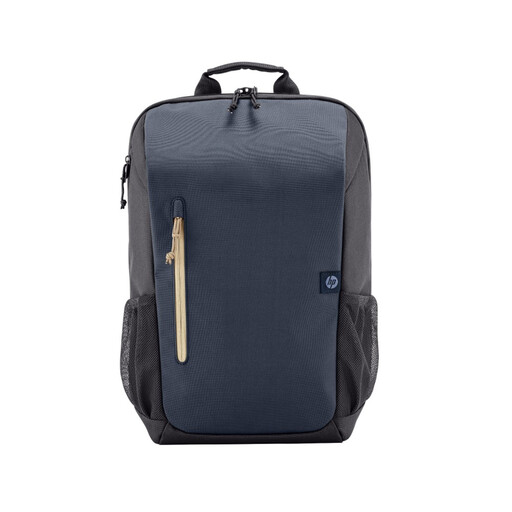
Why This Fits Their Persona: Students and first-time buyers receive a compact everyday layout for campus, office or short trips, with space for a 15.6-inch laptop and daily essentials.
Its stated capacity, laptop limit and 5 kg recommended load make the carrying requirements clearer than a vague “large capacity” description. It is water-repellent rather than fully waterproof, which is clearly specified.
18-litre capacity; padded laptop compartment; two side mesh pockets; breathable back panel and padded S-shaped shoulder straps.
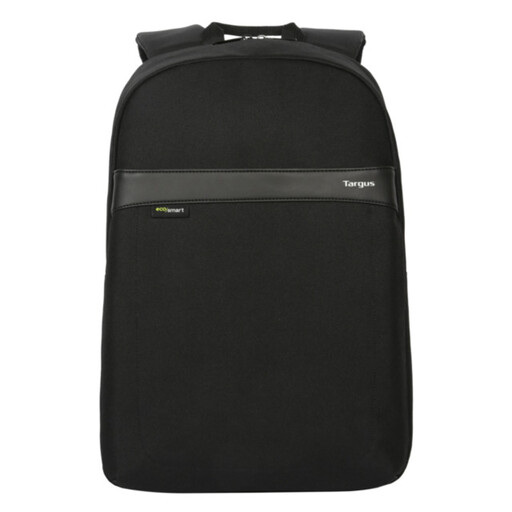
Why This Fits Their Persona: Office workers and business professionals may prefer its slim black profile, organised storage and features suited to commuting or hybrid work.
The listing identifies a padded 15.6-inch laptop compartment and water-resistant exterior, rather than relying only on a general laptop-bag label.
Recycled interior material equivalent to four plastic bottles; padded straps and back panel; front zip pocket and top carry handle.
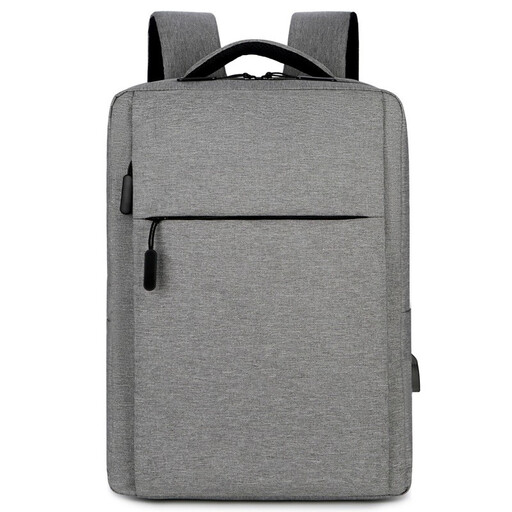
Why This Fits Their Persona: Frequent commuters and travellers can use the luggage strap to secure the bag to a suitcase, while the external USB port offers convenient phone charging when paired with a separate power bank and cable.
Its charging function is not presented as a built-in battery: the power bank and cable must be supplied separately. The listing also states that water-repellent fabric is not complete waterproofing.
Fits a 15.6-inch laptop; multiple zipped and slip pockets; breathable honeycomb back panel; luggage strap and external USB charging port.
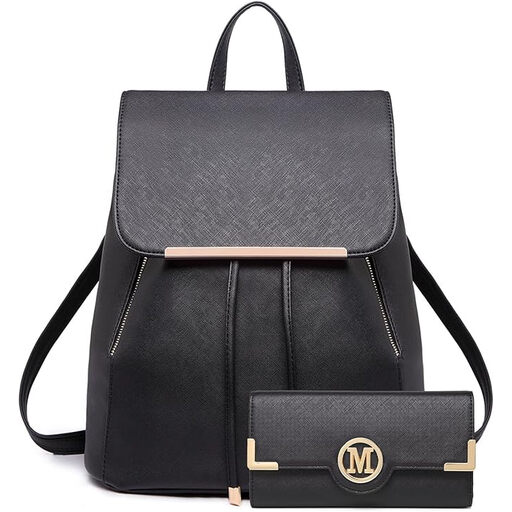
Why This Fits Their Persona: Users seeking a women's fashion backpack for school, work or short travel may value its structured appearance and internal organisation.
The 29 × 15 × 35 cm dimensions and 0.8 kg weight make its compact format easier to assess. It offers pockets for smaller valuables instead of relying on one open compartment.
PU leather construction; drawstring closure with magnetic flap; zipped internal pockets; adjustable straps and space for A4-sized items.
A structured laptop rucksack is generally more suitable if you carry books, lunch, clothing or accessories. A thin sleeve bag, such as the VoxorAI Computer Bag, may be more appropriate for carrying a smaller notebook inside another bag. Its listed dimensions are 35 × 25.3 × 0.5 cm, and it is designed for 14-inch notebooks, so it should not be treated as a replacement for a 15.6-inch laptop backpack.
For a school backpack or university bag, prioritise padded straps, a stable base and enough room for books. For office use, a slim business laptop backpack may sit more comfortably under a desk or on public transport. Travellers should look for a luggage strap, secure zips and compartments that keep chargers and documents separate.
We have compiled a complete, real-time list of products that fully satisfy these strict selection criteria and UK safety regulations.
Not necessarily. Many are water-repellent or water-resistant, which can help with light rain and splashes. Check whether the seams, zips and laptop compartment include additional protection. For heavy rain, use a rain cover or separate waterproof sleeve.
Lifespan depends on load weight, fabric, stitching, zip quality and daily handling. Avoid overloading, keep sharp objects away from the lining and follow the care instructions. Wipe-clean fabrics should generally be cleaned with a damp cloth and mild detergent rather than machine washed unless the product specifically permits it.
No. An external USB charging port normally passes power from a separate power bank stored inside the backpack. You will also need a compatible charging cable. Check the product instructions and disconnect the power bank when it is not in use.