
24/7 Customer Support

Free returns

Same-day & Next-day Delivery

Quality Guaranteed

Unlock Your Welcome Offers: FREE Delivery | Up to 80% OFF | Free 30-day JoyPlus trial
Download the APP
Finding the right laptop bag can feel like a trivial task, but choosing poorly often leads to frustration or worse, a damaged device. With so many options on the market, from sleek briefcases to feature-packed backpacks, it is easy to fall for marketing hype that does not translate to real-world use. As a Joybuy Product Recommendation Officer, my role is to help you see past the clutter and focus on what truly matters for your daily carry.
Before you make a decision, let’s look at a few common pitfalls that many UK buyers encounter:
To avoid these issues, focus on a few core parameters that define a quality laptop bag.
Do not rely solely on the advertised screen size (e.g., 15.6 inch laptop bag). The most important step is to measure your laptop's physical length, width and depth. Compare these figures to the bag's internal compartment dimensions, not its external ones. Look for a dedicated laptop sleeve with at least 0.5 cm of foam padding on all sides and, ideally, a "suspended" design that keeps your device from hitting the floor when you set the bag down.
The material dictates the bag's durability and weather resistance. High-density polyester and nylon offer a good balance of light weight and toughness. For weatherproofing, check the details. Water-repellent fabric is suitable for very light rain, while a water-resistant coating offers more protection. Pay close attention to the zippers; look for water-resistant zips or storm flaps that cover the zipper teeth, as this is a primary point of water ingress. For those who cycle or walk in all weathers, a roll-top design offers a higher level of protection.
How you carry your bag impacts your daily comfort.
To help you find a match for your needs, here are a few options selected for different lifestyles, each addressing the common pitfalls.
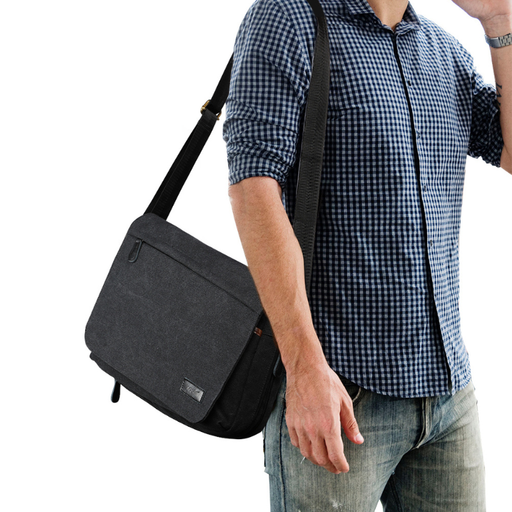
Why This Fits Their Persona: This bag is ideal for university students or professionals with a light carry. Its classic canvas design is durable for daily use, and the messenger style allows quick access to books, a tablet or a smaller laptop (up to 13 inches) while navigating campus or public transport.
It avoids the trap of over-hyped features by focusing on core functionality. Instead of a flimsy USB port, it offers robust canvas material and a simple, practical multi-pocket layout for genuine organisation.
Made from hard-wearing canvas for scratch resistance. The adjustable shoulder strap provides comfortable, flexible carrying options for daily use.
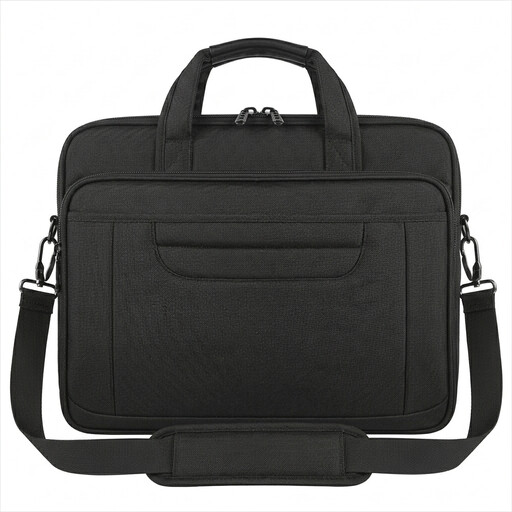
Why This Fits Their Persona: This convertible business briefcase is for the professional who needs a polished look for the office and practicality for travel. It fits a standard 15.6-inch laptop and includes travel-centric features like a luggage strap and a hidden anti-theft travel bag pocket for valuables.
It counters the poor organisation trap with a dedicated main compartment and multiple accessory pockets, ensuring your charger, phone and documents are kept separate and easy to find, not just thrown in together.
Multi-functional design converts from briefcase to shoulder bag. The water-resistant nylon fabric provides protection from unexpected showers during a commute.
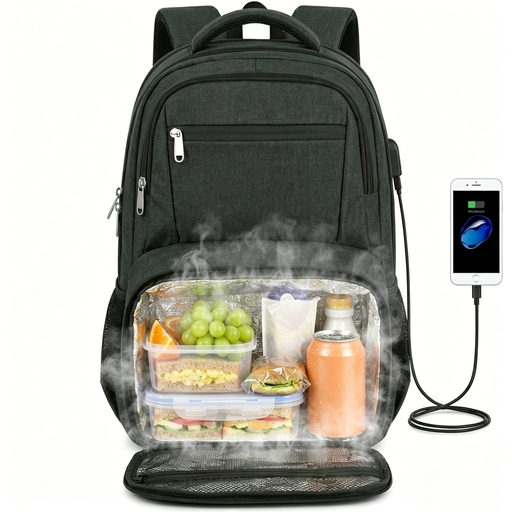
Why This Fits Their Persona: This is for the person who carries their entire day on their back—work laptop, documents and a packed lunch. This commuter backpack combines a large, padded compartment for up to a 17.3-inch laptop with a separate, collapsible insulated lunch backpack section.
It solves the deceptive capacity problem by design. The dedicated, expandable lunch compartment means your food does not compromise the space or safety of your electronics, preventing spills and crushing.
Features a TSA-friendly design that folds open 180 degrees for airport security. The built-in USB port and luggage strap add genuine convenience for business travel.
We have compiled a complete, real-time list of products that fully satisfy these strict selection criteria and UK safety regulations.
1. How do I properly measure my laptop for a bag? Do not rely on the diagonal screen size (e.g., 15.6"). Instead, use a tape measure to get your laptop's exact physical length, width and thickness. Compare these measurements to the internal dimensions of the bag's laptop compartment, which are often listed in the product specifications. Always allow for at least one or two centimetres of extra space for a comfortable fit.
2. Is a bag with a built-in USB port worth the extra cost? A school bag with a USB port can be convenient, but it is important to understand its function. It is not a charger itself but an extension cable that connects to your own power bank stored inside the bag. The value depends on the quality of the port's construction and its weather sealing. For many, it is a useful feature for charging a phone on the move without having to hold a power bank.
3. How should I clean my water-resistant laptop bag? Never put your laptop bag in a washing machine, as this can degrade the water-resistant coatings, damage the padding and harm the zippers. For most polyester or nylon bags, a simple wipe-down with a damp cloth and a small amount of mild soap is sufficient for removing dirt. For an insulated lunch backpack compartment, wipe the interior lining with a food-safe cleaner to prevent odours. Always allow the bag to air dry completely before using it again.