
24/7 Customer Support

Free returns

Same-day & Next-day Delivery

Quality Guaranteed

Unlock Your Welcome Offers: FREE Delivery | Up to 80% OFF | Free 30-day JoyPlus trial
Download the APP
Buying a laptop in the UK can quickly become confusing. Processor names, AI features, OLED displays and large storage figures may look impressive, but a high specification is not automatically suitable for your routine. The right choice depends on how you work, where you use the device and which compromises you are prepared to accept.
A powerful processor or dedicated graphics card can increase cost, weight, fan noise and energy consumption. If your routine mainly involves web browsing, Microsoft Office, video calls and streaming, a premium gaming laptop may be unnecessary. Conversely, entry-level laptops can struggle with video editing, 3D software or modern games.
A 1TB SSD provides more room for applications, photos and games than a 256GB drive, but storage capacity does not determine the laptop’s complete performance. Check the processor, memory and SSD type together. A fast PCIe NVMe SSD helps with boot times and file access, while 16GB RAM is a more comfortable starting point for heavy multitasking than 8GB.
A large display is useful for spreadsheets, editing and entertainment, but a 17-inch gaming laptop may weigh around 2.5kg or more before adding its charger. Also check for a UK keyboard layout, numeric keypad requirements, port selection and charger size. These details affect everyday convenience more than many headline features.
For laptops for students and general laptops for work, look for a modern Intel Core, AMD Ryzen or Qualcomm Snapdragon platform with at least 8GB RAM. 16GB RAM is a practical target for frequent multitasking, creative applications and extended ownership.
Copilot+ PCs use a dedicated NPU to accelerate compatible AI functions locally. This can support selected Windows features and applications, but software compatibility varies. Windows 11 on ARM can run many traditional applications, although some specialist programmes and games may require native ARM support or emulation. Check your essential software before choosing a Snapdragon model.
Resolution, brightness, colour coverage and panel type all influence usability. A Full HD display is suitable for many office and study tasks. OLED laptops generally offer deep contrast and vivid presentation, while IPS panels can be a practical choice for documents and mixed use. For creative work, check stated coverage such as 100% sRGB or 100% DCI-P3, rather than relying on phrases such as “vivid colours”.
Touchscreen laptops and 2-in-1 laptops add flexibility for annotation, browsing and presentations. A 360-degree hinge is useful, but it also introduces moving parts; avoid forcing the screen beyond its intended rotation and keep ventilation clear in tent or tablet mode.
Integrated graphics are suitable for everyday use and some light creative work. Gaming laptops and laptops for creatives may need a dedicated NVIDIA GeForce GPU, particularly for modern games, 3D rendering or GPU-accelerated editing.
Battery figures are usually measured under specific test conditions, so actual runtime varies with brightness, applications, wireless use and performance settings. Check USB-C Power Delivery, HDMI, USB-A, Wi-Fi generation and Ethernet if you regularly connect accessories or external displays.

Why This Fits Their Persona: A straightforward option for home browsing, online study and office documents, with a UK keyboard and a 1.53kg chassis that is manageable for commuting.
Its specification clearly identifies an anti-glare Full HD display, 8GB RAM and a 128GB SSD, helping buyers assess its intended everyday role rather than assume it is suited to demanding creative software.
Full HD anti-glare screen, Wi-Fi 5, HDMI and a stated battery life of up to 12.5 hours under specified conditions.
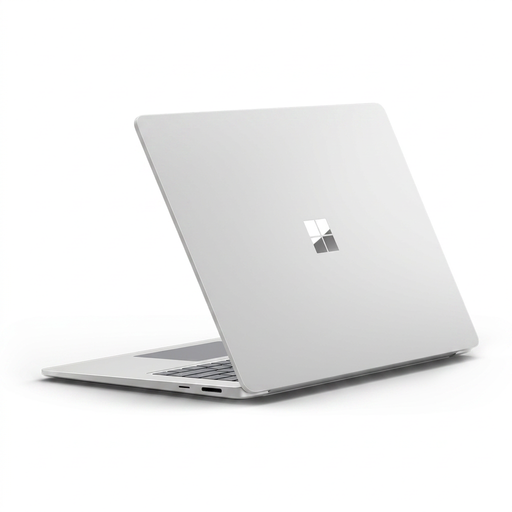
Why This Fits Their Persona: Suitable for professionals and mobile users wanting a larger touchscreen, a premium aluminium design and Windows-based productivity in a relatively portable 1.66kg format.
The 16GB memory, 3:2 Quad HD+ touchscreen and 45 TOPS NPU are specified clearly. Buyers should still confirm ARM compatibility for specialist Windows software before ordering.
10-point touchscreen, up to 120Hz dynamic refresh rate, Wi-Fi 7 and Windows Hello facial recognition.

Why This Fits Their Persona: A practical match for gamers, students using demanding applications and creators who need dedicated graphics without moving to a larger 17-inch chassis.
The RTX 5050, 16GB DDR5 RAM, 1TB SSD and 144Hz display are listed alongside the 2.30kg weight, making the performance-versus-portability trade-off visible.
Full HD IPS anti-glare panel with 144Hz refresh rate, 100% sRGB coverage, HDMI 2.1 and Gigabit Ethernet.
We have compiled a complete, real-time list of products that fully satisfy these strict selection criteria and UK safety regulations.
Yes, provided the specification matches your course. For essays, research, video calls and browser-based learning, 8GB RAM may be sufficient, while 16GB RAM offers more flexibility for multiple applications. Students using engineering, design or video software should check processor, graphics and software compatibility before buying.
A laptop’s useful life depends on workload, build quality, software updates, battery condition and maintenance. Keeping vents clear, installing security updates and avoiding unnecessary heat can help preserve performance. Before purchase, check whether the RAM is upgradeable; onboard memory cannot normally be replaced.
They can use more electricity during demanding gaming because dedicated graphics and high-performance processors draw more power. They are also typically heavier and may need their supplied mains adapter for full performance. Compare the GPU, display refresh rate and games you actually play rather than paying for specifications that will remain unused.