
24/7 Customer Support

Free returns

Same-day & Next-day Delivery

Quality Guaranteed

Unlock Your Welcome Offers: FREE Delivery | Up to 80% OFF | Free 30-day JoyPlus trial
Download the APP
Buying a computer can become confusing quickly. Processor names, RAM figures, SSD capacities and operating-system labels can make similar-looking laptops and PCs seem very different. Marketing may also highlight one attractive feature while hiding a more important limitation.
For UK households, students and hybrid workers, three buying traps appear regularly:
A sensible purchase starts with your routine: where you will use the computer, which applications you need and how much local storage your files require.
Windows 11 laptops support a broad range of desktop applications, including Microsoft software, specialist study tools and many business platforms. However, check whether the model uses Windows 11 Home in S Mode, as this configuration restricts installations to approved sources unless you switch out of S Mode.
Chromebook laptops run ChromeOS and are suited to browser-based work, Google Workspace, Android applications and supported Linux environments. They are not compatible with traditional Windows-only desktop programmes. This makes a Chromebook practical for web research, documents, video calls and online learning, but less suitable where specialist Windows software is compulsory.
Copilot+ PCs add compatible hardware for selected Windows AI features. That does not mean every application becomes faster or that every AI function works offline. Check the processor platform, software requirements and privacy settings before paying extra for the label.
For light browsing, email, streaming and basic documents, 8GB RAM can be suitable. Students and home users who regularly keep many browser tabs, video calls and office applications open may prefer 16GB RAM.
Storage type also matters. Laptops with SSD storage generally start applications and load files more quickly than older mechanical drives. Capacity is equally important:
An SSD does not remove the need for backups. Keep important university, business and personal files in a trusted cloud service or on a separate backup drive.
A 14-inch laptop usually balances portability with a comfortable workspace. Models around 1.4–1.5kg are easier to carry between a home, library or office.
15-inch laptops, including 15.6-inch and 15.3-inch models, provide more room for spreadsheets, split-screen work and entertainment. They can still be portable, but check the weight and charger size before choosing one for regular commuting.
For desktop PCs, check the available desk space, monitor connections and ventilation. Mini PCs can reduce clutter, while tower desktop PCs normally provide easier access to upgradeable memory, storage or expansion hardware. A desktop purchase may also require a separate monitor, unless the bundle includes one.

Why This Fits Their Persona: This Windows 11 laptop provides a large Full HD anti-glare screen, 8GB RAM and a 128GB SSD for browsing, online study and essential office tasks without adding unnecessary hardware.
Its key specifications are clearly defined: Intel N150, 8GB DDR4 memory, 128GB SSD and Windows 11 Home in S Mode. Buyers can assess the limited storage and S Mode before ordering.
15.6-inch Full HD display; 1.53kg weight; HDMI, USB-C and USB-A connectivity; two-year warranty listed in the specification.

Why This Fits Their Persona: A compact Windows option for professionals, hybrid workers and students who want 16GB RAM, generous storage and modern display connectivity in a 1.49kg chassis.
The specification identifies Windows 11 Home on ARM and confirms that the 16GB memory is onboard. Check compatibility for specialist x86 or x64 applications before purchase.
16GB LPDDR5X RAM; 512GB PCIe 4.0 SSD; two USB4 Type-C ports; HDMI 2.1; FHD IR camera with privacy shutter.
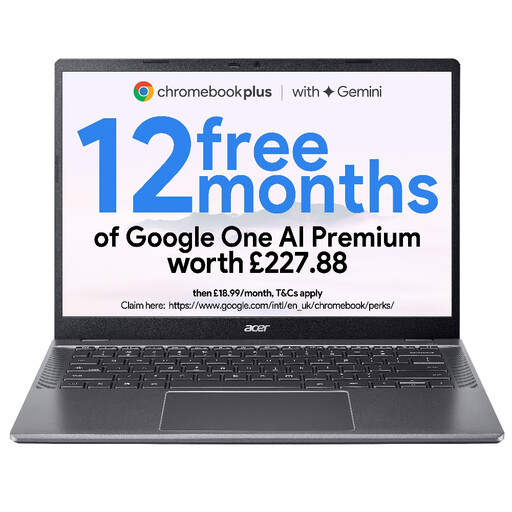
Why This Fits Their Persona: ChromeOS, Google Workspace access and a 14-inch WUXGA screen suit browser-based learning, email, streaming and shared family use.
It makes the ChromeOS limitation clear. Buyers should choose it for compatible web, Android or Linux applications rather than expecting Windows desktop software support.
8GB LPDDR5 RAM; 256GB PCIe Gen4 NVMe SSD; 14-inch WUXGA anti-glare display; 2MP FHD webcam with privacy shutter.
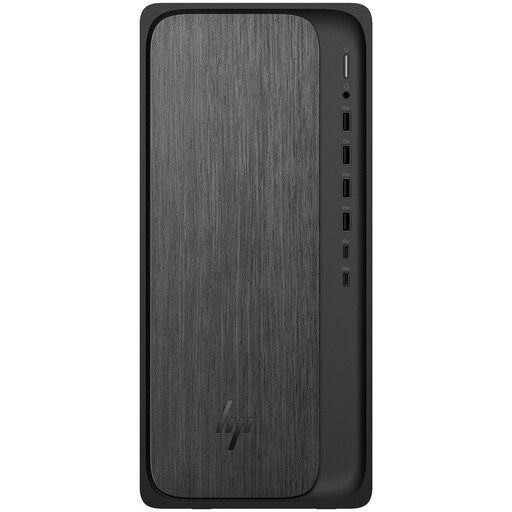
Why This Fits Their Persona: This tower suits a permanent home office, family study area or workstation where portability is less important than storage, connections and future memory expansion.
The tower format avoids the restricted memory found in some thin laptops. It has 8GB DDR5 installed and two DIMM slots, allowing upgrade planning after checking compatibility.
AMD Ryzen 5 8500G; 1TB PCIe 4.0 NVMe SSD; Wi-Fi 6, Bluetooth 5.4 and Gigabit Ethernet; wireless keyboard and mouse included.
We have compiled a complete, real-time list of products that fully satisfy these strict selection criteria and UK safety regulations.
A laptop generally uses less electricity than a desktop tower because it combines lower-power components with a built-in display and battery system. A desktop may use more power, particularly with a separate high-performance monitor or graphics card. Actual running cost depends on usage, electricity tariff and the computer’s power consumption.
Lifespan depends on workload, care, software support and upgrade options. A computer with an SSD, adequate RAM and a supported operating system can remain suitable for everyday tasks for several years. Desktops with accessible memory and storage are often easier to refresh than thin laptops with soldered components.
8GB RAM can suit web browsing, documents, video calls and online learning. Choose 16GB RAM if you regularly use many applications together, work with large files or want more headroom for future software. Always check whether the memory is upgradeable before buying.