
24/7 Customer Support

Free returns

Same-day & Next-day Delivery

Quality Guaranteed

Unlock Your Welcome Offers: FREE Delivery | Up to 80% OFF | Free 30-day JoyPlus trial
Download the APP
Buying a laptop can look straightforward until you compare processors, memory, storage, screen sizes and operating systems. A low headline price may hide limited storage, while an impressive AI specification may not suit the software you use every day.
This guide helps UK shoppers compare laptops more practically, whether you need a student laptop, business laptop, lightweight laptop, touchscreen laptop or machine for demanding creative work.
A newer-sounding processor does not automatically make a laptop suitable for your workload. Core count, graphics capability, memory and software compatibility all matter. A basic processor with 8GB RAM may manage web browsing and documents, but it can feel restricted with large spreadsheets, multiple browser tabs or creative applications.
For Windows laptops, also check whether the model uses an Intel or AMD x86 processor or an ARM-based Snapdragon chip. ARM laptops can offer efficient operation and quiet performance, but some specialist software, older peripherals and games may require a compatible native version or emulation.
An SSD generally provides faster start-up and application loading than older mechanical storage, but capacity still determines how much you can keep locally. A 128GB SSD can fill quickly after operating system files, applications and updates are installed. For most users, 512GB SSD storage offers a more comfortable starting point, especially for coursework, photos and downloaded media.
Copilot+ PCs and other AI laptops include dedicated neural processing hardware for compatible features. However, an NPU does not replace sufficient RAM, a suitable CPU or a dedicated GPU. Check the applications you plan to use rather than paying more solely for an AI label.
8GB RAM remains suitable for lighter tasks such as email, online research, word processing and video streaming. It offers less headroom for demanding multitasking and some laptops have memory that cannot be upgraded.
16GB RAM is a sensible target for many students, professionals and home users. It supports multiple applications more comfortably and is widely available in laptops with 512GB SSD storage. Creators working with high-resolution video, 3D software, large design files or virtual machines may benefit from 32GB, 48GB or 64GB RAM.
Choose at least 256GB SSD storage if your budget is limited, but consider 512GB for a longer-lasting everyday setup. Users working with video, RAW photographs or large game libraries may need 1TB or 2TB.
Check whether the SSD is replaceable. Onboard storage can make future upgrades difficult, so an external SSD may be necessary later. Also check the included charger, as USB-C charging does not always mean that every USB-C charger will provide sufficient wattage.
A 13- or 14-inch screen is easier to carry on UK public transport and suits lectures, commuting and flexible working. A 15- or 16-inch laptop gives you more room for spreadsheets, timelines and side-by-side windows, although it may weigh more.
For comfortable general use, look for at least Full HD resolution. A 16:10 or 3:2 aspect ratio provides additional vertical space for documents and web pages. Touchscreen laptops and 2-in-1 laptops add flexibility, but the hinge and display can increase weight and cost. OLED and HDR screens may be useful for creative work and entertainment, while an anti-glare finish can be more practical in bright rooms.

Why This Fits Their Persona: A practical option for basic study, browsing, office work and streaming at home or in halls of residence.
Its 15.6-inch Full HD anti-glare display is clearly specified, while the 2-year warranty is listed in the product information. The 128GB SSD is limited, so buyers should plan files carefully or budget for external storage.
1.53kg weight, Full HD resolution, UK English keyboard and Windows 11 Home in S Mode.
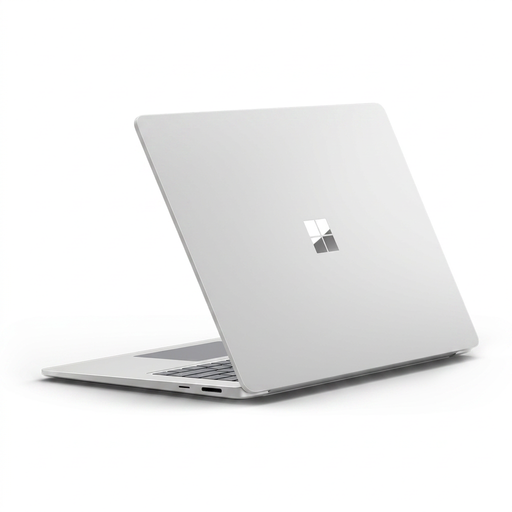
Why This Fits Their Persona: A large-screen Windows laptop for professionals, home workers and students who value touch input and a premium aluminium design.
It pairs 16GB LPDDR5x memory with a clearly listed 256GB PCIe Gen 4 SSD. Buyers should confirm ARM software compatibility before choosing it for specialist business applications.
15-inch 2496 × 1664 touchscreen, up to 120Hz dynamic refresh rate, Wi-Fi 7 and Windows Hello facial recognition.

Why This Fits Their Persona: Designed around demanding creative workloads such as video editing, 3D rendering, design and GPU-accelerated applications.
The specification identifies a dedicated RTX 5080 Laptop GPU with 16GB GDDR7 graphics memory, rather than relying only on integrated graphics. Its 1.95kg weight and higher power needs should be considered before commuting regularly.
64GB LPDDR5X RAM, 2TB SSD, 4K OLED touchscreen, 120Hz refresh rate and a 2-year warranty.

Why This Fits Their Persona: Suitable for users who want a spacious screen for documents and entertainment, with the option to fold into tablet, tent or stand mode.
The 360-degree hinge is matched with a 16-inch 2K IPS touchscreen, 16GB RAM and 512GB SSD. Buyers should keep ventilation clear when using tent or tablet modes.
Intel Core Ultra 5 processor, Intel Arc Graphics, Wi-Fi 7 and a 5MP IR FHD camera with privacy shutter.
We have compiled a complete, real-time list of products that fully satisfy these strict selection criteria and UK safety regulations.
For many users, yes. Laptops with 16GB RAM provide more capacity for simultaneous browser tabs, office applications, video calls and study software. They are particularly useful if the memory is soldered and cannot be upgraded later.
Useful lifespan depends on workload, battery condition, software support and physical care. A laptop with adequate memory, SSD capacity and processor performance is less likely to feel restricted quickly. Keep ventilation clear, install operating system updates and use a suitable protective sleeve when commuting.
Power consumption varies by processor, display brightness, charger and workload. Lightweight laptops and efficient ARM-based models may use less power during everyday tasks, while gaming and creator laptops with dedicated graphics generally draw more under sustained load. Check the charger wattage and use power-saving settings when running on battery.