
24/7 Customer Support

Free returns

Same-day & Next-day Delivery

Quality Guaranteed

Unlock Your Welcome Offers: FREE Delivery | Up to 80% OFF | Free 30-day JoyPlus trial
Download the APP
By Joybuy Product Recommendation Officer
Choosing among the many laptops available in the UK is not simply a matter of comparing processor names. A suitable model must match your software, daily routine, portability needs and budget. A student may prioritise battery life and weight, while a creative professional may need a high-resolution display, generous memory and fast storage.
Before looking at individual models, it is worth identifying the buying traps that can make an apparently attractive laptop unsuitable after purchase.
Manufacturers usually quote battery figures under particular test conditions. Actual results vary according to screen brightness, wireless activity, video calls, software and performance settings. A laptop advertised with “up to” a certain number of hours may deliver less during demanding work.
For commuting or university use, check the battery capacity, charger type and independent user feedback where available. USB-C charging can also be useful when you already carry compatible devices.
A fast processor cannot compensate for insufficient RAM when you regularly use many browser tabs, spreadsheets, video calls and creative applications together. 16GB RAM laptops are a sensible starting point for many users planning to keep their device for several years. Models with 8GB may suit web browsing, documents and streaming, but memory is often soldered and cannot be upgraded.
A thin laptop may look ideal for study or travel, yet the operating system can affect which programmes work. Windows 11 laptops support a broad range of desktop applications. macOS suits users already invested in Apple devices, although some Windows-only software may require an alternative solution. Chromebook laptops use ChromeOS and are designed around web applications, Android apps and cloud services rather than traditional Windows or macOS software.
ARM-based Copilot+ PCs can offer efficient performance and long quoted battery life, but some specialist applications, older drivers and games may need native ARM support or emulation. Check compatibility before ordering.
For documents, web browsing, video calls and streaming, a modern Intel Core 5, AMD Ryzen 5, Apple silicon chip or Qualcomm Snapdragon platform should cover everyday needs. Business users working with large spreadsheets, development tools or frequent multitasking may benefit from a higher-tier processor.
Gaming laptops require more than a fast CPU. A dedicated graphics processor, such as an NVIDIA GeForce RTX model, is important for modern games and GPU-accelerated creative software. Cooling design and power limits also matter, so a compact gaming machine may run differently from a larger desktop replacement.
Choose 16GB RAM if you use demanding applications or want longer-term flexibility. Creatives working with large photo, video or design projects may prefer 24GB, 32GB or more.
A 512GB SSD laptop provides a practical balance for documents, applications and media. If you store large video libraries, game installations or professional projects locally, consider 1TB or 2TB. SSD storage is substantially more responsive than older mechanical hard drives, while eMMC storage, found in some affordable Chromebooks, is generally intended for lighter workloads.
A 13- or 14-inch laptop is easier to carry on UK trains and between lectures. A 15- or 16-inch display gives more room for split-screen work but usually adds weight. For regular creative work, check resolution, colour coverage and brightness rather than relying on phrases such as “vivid display”.
Also count the ports. USB-C may support charging, displays and fast data, but not every USB-C port offers all three functions. HDMI, a headphone socket, an SD card reader or USB-A can reduce the need for adapters.
The following options are matched to different requirements rather than ranked universally. Specifications and availability should be checked on each product page before purchase.

Why This Fits Their Persona: A practical option for students and home users focused on browsing, Google Workspace, streaming and straightforward study tasks.
Its ChromeOS platform makes the intended web-first use clear, avoiding the assumption that it runs traditional Windows desktop software.
14-inch anti-glare Full HD display, 8GB RAM, 256GB eMMC storage and a stated battery figure of up to 10 hours.
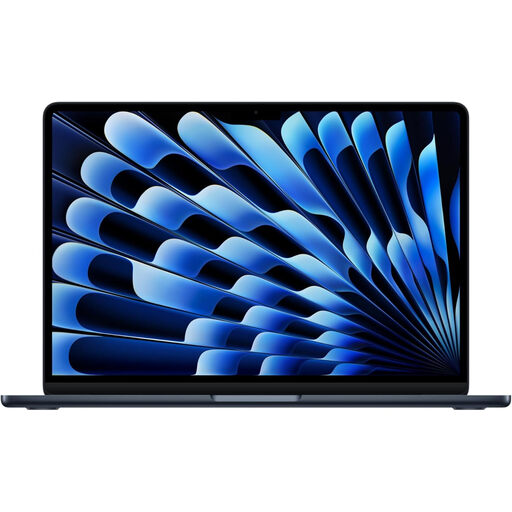
Why This Fits Their Persona: Its compact format suits commuters, students and professionals who want a portable macOS laptop for work, study and everyday creative tasks.
The listed 16GB unified memory and 512GB SSD provide a clearer specification baseline than models offering only entry-level memory.
M5 chip with a 10-core CPU and 8-core GPU, Liquid Retina display, MagSafe charging and Thunderbolt 4 connectivity.
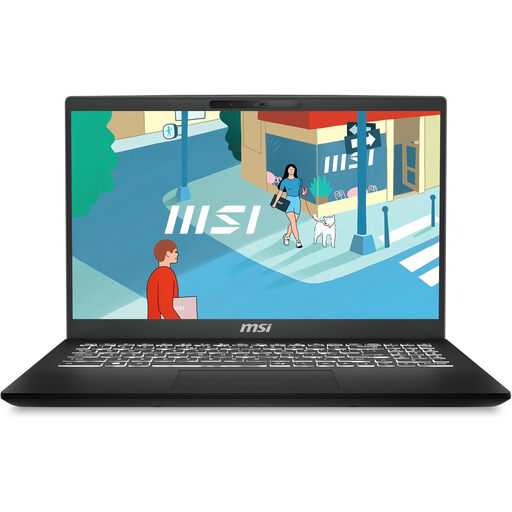
Why This Fits Their Persona: A conventional Windows choice for office software, study, home administration and users who prefer a larger screen with familiar connectivity.
It combines 16GB RAM with a PCIe 4.0 SSD, helping avoid the common low-memory, slow-storage combination in affordable office laptops.
15.6-inch 1920×1080 display, Wi-Fi 6E, Bluetooth 5.3, backlit keyboard and a physical camera privacy shutter.
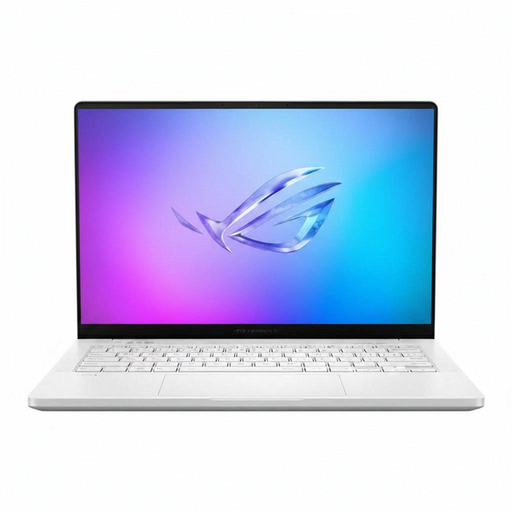
Why This Fits Their Persona: Designed for demanding workloads and gaming users who need dedicated graphics in a relatively compact 14-inch chassis.
Its dedicated NVIDIA GeForce RTX 5070 Ti graphics, 32GB memory and 2TB SSD are clearly specified, rather than relying on vague gaming language.
WQXGA+ display, 32GB LPDDR5X memory, 2TB SSD and Wi-Fi 7 connectivity.
We have compiled a complete, real-time list of products that fully satisfy these strict selection criteria and UK safety regulations.
Yes, provided the model supports your course software. Lightweight laptops with 13- or 14-inch screens are convenient for commuting, while 15-inch models offer more workspace. Students using browser tools and Google Workspace may consider a Chromebook; students using specialist Windows applications should choose a compatible Windows 11 laptop.
8GB RAM can handle basic browsing, email and documents. 16GB RAM is a more flexible choice for multitasking, work and study. Creative professionals, developers and users running virtual machines may need 24GB, 32GB or more.
Electricity use depends on the charger rating, usage time and power settings. Lightweight productivity laptops typically use less power than gaming laptops with dedicated graphics. Battery charging is only one part of ownership costs; also allow for accessories, cloud storage, extended cover and potential repairs.