
24/7 Customer Support

Free returns

Same-day & Next-day Delivery

Quality Guaranteed

Unlock Your Welcome Offers: FREE Delivery | Up to 80% OFF | Free 30-day JoyPlus trial
Download the APP
Choosing between laptops can be difficult when product pages focus on processor names, display refresh rates and AI features without explaining how they affect everyday use. A suitable laptop for a university library, home office or gaming desk will not necessarily suit video editing or software development.
Before comparing models, UK shoppers should look beyond headline specifications and check the details that influence comfort, longevity and total cost.
A high-performance laptop with a dedicated graphics card can be useful for gaming, 3D work and video production. For email, documents, web browsing and streaming, however, an integrated GPU may be sufficient. Paying for unnecessary graphics power can also mean a heavier chassis, louder cooling fans and shorter battery life away from a socket.
A 1TB SSD gives you more file and application space, but it does not replace having enough memory. Laptops with 16GB RAM are generally more comfortable for multitasking between browsers, office applications and creative tools than entry-level 8GB configurations.
Also check whether memory is upgradable. For example, the Acer Aspire Go includes 8GB DDR4 memory and supports expansion up to 32GB, while some slim laptops use memory soldered to the mainboard.
OLED laptops can provide deep blacks and strong contrast, while 4K laptops offer high pixel density for detailed images and video work. Yet a higher resolution can increase power consumption, and OLED panels may not be necessary for spreadsheets or general study.
Refresh rate matters most for gaming and fast-moving content. A 240Hz panel is useful when the hardware can produce suitably high frame rates; it is not automatically an advantage for word processing or video calls.
For general productivity, a modern Intel Core i5 or equivalent AMD processor can provide a practical balance of responsiveness and price. The Acer Aspire Go AG15-71P uses an Intel Core i5-13420H with 8 cores and 12 threads, making it suitable for office work, programming, data processing and student projects.
Gaming laptops usually need a dedicated GPU. RTX gaming laptops such as the Lenovo LOQ Essential 15ARP11 use an NVIDIA GeForce RTX 5050, while more demanding systems may feature RTX 5060, RTX 5080 or RTX 5090 graphics. Compare the exact GPU, graphics memory and power configuration rather than relying on the RTX label alone.
For everyday use, 8GB RAM can work, but 16GB is a more flexible starting point for multiple applications, modern browsers and light content creation. Demanding professional laptops may benefit from 32GB or 64GB.
An NVMe SSD usually provides quicker start-up and application loading than older mechanical storage. Check whether the laptop has an additional M.2 slot or drive bay if you expect your storage needs to grow.
A 15.6-inch Full HD display is a practical size for home working and study. Larger 17-inch screens can improve gaming and video editing comfort but are less convenient for commuting. Consider the complete weight including the power adapter.
For UK users, also check for a UK keyboard layout, USB-C functionality, HDMI, Wi-Fi generation and Ethernet if you need a wired connection. A USB-C port may support data, display output or charging, but these functions vary by model.
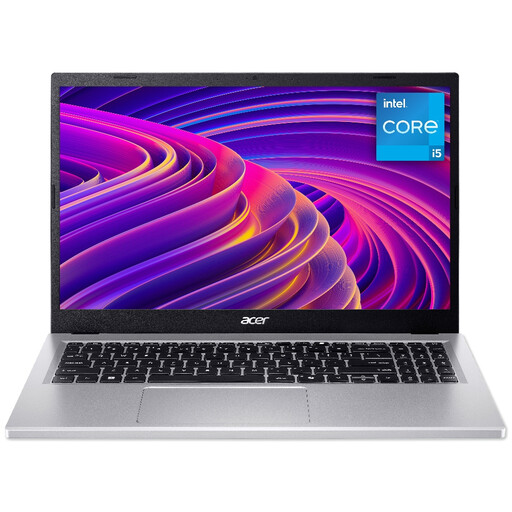
Why This Fits Their Persona: A sensible option for students, home users and office workers who need Windows 11, a numeric keypad and useful everyday connectivity without gaming-focused hardware.
Its 512GB PCIe NVMe SSD gives practical working space, while the memory can be expanded from 8GB up to 32GB.
15.6-inch anti-glare Full HD display, Wi-Fi 6, HDMI 2.1, USB-C and RJ-45 Ethernet.

Why This Fits Their Persona: Suitable for professionals and creators who value macOS, a compact premium format, strong connectivity and a high-quality display for mobile work.
The specification lists 24GB unified memory and 2TB storage, reducing the likelihood of quickly outgrowing the initial configuration.
Liquid Retina XDR display, three Thunderbolt 5 ports, HDMI, SDXC card reader and MagSafe 3 charging.

Why This Fits Their Persona: Designed around demanding creative work, including photo editing, video production, design applications and GPU-accelerated workflows.
Its 64GB memory, 2TB SSD and dedicated RTX 5080 graphics are specified clearly, rather than relying only on general “creator” branding.
16-inch 3840 × 2400 OLED touchscreen, RTX 5080 with 16GB GDDR7 and Wi-Fi 7.
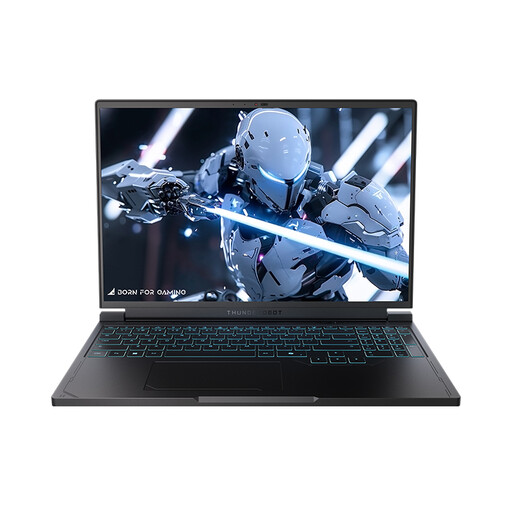
Why This Fits Their Persona: A 16-inch gaming system for users who want a high-refresh display, dedicated graphics and enough storage for a sizeable game library.
The 240Hz QHD+ panel is paired with a Ryzen 7 7745HX processor, RTX 5060 graphics, 16GB DDR5 RAM and a 1TB SSD.
QHD 240Hz display, RGB backlit keyboard, Wi-Fi 6 and HDMI, USB-C, USB-A and Mini DisplayPort connections.
We have compiled a complete, real-time list of products that fully satisfy these strict selection criteria and UK safety regulations.
For many students and office users, 16GB provides useful flexibility for browsers, video calls, documents and several applications running together. Users working with large datasets, virtual machines or professional creative software may prefer 32GB or more.
Lifespan depends on workload, battery care, software support and physical handling. A laptop with upgradeable memory or storage may remain practical for longer. Avoid blocking cooling vents, install system updates and use a protective case when carrying it.
Gaming laptops generally draw more power during demanding workloads because their processors, dedicated GPUs and cooling systems operate at higher levels. Using balanced modes, reducing display brightness and connecting to mains power only when needed can help manage consumption. A larger adapter and heavier chassis are also common trade-offs for gaming performance.