
24/7 Customer Support

Free returns

Same-day & Next-day Delivery

Quality Guaranteed

Unlock Your Welcome Offers: FREE Delivery | Up to 80% OFF | Free 30-day JoyPlus trial
Download the APP
Buying a laptop can look straightforward until you compare processor names, RAM, storage, screen sizes and operating systems. A low headline price may hide limited storage, restricted software support or memory that cannot be upgraded.
This guide from the Joybuy Product Recommendation Officer explains the practical specifications UK buyers should check before choosing laptops for university, office work, remote working, family use or everyday entertainment.
An Intel Core i5 laptop will usually sit above an entry-level Core i3 or Intel N-series model, but the exact processor generation and model matter. Similarly, AMD Ryzen 3, Ryzen 5 and Ryzen 7 chips cover a wide range of performance levels.
Check the full processor number, core count and intended workload. Email, web browsing and streaming require less power than large spreadsheets, coding environments, photo editing or frequent multitasking.
8GB RAM is suitable for many student laptops, office applications, video calls and general browsing. However, buyers who keep many browser tabs open or use creative and technical software may find 16GB RAM more comfortable.
Storage is another common compromise. A 128GB SSD can fill quickly after installing applications and saving photos, while a 256GB SSD suits lighter users. A 512GB SSD provides more practical space for coursework, work documents, applications and personal files. SSD storage also generally supports quicker start-up and file access than older hard-drive technology.
Windows 11 laptops using conventional Intel or AMD processors generally offer broad compatibility with desktop software. Windows 11 on ARM devices, such as Snapdragon-powered Copilot+ PCs, can run many applications, but certain specialist, older or hardware-dependent programmes may need a native ARM version or emulation.
Chromebook Plus laptops use ChromeOS rather than Windows. They work well with browser-based services, Google Workspace, Android applications and selected Linux tools, but they are not a direct substitute for software that requires a traditional Windows installation.
15-inch laptops and 15.6-inch laptops provide useful workspace for spreadsheets, online lectures and split-screen documents. A Full HD resolution of 1920 × 1080 is a sensible minimum for clear text and video.
Anti-glare displays can help reduce reflections in bright rooms, libraries and offices. IPS panels generally offer wider viewing angles than TN panels, although the exact brightness, colour coverage and refresh rate should still be checked.
Smaller 14-inch models can be easier to carry on trains or between lectures. Consider the laptop’s weight alongside the screen size: models around 1.4–1.8kg may be more practical for regular commuting than heavier performance machines.
For everyday work, Intel Core i5 laptops and AMD Ryzen 5 laptops offer a useful balance between responsiveness and price. Entry-level Intel N-series and AMD Ryzen 3 models can suit documents, browsing, streaming and online learning, but they are less appropriate for demanding multitasking.
Integrated graphics are sufficient for office software, media playback and light creative work. Buyers interested in modern games, 3D design or advanced video editing should look for a dedicated graphics processor and confirm the software requirements before ordering.
Manufacturer battery figures are usage-dependent. Screen brightness, video calls, wireless activity and demanding applications can reduce runtime, so treat “up to” figures as a guide rather than a guarantee.
For UK home offices, useful connections may include USB-C, USB-A, HDMI, Wi-Fi 6 or Wi-Fi 6E and, for wired networks, Ethernet. Also check whether RAM is soldered or upgradeable. For example, some models provide an empty memory slot, while others have onboard memory that cannot be expanded.
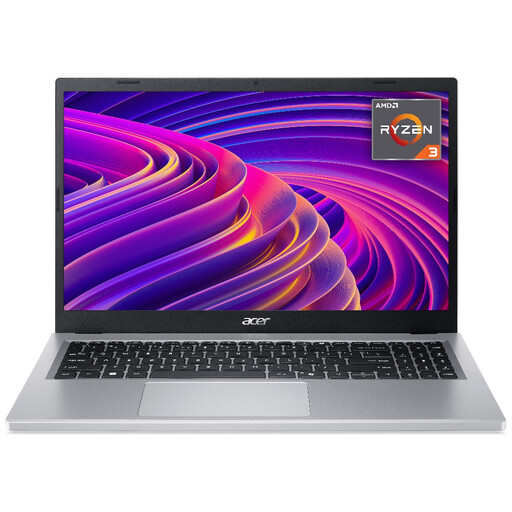
Why This Fits Their Persona: A practical option for students, families and home users who need a large Full HD screen, Windows 11 and everyday performance without moving into a higher specification tier.
It combines 8GB LPDDR5 RAM with a 256GB NVMe SSD, avoiding the slower storage and very limited capacity found on some entry-level laptops.
15.6-inch Full HD IPS display, Wi-Fi 6, approximately 1.6kg weight and stated battery life of up to 10 hours, depending on use.

Why This Fits Their Persona: Suitable for remote workers, commuters and professionals who value portability, modern connectivity and generous everyday multitasking capacity.
The specification clearly identifies Windows 11 on Snapdragon ARM, helping buyers check software compatibility before purchase rather than assuming every desktop application will behave identically.
16GB onboard RAM, 512GB PCIe 4.0 SSD, 1.49kg weight, 16:10 WUXGA display and two USB4 Type-C ports.
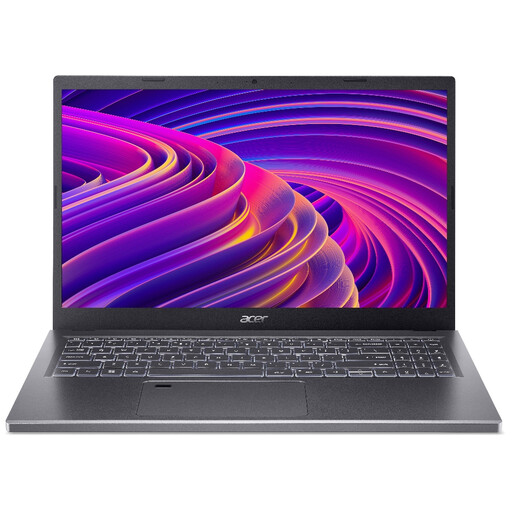
Why This Fits Their Persona: A stronger fit for professionals, home-office users and light creative workers who regularly switch between applications and handle larger files.
Its 16GB RAM and 512GB SSD address the common problem of buying a laptop that becomes restrictive as applications, documents and media accumulate.
AMD Ryzen 5 processor, 15.6-inch Full HD IPS display, backlit keyboard and Wi-Fi 6E connectivity.

Why This Fits Their Persona: Well suited to students and users who mainly work in Google Workspace, web applications, streaming services and Android apps.
ChromeOS is stated clearly, so buyers can confirm that their required coursework, browser tools and cloud services are supported before ordering.
14-inch WUXGA IPS screen, 8GB LPDDR5 RAM, 256GB PCIe SSD, backlit keyboard and stated battery life of up to 12 hours.
We have compiled a complete, real-time list of products that fully satisfy these strict selection criteria and UK safety regulations.
For essays, research, video calls, web browsing and standard office applications, 8GB RAM can be sufficient. Choose 16GB if you use many browser tabs, programming tools, design applications or large spreadsheets.
A laptop’s useful lifespan depends on build quality, software demands, battery wear and storage capacity. Keeping Windows or ChromeOS updated, maintaining ventilation and avoiding physical damage can help. Choosing 16GB RAM and a 512GB SSD may also reduce the need for an early upgrade.
Most laptops use considerably less electricity than desktop PCs, but running cost varies with processor efficiency, screen brightness, charging frequency and workload. A model with a stated efficient design and suitable performance can help avoid paying for unnecessary power, while battery life figures should always be treated as usage-dependent.