What to check when buying
Assess the screen at your intended desk position, then check whether its colour capabilities and the laptop’s software and connections fit the calendars you make.
| Concern |
What to check |
Who this matters to |
| Daylight readability |
Check the exact panel’s normal brightness in nits and whether its finish is described as anti-glare, low-reflection or glossy. Consider where the screen will face. |
When daylight reaches my desk, I need to read small dates and colour-coded blocks without fighting reflections. Around 42% of consumers put glare control first. |
| Colour and layout |
Check the selected panel’s colour-gamut claim and resolution; plan how you will review exported or printed artwork. |
If my calendar carries logos and event imagery, I need room to arrange them and review their colours, without assuming the laptop screen guarantees a print match. Roughly 33% of consumers make colour and layout their primary concern. |
| Portable workflow |
Confirm application and plug-in compatibility, then check the chosen memory and storage configuration and the connections your display and peripherals need. |
Moving between venues, I need my design tools and external display to work with the laptop I carry. About 25% of consumers prioritise workflow compatibility and portability. |
Joybuy laptop choices
These laptops offer different starting points for calendar layouts, mobile planning and colour-focused work. Check each selected screen’s finish and your software workflow before deciding which suits a bright-window desk.
 No image available
Lenovo LOQ Essential 15ARP11, Ryzen 7 170, 16GB, 1TB, RTX 5050, 15.6-inch FHD
Consider this configuration if you want a 15.6-inch workspace for arranging calendar grids and assets. Its title specifies a 144Hz FHD display, 16GB RAM and a 1TB SSD. Check the selected panel’s finish and brightness at your intended desk position, along with compatibility with your design tools.
View on Joybuy
 No image available
ASUS Vivobook 14 X1407QA-LY003W Copilot+ PC, Snapdragon X, 16GB, 512GB, Quiet Blue
This 14-inch configuration is a choice to assess for portable planning and calendar work. Its title specifies a Snapdragon X processor, 16GB RAM and a 512GB SSD. Confirm that your required Windows design applications, plug-ins and peripherals support this processor, and check the exact panel for window-side use.
View on Joybuy
 No image available
Apple 13-inch MacBook Air (2026), M5 10-core CPU and GPU, 16GB, 1TB, Sky Blue
Consider this macOS configuration if you review colours and imagery on the laptop while working on calendar designs. The matching Joybuy listing specifies 100% DCI-P3 colour coverage, while Apple UK lists a 500-nit P3 display for the current MacBook Air. Check how the selected screen handles reflections at your desk and confirm that your apps, fonts and file-sharing workflow suit macOS.
View on Joybuy
 No image available
ASUS ProArt P16 H7606WW-SE006W, 16-inch 4K OLED Touch, Ryzen AI 9 HX 370, RTX 5080 16GB, 64GB, 2TB
This Windows configuration is worth assessing if a larger touchscreen workspace matters for detailed calendar layouts. Its title specifies a 16-inch 4K OLED touchscreen, 64GB RAM and a 2TB SSD. Confirm the exact panel’s brightness, finish and colour coverage before choosing it for a bright window or colour-critical review.
View on Joybuy
 No image available
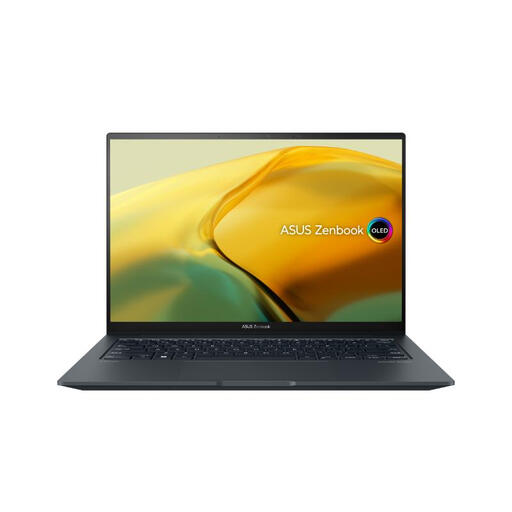
ASUS ZenBook UX3404VC-M3130W, 14.5-inch OLED Touch, Core i9, 16GB, 1TB, RTX 3050
Consider this Windows model if touch input and a detailed screen matter to your calendar-layout process. Its title specifies a 14.5-inch 2.8K OLED touchscreen, 16GB RAM and a 1TB SSD. Check this model’s brightness, screen finish, colour coverage and required monitor connections rather than assuming another Zenbook configuration has the same features.
View on Joybuy
Frequently asked questions
Will a brighter laptop screen solve glare from a nearby window?
No, brightness alone will not remove direct reflections. Compare the exact screen’s brightness and finish, then position it so it does not face the window or bright lights; the Health and Safety Executive also advises using blinds or curtains where needed.
Should I choose an anti-glare or glossy screen beside a window?
If reflections are your main difficulty, give priority to an exact configuration described as anti-glare or low-reflection. Check its full model number: ASUS UK describes such options for the Zenbook 14 OLED UX3402, while Joybuy describes the separate UX3405CA touchscreen as glossy.
How much memory should I compare for calendar design?
A 16GB configuration is a practical comparison point if you expect to keep design tools, browser tabs and documents open together, but confirm the memory of the model you select. Apple UK lists 16GB as the current MacBook Air’s starting unified memory, and the cited Lenovo ThinkPad and ASUS configurations also specify 16GB.
Can I cancel an online laptop order in the UK?
For eligible UK distance sales, GOV.UK says sellers must tell customers that they can cancel up to 14 days after delivery without giving a reason. Check the seller’s cancellation instructions for your order; a change-of-mind cancellation is distinct from seeking a remedy for a faulty or misdescribed laptop.
What should I do if the laptop is faulty or differs from its description?
Contact the seller with the product listing, order confirmation and evidence of the fault or mismatch. GOV.UK identifies faulty goods as covered by the Consumer Rights Act 2015; do not treat a seller’s change-of-mind policy as the only route for addressing a fault.


