Choose a laptop that supports your catalogue system, browser and required workplace tools before comparing hardware. For browser-led updates, weigh memory and storage against the tabs, spreadsheets and files you actually use; if product-photo editing is a regular part of the job, Adobe recommends 16GB or more RAM and a fast SSD for Lightroom Classic. A Windows business laptop suits a Windows-required workflow, while a MacBook Air is an option only when the catalogue system and other essential tools support macOS.
Who needs which laptop?
Browser-and-spreadsheet catalogue editors
If you mainly change product titles, stock fields and descriptions in a browser while keeping spreadsheets open, start with software compatibility, a comfortable keyboard and enough memory and storage for your concurrent work. Specialist graphics hardware is not the starting point for this workflow.
Product-image catalogue managers
If you regularly edit, export and organise photographs before upload, check the requirements of your actual image software and where the files will be stored. Adobe recommends 16GB or more RAM and a fast SSD for Lightroom Classic; that recommendation is specific to that application.
Mobile business-data handlers
If you work across locations and store personal information on the laptop, make storage encryption and your organisation’s account controls part of the choice. The Information Commissioner’s Office advises enabling storage encryption on laptops that store personal information.
What matters when choosing?
Check the catalogue platform and essential applications first, then decide how much local image work, data protection and external equipment the laptop must accommodate.
| Concern |
What to check |
Who this matters to |
| Browser and spreadsheet workflow |
Confirm supported operating systems, browser versions and any supplier applications. Assess memory and SSD space for the tools you keep open together. |
When I move between the catalogue system, supplier pages and spreadsheets, I need those tools to work on the same laptop without choosing hardware solely by an operating-system minimum. Around 40% of consumers put this everyday workflow first. |
| Images and local files |
Check your image software’s requirements and whether photo libraries and exports will be stored locally; for Lightroom Classic, Adobe recommends 16GB or more RAM and a fast SSD. |
If I edit and export product photographs regularly, I need room for the files and a configuration suited to my editing software. This is the primary concern for around 30% of consumers. |
| Business-data protection |
Establish whether personal information is stored locally, whether storage encryption can be enabled and which account or device controls your organisation requires. |
When customer or employee information is kept on my laptop, protecting that data matters more to me than an extra display feature. Around 20% of consumers prioritise these controls. |
| Display and connections |
Check the chosen model’s screen size and ports against your monitor, wired network and existing accessories; confirm which adapters and charger are included. |
If I move between work locations but connect to a larger screen at a desk, I need a laptop and connections that fit both setups. For around 10% of consumers, that flexibility comes first. |
Purchasing mistakes to avoid
-
Treating Windows 11 minimums as a working specification
Microsoft lists 4GB RAM and 64GB storage among the Windows 11 installation requirements. Meeting those minimums does not establish how comfortably a laptop will handle your browser tabs, spreadsheets, uploads and local files together.
Use the minimums to check eligibility, then choose memory and SSD capacity for your actual catalogue workload.
-
Choosing an image-editing laptop by an application minimum alone
Adobe lists 8GB RAM as a Lightroom Classic minimum but recommends 16GB or more and a fast SSD. Those figures matter when Lightroom Classic is part of regular product-image work, not as a blanket requirement for editing text in a browser.
Check the requirements of the image software you use and how you manage imports, exports and local photo libraries.
-
Assuming the necessary accessories are in the box
HP states that a charger is not included with its specified ProBook 4 G1i configuration. Apple lists Thunderbolt 4/USB-C ports on the current UK MacBook Air, so existing USB-A, HDMI or wired-network equipment may need compatible connections.
Check the exact configuration’s included items and compare its ports with the equipment at your workspace.
A separate charger, dock or adapter may be needed for the setup you intend to use.
-
Leaving locally stored personal information unprotected
A catalogue laptop may hold exports containing personal information. The Information Commissioner’s Office advises enabling storage encryption on laptops that store such information, particularly because a device can be lost or stolen.
Enable storage encryption where personal information is stored locally, and follow your organisation’s account-access and incident procedures.
Relevant laptop brands to consider
These product lines illustrate different configurations to investigate; brand-wide descriptions are no substitute for checking the exact laptop you plan to buy.
HP
HP ProBook is a business-laptop line worth considering when a catalogue workflow calls for a Windows business configuration.
- HP offers ProBook configurations with business-oriented security features and different display sizes.
- Memory, storage, security features and included accessories depend on the configuration. HP states that a charger is not included with its specified ProBook 4 G1i model.
Dell
Dell Latitude is a commercial Windows-laptop line to examine for work across desks and locations.
- Dell presents Latitude models with configurable business and mobile-work features.
- Check the selected model’s ports, security features and warranty rather than assuming every Latitude has the same equipment.
Lenovo
Lenovo ThinkPad is relevant when an organisation needs to assess business-device security options.
- Lenovo describes security options on selected ThinkPad Secured-core PC configurations.
- Those options do not necessarily apply to every ThinkPad; confirm the features and management requirements on the exact model.
Apple
MacBook Air is an option for catalogue work when the platform and all required applications support macOS.
- Apple’s current UK MacBook Air specification lists 16GB unified memory as standard and two Thunderbolt 4/USB-C ports.
- Check macOS compatibility before choosing it for workplace tools, and account for any adapters your existing accessories require.
Joybuy laptop choices
These laptops cover browser-led catalogue updates, working with external equipment and more demanding product-image workflows. Match each configuration to your required software and files before choosing.
 No image available
ASUS ProArt P16 H7606WW-SE006W, RTX 5080 16GB
Consider this configuration if regular product-image work calls for substantial memory and local storage; check whether your actual software needs its dedicated graphics hardware.
The named configuration has a 16-inch 4K OLED touchscreen, AMD Ryzen AI 9 HX 370, NVIDIA GeForce RTX 5080 16GB, 64GB RAM, a 2TB SSD and Windows 11 Home. Check its carrying weight if you often work away from a desk.
View on Joybuy
 No image available
HP OmniBook X Flip 16-as0004na, 16-inch 2-in-1
This touchscreen configuration is worth considering if you work across catalogue pages and documents and want a 2-in-1 design.
Its name specifies an Intel Core Ultra 5 226V, 16GB RAM, a 512GB SSD and Windows 11 Home. Confirm that your required catalogue tools and any touch-dependent functions work as expected on the selected configuration.
View on Joybuy
 No image available
ASUS Vivobook 14 X1407QA-LY003W, Snapdragon X
This 14-inch option fits a catalogue workflow only if the CMS, supplier tools and other required applications work with its Snapdragon X configuration.
The name specifies 16GB RAM and a 512GB SSD. Check compatibility with this ARM-based setup before buying, particularly if your work relies on specialist applications or extensions.
View on Joybuy
 No image available
MSI Modern C2RMG-282UK, 15-inch FHD
Consider this model for desk-based catalogue and document work if its operating system supports your required browser and applications.
The name specifies an Intel Core 5, 16GB RAM and a 512GB SSD. Confirm the pre-installed operating system and version before relying on it for a Windows-specific workflow.
View on Joybuy
 No image available
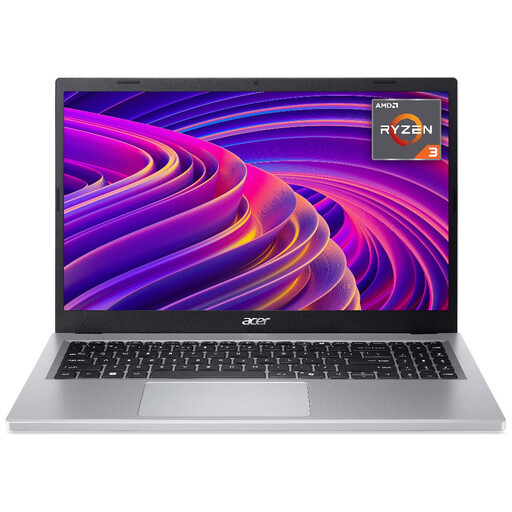
Acer Aspire Go 15 AG15-21P, Ryzen 3 7320U
This model is a candidate for mostly browser-based catalogue changes if its memory and local storage cover your concurrent tools and files.
The name specifies a 15.6-inch Full HD display, 8GB RAM and a 256GB SSD. For regular Lightroom Classic work, compare that memory with Adobe’s recommendation of 16GB or more, and check the software and operating system needed by your catalogue platform.
View on Joybuy
Common questions
Do I need Windows to update an online catalogue?
Not necessarily: choose Windows when your catalogue platform, supplier software or workplace IT requires it; macOS is an option when those same essential tools support it. Check the catalogue provider’s requirements and your required browser and extensions before selecting an operating system.
Should a catalogue laptop have storage encryption?
If the laptop stores personal information, the Information Commissioner’s Office advises enabling storage encryption. Confirm how encryption, account access and backups fit your organisation’s procedures as well as checking the laptop’s available controls.
What should I do with an old catalogue laptop?
Arrange an appropriate reuse or electrical-equipment recycling route and address any work data on the device before handing it over. UK government guidance describes waste electrical and electronic equipment rules as encouraging recovery, reuse and recycling; follow your organisation’s requirements for removing stored information.


