Socket-limited checkout testers
If you work with test accounts, browser tools and colleagues away from a convenient socket, the charging method and supplied equipment matter alongside battery claims.


Choose a laptop that can run your browser and work tools together, but decide first whether checkout sign-off requires native Safari or a Windows-managed environment. A MacBook Air provides the macOS route for Safari checks; a Windows laptop fits work that depends on Windows tools or device management. With few sockets available, check the exact charging arrangement and treat published battery figures as workload-specific claims, not a promise of testing runtime.
If you work with test accounts, browser tools and colleagues away from a convenient socket, the charging method and supplied equipment matter alongside battery claims.
If a checkout issue must be checked in Safari, you need a way to run that browser rather than relying on a Chromium mobile viewport. Chrome for Developers describes Device Mode as an approximation; MDN Web Docs advises testing across relevant browsers and devices.
If your work requires Windows tools or employer-managed software, check the operating system, application compatibility and exact laptop configuration before choosing a portable setup.
Set the browser and workplace requirements before comparing laptops: native Safari access and a required Windows environment lead to different choices. Then check how the exact configuration will be charged during sessions away from a socket.
Choose when: your checkout must be investigated in native Safari as well as other browsers.
Allow for: the 13-inch MacBook Air M5 has two Thunderbolt 4 ports according to Apple, so a peripheral-heavy desk may need a dock.
Choose when: Windows applications or employer device management determine your testing setup.
Allow for: this route does not provide native desktop Safari; charger inclusion also varies by configuration, as Dell's listed XPS 13 DX13260 demonstrates.
| Concern | What to check | Who this matters to |
|---|---|---|
| Time away from sockets | Check the battery claim's test conditions, charger inclusion and the exact model's charging requirements. | If I have a long checkout-testing session and few places to plug in, I need a workable charging plan rather than a headline battery figure. Around 50% of consumers put uninterrupted work away from sockets first. |
| Native Safari coverage | Confirm the project's browser requirements and arrange Safari or relevant real-device checks where required. | When a payment or login issue appears in Safari, an emulated phone viewport cannot settle whether that browser behaves correctly. Native Safari coverage comes first for around 30% of consumers. |
| Windows workflow | Check required applications, operating-system edition and memory on the exact configuration. | If employer tools must run beside browser profiles and DevTools, I need a laptop that fits that Windows workflow. Around 20% of consumers prioritise this managed, multi-tool need. |
Apple's up-to-15-hour MacBook Air figure is for its wireless-web test. A session involving DevTools, multiple profiles, calls or an external display is a different workload.
Use the published test condition to understand the claim, then plan a charging fallback for long sessions.
Dell states that a charger is not included with its listed XPS 13 DX13260 configuration. An existing USB-C plug should not be assumed compatible merely because it fits.
Check the exact box contents and charging requirements before deciding how you will use limited sockets.
A separate compatible charger may be needed.
Chrome for Developers calls Device Mode a first-order approximation of a mobile device. It cannot establish how a checkout behaves in Safari or on a real phone.
Use emulation for exploratory layout checks, then validate important payment, login and responsive flows in the browsers or devices your project requires.
Electrical Safety First warns about substandard and counterfeit chargers. A spare charger is useful only if it is appropriate for the laptop and safe to use.
Check the required charging specification and obtain the original charger or a suitable replacement from the manufacturer or a reputable retailer. Stop using a plug or socket showing burn marks.
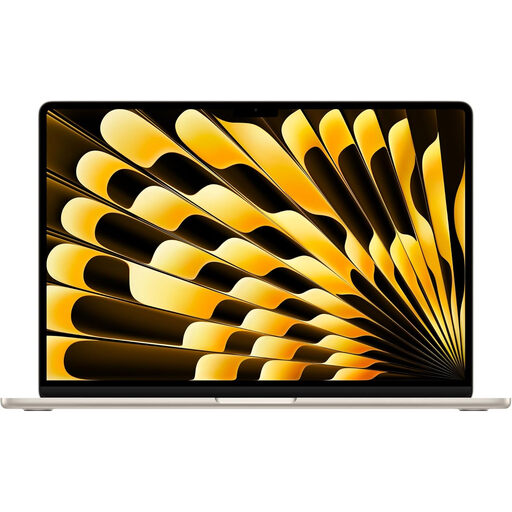
Apple's 13-inch MacBook Air M5 is a macOS option when checkout testing requires native Safari. Apple lists 16GB unified memory as its starting configuration, MagSafe 3 charging and two Thunderbolt 4 ports.
Dell's listed XPS 13 DX13260 is a compact Windows route; the researched Windows 11 Home configurations charge at 27–65W, according to Dell Technologies.
Lenovo's specified ThinkPad X1 Carbon Gen 13 Aura Edition configuration is a business-laptop option for a managed workflow.
These laptops offer macOS and Windows routes for checkout-testing work. Choose by the browsers and software you must run, then check charging and connections for your limited-socket setup.
 No image available
Consider this macOS model when native Safari checks are part of the checkout test plan.
The product title specifies a 10-core CPU and 10-core GPU; confirm the CPU configuration before buying. Apple lists MagSafe 3 and two Thunderbolt 4 ports for the 13-inch M5 model. Check charger inclusion and do not treat Apple's wireless-web battery claim as testing runtime.
 No image available
This 2-in-1 Windows 11 Home laptop is a choice to assess if your checkout tools require Windows.
Check the connections needed for your test devices and the runtime you require away from a socket. Confirm any graphics capability you depend on against the exact configuration before purchase.
 No image available
Consider this Windows laptop only after checking that your required browsers, testing applications, VPN and management tools work with its Snapdragon X platform.
The title identifies a 16GB memory and 512GB SSD configuration. Confirm the charging arrangement and battery runtime needed for your sessions away from a socket.
 No image available
Assess this larger-screen laptop if your checkout-testing setup needs room for browser windows and work tools.
Confirm that its operating system and connections fit your tools. Before relying on it away from a socket, check charger inclusion, charging requirements and battery runtime for the exact configuration.
No. Chrome for Developers describes Device Mode as an approximation, not code running on a mobile device. Use it to explore layouts and constrained conditions, then check important checkout paths in the browsers or devices your project requires.
Check the requirement for the exact laptop and charger rather than assuming any USB-C adapter will do. Apple specifies a 30W minimum for the researched MacBook Air M5, while Dell Technologies lists 27–65W charging for its XPS 13 DX13260; neither figure should be applied to a different model.
Arrange a compatible charger before relying on the laptop for work away from sockets. Electrical Safety First advises using the original charger or an appropriate replacement from the manufacturer or a reputable retailer, and checking for signs of damage such as burn marks on plugs and sockets.
Do not assume they do. GOV.UK guidance from the Office for Product Safety & Standards describes the Electrical Equipment (Safety) Regulations 2016 for Great Britain and notes different arrangements for Northern Ireland under the Windsor Framework. For a laptop or replacement charger, check that the supplied equipment is appropriate for where it will be used rather than relying on a marking alone as proof of safety.