What matters when choosing
For college and further-education study, check course requirements first, then weigh up the device’s day-to-day fit for carrying, working and maintaining it.
| Concern |
What to check when buying |
Who this matters to |
| Course software and equipment compatibility |
Confirm required applications, operating systems, processors, browsers, peripherals, storage and accessibility requirements; test the intended workflow. |
I need the required apps and equipment to work for assessed tasks before anything else; around 31% of consumers put course compatibility first. |
| Carrying comfort and work between charges |
Compare the exact configuration’s weight, screen, keyboard and charger requirements with your timetable; check the activity behind any battery-life claim. |
When I move between home and lessons, I need a manageable device and a realistic plan for charging; around 25% of consumers prioritise carrying comfort and working between charges. |
| Total cost and usable life |
Check the complete device-and-accessory setup, refurbished condition, battery information, seller terms, repair options and operating-system support. |
I want the whole study setup to remain usable, not just a low starting cost; about 19% of consumers put total cost and usable life first. |
| Accessibility and input comfort |
Try the screen, keyboard, pointing or alternative-input method you need, and check assistive software and equipment compatibility. |
If I rely on particular reading, input or assistive tools, they need to work with the device I choose; around 13% of consumers prioritise accessibility and input comfort. |
| Notes and extended coursework |
On a tablet, test the required apps, learning platform, file submissions and external keyboard before relying on it as your only device. |
I may prefer tablet-style note-taking, but still need to complete every required task; around 12% of consumers put that workflow first. |
Joybuy laptops for college study
These Joybuy choices are Windows laptops for college study. Check your course’s required applications and peripherals against the exact configuration before buying.
 Image unavailable
Lenovo IdeaPad Slim 3 (83K7009MUK)
A Windows laptop option for typed coursework; check that your required software and peripherals support this exact configuration.
15.3-inch WUXGA display, AMD Ryzen 5 7535HS, 24GB DDR5 RAM, 512GB PCIe SSD, Windows 11 Home, Wi-Fi 6 and Grey.
Joybuy
 Image unavailable
Lenovo IdeaPad 1 15-inch Full HD Laptop
This Windows laptop is a study-device option; confirm that required course applications work with its stated configuration.
AMD Ryzen 3 7320U, 8GB RAM, 128GB SSD, Windows 11 Home in S Mode and Cloud Grey.
Joybuy
 Image unavailable
ASUS Vivobook 15 X1504VA
A Windows laptop option for assignments and file storage; check course software and peripheral compatibility for this model.
15.6-inch, Intel Core 5 120U, 24GB RAM, 1TB SSD and Cool Silver.
Joybuy
 Image unavailable
Acer Aspire Lite AL15-36P-C29Z
This Windows laptop may suit study tasks that work with its exact configuration; check required applications before choosing it.
15.6-inch Full HD display, Intel N150, 8GB DDR4 RAM, 128GB SSD, Windows 11 Home and Silver.
Joybuy
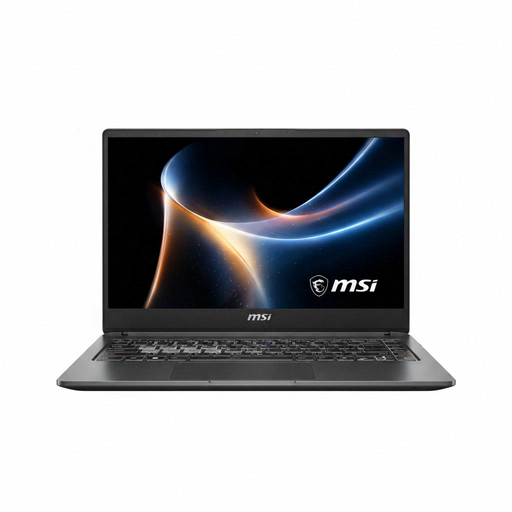 Image unavailable
MSI Prestige N16 Flip AI+ C1XMT-044UKY
A convertible Windows laptop option for typed study work with tablet-style use; confirm that its form and required software suit your course.
16-inch 2-in-1 Copilot+ PC, NVIDIA RTX Spark N1X, 32GB RAM, 1TB SSD, 2.8K 120Hz OLED touchscreen and UK keyboard.
Joybuy
Questions about college study devices
Can a tablet with a keyboard be my only college device?
Only if your college confirms that every required platform, assessed task, app, file submission and peripheral works on that tablet. Apple’s keyboard guidance describes physical-keyboard control; it does not establish desktop-app compatibility.
What should I test before relying on a Chromebook in lessons?
Sign in as you would for college, test the learning platform and required apps, prepare any work you may need offline, and check the device’s automatic-update schedule. Google notes that school-managed devices may restrict Android-app installation.
What should I ask about repair and after-sales support?
Ask about the exact model’s battery, repair options, replacement parts or service, and the seller’s warranty terms. Repairability evidence is model-specific: iFixit assesses factors such as disassembly, parts and instructions rather than rating a whole brand uniformly.
Do UK online buyers have a legal cancellation right for a laptop?
GOV.UK says consumers generally have up to 14 days after delivery to cancel a distance purchase without giving a reason, subject to applicable rules and exceptions. Fault-related statutory rights are separate, so do not treat a commercial warranty as a replacement for those rights.
Is UKCA marking required instead of CE on every laptop sold across the UK?
There is no single UK-wide UKCA-only conclusion for every laptop. Office for Product Safety and Standards guidance dated 25 March 2025 says CE marking continues to be recognised beyond 2024 for certain relevant goods in Great Britain; Northern Ireland has separate requirements. The applicable marking depends on the product and market rules.


