Choose an operating system that runs the tools your review work requires: current Xcode calls for a supported Mac, while Windows can provide Linux command-line tools through WSL, and a laptop offered with Ubuntu is another route for native Linux work. For long sessions reviewing changes at home, assess the configured screen and desk setup alongside memory, storage and connections for the tools you run concurrently.
Who this is for
Long-session home-office reviewers
If you spend sustained periods reading diffs, comparing files and leaving comments at a desk, consider the display and input setup as well as the laptop. The Health and Safety Executive says home workers should be able to maintain a comfortable, sustainable posture.
Windows or Linux-tooling reviewers
If local checks depend on Windows workplace software or Linux command-line tools, establish which environment you need before choosing hardware. Microsoft documents Linux distributions and Bash tools through WSL on supported Windows installations; Dell also lists an Ubuntu option for the Latitude 7450.
Apple-platform reviewers
If reviewing a change also means using current Xcode for Apple-platform work, browser access to a pull request is not the only requirement. Apple Developer specifies a Mac running a supported macOS version for current Xcode.
What matters when choosing
macOS
Choose when: Your review workflow also requires current Xcode or other Apple-platform development tools.
Check: Required workplace apps, containers and peripherals must work with macOS; a fixed desk with several wired devices may also call for a dock.
Windows with WSL
Choose when: Workplace software requires Windows and you also need Linux distributions or Bash tools, which Microsoft documents through WSL on supported installations.
Check: Confirm workplace permissions and the Linux distribution and local services you need before relying on WSL.
Native Ubuntu
Choose when: Your workflow calls for a native Linux installation; Dell lists Ubuntu Linux 22.04 LTS as an option for the Latitude 7450.
Check: Confirm an obtainable configuration, workplace-app support, peripherals and warranty terms rather than assuming every listing includes Ubuntu.
| Concern |
What to check |
Who this matters to |
| Desk comfort |
Check the configured screen and external-display connections, then assess whether your desk needs separate input devices. |
If I read diffs for hours at a fixed desk, I want a display and input setup I can use comfortably throughout the session. Around 37% of consumers put this need first. |
| Tool compatibility |
List must-run development and workplace software before selecting macOS, Windows with WSL or native Linux. |
When local checks depend on a particular environment, I cannot choose by hardware specifications alone; around 27% of consumers prioritise tool compatibility. |
| Memory and storage |
Compare the exact configuration with your concurrent apps, repositories and any local test or container workload. |
I may need a browser, editor and local tools open together, with room for project files. Roughly 27% of consumers make capacity for that parallel work their primary concern. |
| Moving and meeting |
Check the listed weight, camera and battery-test conditions if the laptop will regularly leave the desk. |
If I move between workspaces or join video reviews, carrying the laptop and taking calls matter alongside desk use; around 9% of consumers put this need first. |
Buying pitfalls
-
Choosing a processor before checking the operating system
A laptop can have the hardware you want yet be unsuitable for a required tool. Apple Developer requires supported macOS for current Xcode, while Microsoft's WSL and Dell's listed Ubuntu option serve different Linux workflows.
Write down the IDE, test commands, containers, workplace security tools and authentication devices you must use before comparing configurations.
-
Treating the laptop as the whole workstation
External-display support alone does not establish that a home desk is comfortable for prolonged review. Where workplace display-screen-equipment rules apply, the Health and Safety Executive calls for an individual assessment.
Assess your working position and connections before purchase, and ask about your employer's assessment process where it applies.
Depending on that setup, you may also need a monitor, dock, separate keyboard, mouse, stand or compatible cables.
-
Assuming every configuration of a model is alike
Memory, display panels and other options differ within the laptop lines listed by Apple, Dell and Lenovo. A family name alone does not identify the configuration you will receive.
Check the complete model and configured memory, storage, display, operating system, keyboard layout and warranty on the product-detail page.
Brands to consider for these routes
Apple
The M5 MacBook Air line is a macOS option for reviewers whose work includes current Xcode. Apple lists 13-inch and 15-inch models and says the line supports up to two external displays.
- Apple lists 16GB, 24GB and 32GB unified-memory choices for the 13-inch model.
- Confirm that every required workplace tool and peripheral supports macOS before choosing a configuration.
Lenovo
The ThinkPad T14 Gen 6 AMD is a business-laptop reference for reviewers interested in a Windows desk setup and documented repairability.
- Lenovo describes customer-replaceable units for the T14 Gen 6 AMD, including its 57Wh battery.
- Check the exact T14 or T14s configuration and desk peripherals; specifications differ across listings.
Dell
The Latitude 7450 is a reference for buyers comparing Windows 11 Pro and an officially listed Ubuntu Linux 22.04 LTS option.
- Dell lists several memory and 14-inch display configurations, allowing the specification to be checked against the intended environment.
- Confirm current availability and the operating system, display and memory of the exact configuration before making a decision.
Joybuy product choices
These laptops provide Mac and Windows choices for reviewing code changes at home. Check each configuration against your required software and desk setup; a Windows laptop should not be assumed to meet a particular WSL or workplace requirement without that check.
 No image available
Apple 13-inch MacBook Air (2026, M5, 24GB, 1TB SSD, Midnight)
Consider this configuration if reviewing changes also requires a Mac capable of running your required Xcode version.
- The listed configuration has an M5 chip with a 10-core CPU and 10-core GPU, 24GB memory and a 1TB SSD.
- Apple says the M5 MacBook Air line supports up to two external displays; check the connections your desk setup needs.
- Confirm macOS support for workplace tools and the keyboard layout you require.
View on Joybuy
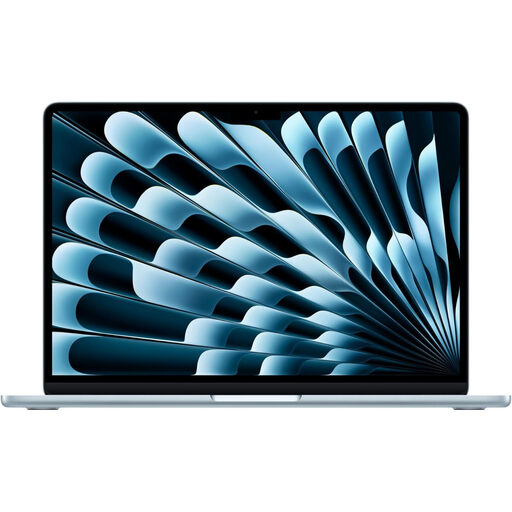 No image available
Apple 15-inch MacBook Air (2026, M5, 16GB, 1TB SSD, Sky Blue)
Consider the 15-inch built-in screen if you want more laptop display area for reading changes and your required tools run on macOS.
- The listed configuration has an M5 chip with a 10-core CPU and 10-core GPU, 16GB memory and a 1TB SSD.
- Check the exact display characteristics and connections against your desk arrangement, as well as macOS compatibility for workplace tools.
View on Joybuy
 No image available
Lenovo Legion Pro 7 16IAX10H (83F5000UUK, 64GB, 2TB SSD)
Consider this Windows configuration if your local review work calls for the listed memory and storage, while checking whether its 16-inch format suits your desk.
- The title specifies an Intel Core Ultra 9 processor, 64GB RAM, a 2TB SSD, NVIDIA GeForce RTX 5090 and Windows 11 Home.
- Confirm workplace-tool compatibility and any WSL requirements on the intended installation; assess the laptop and power adapter for your workspace.
View on Joybuy
 No image available
Lenovo LOQ Essential 15ARP11 (Ryzen 7 170, 16GB, 1TB SSD)
For a Windows-based review setup, assess whether this configuration has enough memory for the local tools you expect to run together.
- The title specifies an AMD Ryzen 7 170, 16GB RAM, a 1TB SSD, GeForce RTX 5050 and a 15.6-inch 144Hz Full HD display.
- Confirm the operating-system setup, required workplace software and connections for any external display or desk peripherals.
View on Joybuy
 No image available
ASUS Vivobook 14 X1407QA-LY003W (Snapdragon X, 16GB, 512GB SSD)
Consider this 14-inch option if a compact laptop suits your workspace, but establish that your required development and workplace software works with its Snapdragon X platform.
- The title specifies 16GB RAM and a 512GB SSD.
- Check the exact display and desk connections you need, and whether the listed memory meets your local workload.
View on Joybuy
Common questions
Do I automatically need an external monitor to review code at home?
No: the right display arrangement depends on your workstation and how you use it. Where display-screen-equipment rules apply, the Health and Safety Executive calls for an individual home-workstation assessment to identify what is needed for a comfortable, sustainable posture.
Can I use Linux command-line tools on a Windows review laptop?
Yes, WSL can run a Linux distribution and Bash tools on supported Windows installations, according to Microsoft. Check company policy, the distribution you require and any container or local-service requirements before depending on that route.
Do I need a Mac if my code review includes current Xcode?
Yes, Apple Developer requires a Mac running a supported macOS version for current Xcode. If your work is limited to browser-based pull-request review and does not require Xcode, that requirement may not apply.
What if a laptop bought from a UK retailer is faulty?
The UK Consumer Rights Act 2015 requires goods supplied under a consumer contract to be of satisfactory quality, taking relevant circumstances into account. Keep the listing, order confirmation and evidence of the fault when contacting the retailer; a manufacturer warranty is separate from statutory rights.


