What matters when choosing?
Confirm operating-system compatibility before comparing configurations. Then decide which need would govern the purchase if local workload, desk connections and shared-space comfort pull you in different directions.
| Concern |
What to check |
Who this matters to |
| Local-workload capacity |
List the tools and services you run together; check the exact RAM and SSD capacity, including whether memory can be upgraded. |
If I keep containers, local services and an IDE open together, I need capacity for that particular workload rather than for editing text alone. Around 40% of consumers put local-workload capacity first. |
| Desk displays and connections |
Check external-display count, required resolution and refresh rate, dock compatibility, charging and ports left for peripherals. |
When I connect monitors and peripherals at a shared desk, I want the intended arrangement to work without repeatedly changing cables. Desk connectivity comes first for around 30% of consumers. |
| Privacy and viewing comfort |
Check camera controls, screen reflections and keyboard layout; assess screen visibility to people nearby separately. |
If others work beside me, I need to manage what they can see while keeping code comfortable to read. Around 30% of consumers prioritise shared-space privacy and viewing comfort. |
Joybuy laptops for shared-desk coding
These laptops offer different built-in screen sizes and memory and storage configurations for code work at a shared desk. Check your operating-system tools, monitor arrangement and shared-space requirements against the exact model before choosing.
 No image available
Stormforce Exobook 16 QHD+ Ultra 9, 32GB, 4TB, 5080
Consider this configuration if your local projects make 32GB of memory and a 4TB SSD relevant; confirm that its operating system supports your development tools.
The product name specifies a 16-inch QHD+ display. Check its external-display support and dock compatibility for your desk.
View on Joybuy
 No image available
ASUS ProArt P16 H7606WW-SE006W, 64GB, 2TB
Consider its 64GB RAM and 2TB SSD configuration if your local development workload calls for that capacity; check compatibility with your required Windows tools.
The product name specifies a 16-inch 4K OLED touchscreen, AMD Ryzen AI 9 HX 370, NVIDIA GeForce RTX 5080 16GB and Windows 11 Home. Confirm your intended monitors and dock will work with this model.
View on Joybuy
 No image available
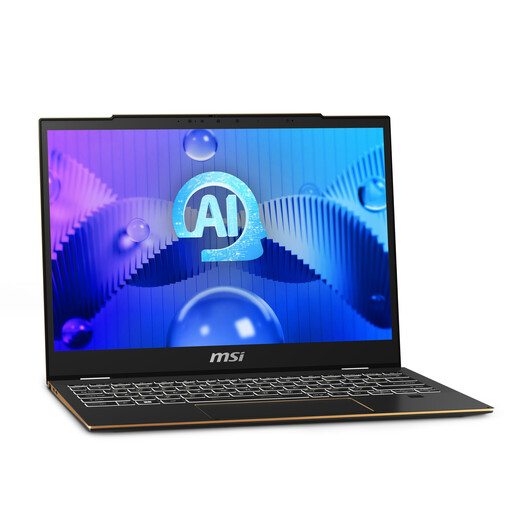
MSI Summit E13 AI Evo, 32GB, 1TB
This configuration is worth checking if you want 32GB RAM and a 1TB SSD in a smaller laptop for local work at the desk.
The product name lists an Intel Core Ultra 7 155H and an FHD+ 60Hz touch display. Confirm the exact display size, external-monitor arrangement, keyboard layout and camera controls if those affect your setup.
View on Joybuy
 No image available
MSI Stealth 18 AI Studio A1VGG-001UK, 32GB, 2TB
Its 18-inch display and 32GB RAM configuration may suit a desk where a larger built-in screen matters; consider whether you will regularly carry the laptop between desks.
The product name lists an Intel Core Ultra 9, a 2TB SSD and NVIDIA GeForce RTX 4070. Check external-display support and dock compatibility for your intended setup.
View on Joybuy
 No image available
MSI Summit 16 AI Evo, 32GB, 1TB
Consider this 32GB RAM and 1TB SSD configuration if you want a larger built-in screen for code work alongside your local tools.
The product name specifies a 16-inch QHD+ 165Hz display and Intel Core Ultra 7 255H. Check its ports, monitor and dock support, keyboard layout and camera controls against your shared-desk needs.
View on Joybuy
Questions about shared-desk coding laptops
How much memory do I need for editing source code?
Choose memory for everything you run at once, not for the code editor in isolation. Containers, virtual machines, emulators and local databases can change the requirement; Lenovo and HP list UK business-laptop configurations with 16GB and 32GB respectively, so confirm the exact variant and any upgrade limitations.
Will a camera shutter stop people seeing my code?
No: a camera shutter does not conceal what is on the screen. If people sit nearby, assess desk position and display angle separately, and consider whether a privacy filter suits the way you use the screen.
What should I check before buying a dock?
Match the dock to your exact laptop, monitors, charging needs and peripherals. Check external-display count, required resolution and refresh rate, monitor inputs, cable specifications, power delivery and the ports that remain available; Apple’s MacBook Air display and port specifications do not establish that every dock combination will work.
How should I prepare an old development laptop for recycling?
Back up what you need and erase the device before taking it to an appropriate electrical-recycling point. The National Cyber Security Centre warns that deleting files alone may not prevent recovery and identifies built-in restore or erase features as a convenient approach; follow any employer or client data-handling policy as well.


