Who needs a portable work kit?
The useful kit depends on what you carry between locations and what is already waiting at each desk.
Laptop commuters without a fixed carry kit
If you take a work laptop between home and a workplace, start with a close-fitting way to carry it. Then decide whether you need a charging setup at both locations or can carry one suitable adapter without adding loose accessories.
Workers using temporary desks for long sessions
A hot desk or home table may leave you working directly on a laptop for prolonged periods. The Health and Safety Executive advises using a separate keyboard and mouse so the laptop screen can be raised on a riser or similar support.
Mobile multi-screen workers
If you regularly need to view documents, spreadsheets or presentation materials alongside your main work, a portable display may be useful where no suitable screen is available. Its connection requirements and added carrying weight matter as much as its screen size.
What should earn a place in your bag?
Check device fit and compatibility before adding equipment for a temporary desk. An accessory you already keep at both destinations may not need to travel with you.
| Priority | What to check | Your needs |
|---|
| Laptop protection |
Compare a sleeve’s internal width, depth and thickness with the laptop’s external dimensions, including any fitted shell. Check how it will sit inside your usual bag. |
My laptop travels inside another bag, and I want protection that fits the device rather than relying on its screen-size label. |
| Charging |
Confirm that the exact laptop accepts USB-C charging and check its required input power. Compare those requirements with the adapter’s output and the cable’s rating; a cable alone is not a charger. |
I would rather carry a compact charging setup, but only if it can meet my laptop’s requirements at the locations where I use it. |
| Temporary-desk setup |
Check that a folding stand supports your laptop and works on the desk available. For prolonged laptop use, include a separate keyboard and mouse so the screen can be raised, as the Health and Safety Executive advises. |
Long sessions at a hot desk or home table call for a workable screen and input arrangement, not just another item to carry. |
| Input devices |
Check the keyboard layout, connection method and compatibility with each device you intend to use. Account for any receiver, batteries or charging needed by the chosen model. |
If I switch devices or raise my laptop screen, a compact keyboard and mouse may serve both tasks without duplicating a set already kept at my desk. |
| Second screen |
Check the laptop’s supported video output against the monitor’s required connection. Consider the display’s weight and whether a screen is already available where you work. |
I need extra screen space for recurring work away from my main desk, and I am willing to carry the additional display. |
Relevant brand references
These model-specific examples help frame compatibility and carrying checks; they do not indicate which brands or models are in the Joybuy selection below.
Anker
Anker’s 715 Nano II A2663 is an example of a compact USB-C charger to consider when the exact laptop supports USB-C charging.
- Anker states that this model provides 65W USB-C output and names specific compatible notebook examples.
- Those examples do not establish that it meets every laptop’s power requirement or covers simultaneous charging needs.
Kensington
The SmartFit Easy Riser EQ is a fold-flat laptop riser intended for use at a desk.
- Kensington states that it fits 12- to 17-inch laptops and has padded, non-slip inserts.
- For prolonged laptop use, a riser still needs separate keyboard and mouse input to follow the Health and Safety Executive’s screen-elevation guidance.
Logitech
The Pebble 2 Combo is a compact keyboard-and-mouse example for a raised laptop or compatible devices used at different desks.
- Logitech describes switching between three devices and lists Windows, macOS, iPadOS and Android compatibility for this model.
- Check the required connection method and keyboard layout for your own devices before choosing a set.
ASUS
The ZenScreen MB16AHG illustrates the connection and carrying checks involved in adding a portable display.
- ASUS lists this model as a 15.6-inch FHD display with two USB-C ports, mini-HDMI and a weight of 0.92kg.
- Check the laptop’s supported video output before buying; these MB16AHG specifications should not be assumed for other ZenScreen models.
Joybuy options for commuting
These options cover carrying a laptop, a USB-C charging cable and portable second screens for work between locations. Choose by the gap in your own kit rather than treating them as items to buy together.
 No image available
ASUS ZenScreen MB166CR FHD
Consider this portable monitor if recurring work calls for a second screen away from your usual desk. Check the MB166CR’s connection requirements against your laptop’s supported video output before choosing it.
View on Joybuy
 No image available
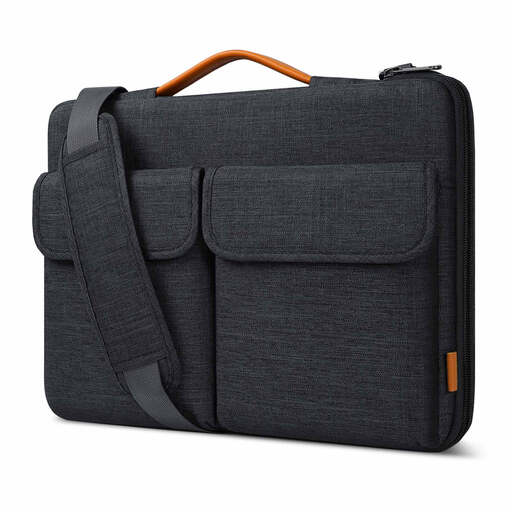
Inateck LB03008-15BG 15.6-inch laptop bag sleeve
This carry option is relevant if your laptop needs its own protection while travelling between desks. Its 15.6-inch label is not a fit measurement: compare the compartment’s internal dimensions with your laptop, including any fitted shell.
View on Joybuy
 No image available
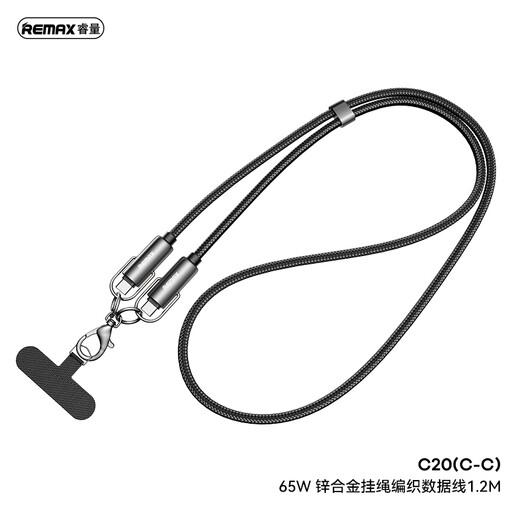
REMAX 65W USB-C to USB-C braided cable, 1.2 m
A 1.2 m USB-C cable may suit a charging setup carried between work locations. This is a cable, not a power adapter: confirm that your laptop and adapter support the intended charging method and power requirement.
View on Joybuy
 No image available
UPERFECT 14-inch 60Hz touchscreen portable monitor
This second-screen option has a touchscreen and an adjustable stand described in its product title. Check your laptop’s video output and the display’s connection and power requirements; consider its weight if you will carry it regularly.
View on Joybuy
 No image available
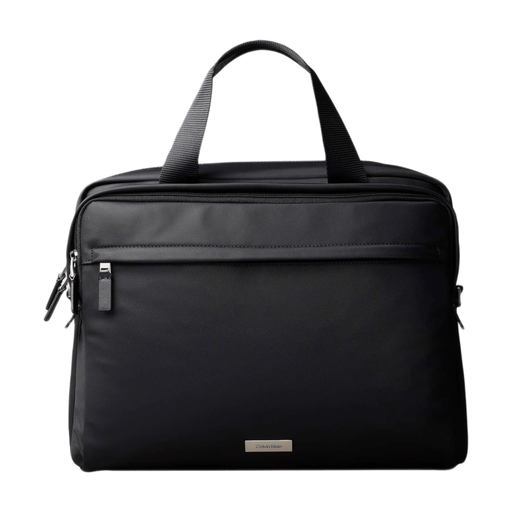
Calvin Klein water-repellent commuter laptop bag, black
This commuter bag is an option for carrying a laptop with other work essentials. Confirm the laptop compartment’s internal dimensions against your device rather than assuming that a stated laptop-size category guarantees a fit.
View on Joybuy
Common questions
Is a laptop stand enough for a long session at a temporary desk?
Not on its own. The Health and Safety Executive advises using a separate keyboard and mouse for prolonged laptop use so the screen can be raised on a riser or similar support. Plan space for all three items if this is a regular part of your working day.
Can a compact USB-C charger replace my laptop’s original adapter?
Only if the exact laptop supports USB-C charging and the adapter meets its stated power requirement. Check the laptop manufacturer’s documentation and the charger’s output before making the switch; Anker’s 65W 715 Nano II, for example, names specific compatible notebooks rather than every USB-C laptop.
What should I measure before ordering a laptop sleeve?
Measure the laptop’s external width, depth and thickness as you carry it, including any fitted shell, and compare them with the sleeve’s internal dimensions. A screen-size label alone does not establish how closely a particular laptop will fit.
When is a portable monitor worth carrying?
Consider one when a second display helps with recurring work away from your main desk and a suitable screen is not already available at the destination. Check the laptop’s video output and the monitor’s required connection, then weigh that benefit against the extra item in your bag; ASUS lists its ZenScreen MB16AHG example at 0.92kg.


